
Qualify Before You Analyze: Shared Input Guards and a Single Decode
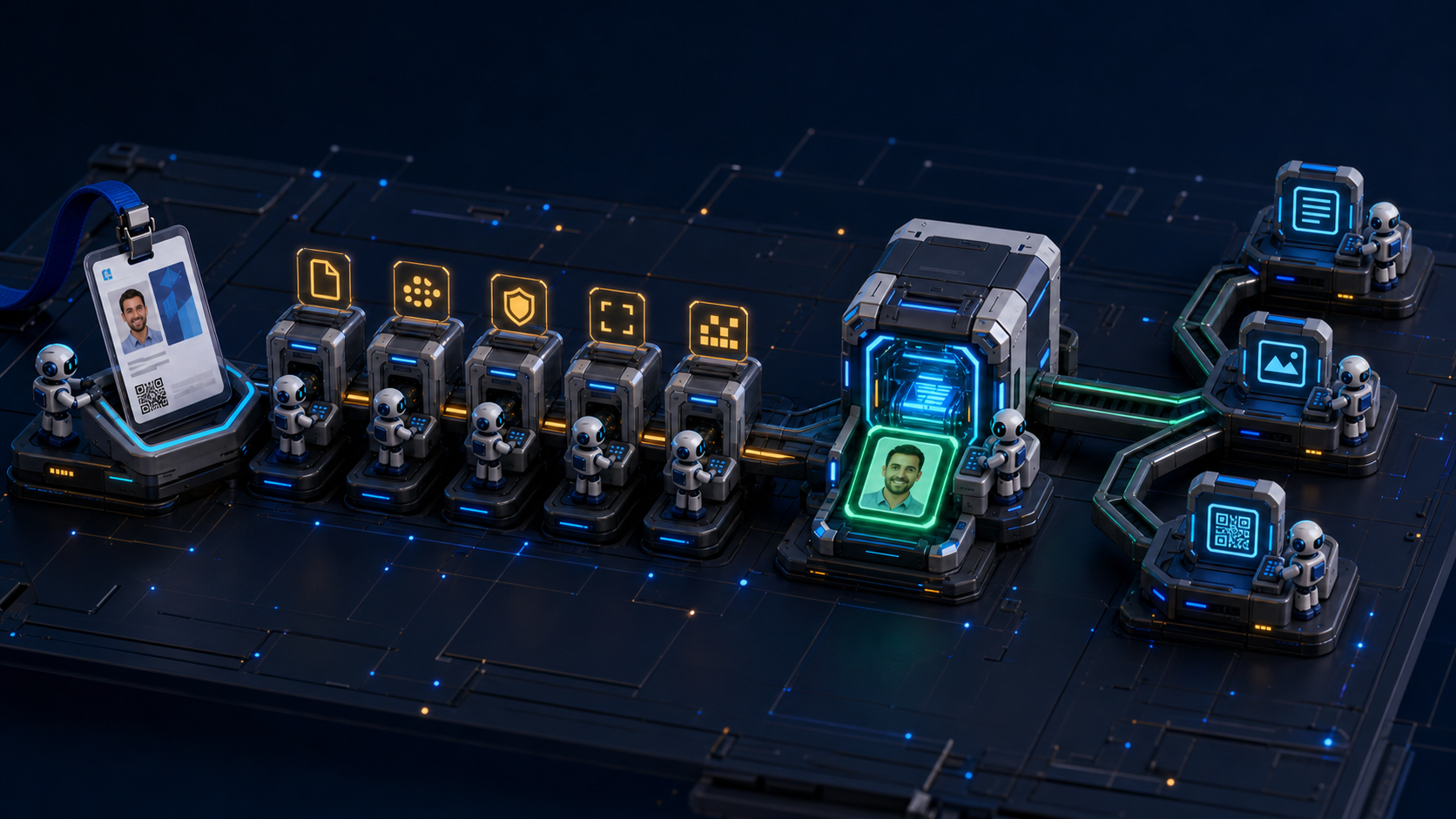
If OCR, object detection, and QR readers each reopen the same visitor-pass upload, the service gains three analyzers—and three input boundaries. OCR might accept a file as JPEG while the QR reader rejects it as damaged. All three paths might also decode the same bytes independently, repeating CPU and memory work.
Moving validation code into a shared function does not solve the whole problem. The service must separate whether this input may enter analysis from what each analyzer found. Once qualification succeeds, every analyzer should share the image object produced at that boundary.
This article uses the
bluetape4k-image Spring Boot Image Intelligence API
to examine shared input qualification and a single-decode boundary. It does not attempt to build a universal upload-security
layer that also handles malware scanning or content disarm and reconstruction. The focus is narrower: apply the minimum
conditions for starting analysis consistently and avoid repeating expensive work.
Input qualification and analysis results answer different questions
Section titled “Input qualification and analysis results answer different questions”“Is this a valid image?” is too broad a question. A visitor pass with an unreadable name or no QR code is not necessarily an
invalid file. Conversely, a .jpg filename and Content-Type: image/jpeg declaration do not prove that the bytes contain a
JPEG image.
Shared qualification and individual analysis answer different questions:
| Input qualification | Individual analysis result |
|---|---|
| Is this an image format the service supports? | Is there readable text? |
| Is the compressed byte size within the limit? | Is there a face or sensitive region? |
| Are the dimensions and total pixel count within budget? | Is there a QR code and value? |
| Can the service decode the complete image? | Was the result empty, or did the analyzer fail? |
Passing input qualification means that OCR, object detection, and QR reading may run on the image. It does not guarantee that the image contains text, a face, or a QR code, or that analysis quality will be sufficient. Preserving this distinction keeps a normal image without a QR code from becoming an input error.
Put one gate in front of all three analyzers
Section titled “Put one gate in front of all three analyzers”ImageUploadQualifier
starts with low-cost checks on the multipart upload. When an early check fails, the service does not run the later,
more expensive checks or any analyzer.
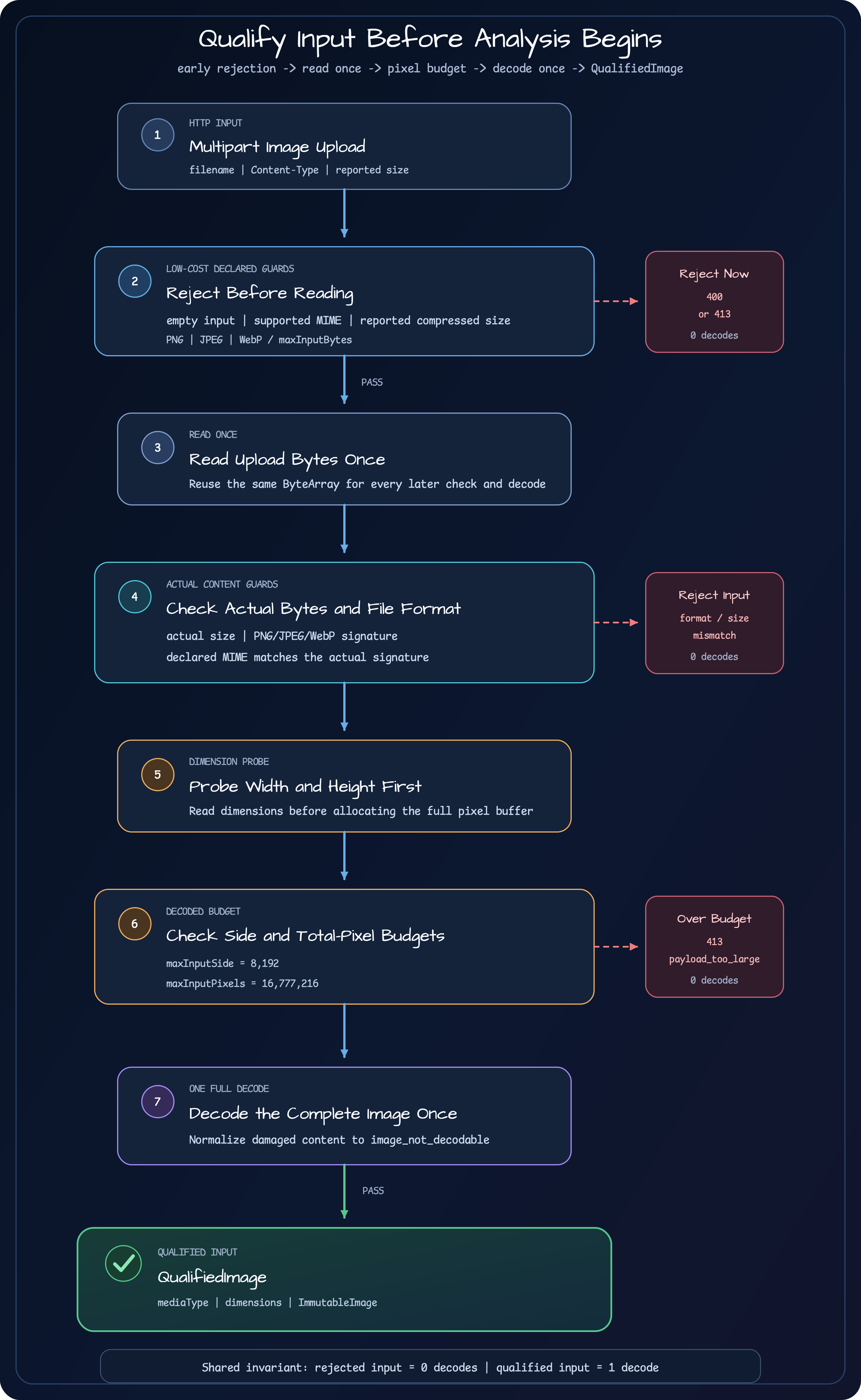
The implementation can be reduced to the following pseudocode:
suspend fun qualify(file: MultipartFile): QualifiedImage {    requireNotEmpty(file)    val declaredType = requireSupportedMediaType(file.contentType)    requireEncodedSize(file.size)
    val bytes = readOnce(file)    requireEncodedSize(bytes.size)    requireMatchingSignature(declaredType, bytes)
    val dimensions = probeDimensions(bytes)    requireDecodedBudget(dimensions)
    return QualifiedImage(        mediaType = declaredType,        dimensions = dimensions,        image = decodeOnce(bytes),    )}
The function names and details are simplified for explanation. The design depends on the order of checks and the number of times each operation runs:
- Reject an empty upload.
- Require a declared MIME type of PNG, JPEG, or WebP.
- Check the compressed size reported by the multipart adapter.
- Read the uploaded bytes once.
- Check the number of bytes actually read against the same limit.
- Detect the actual image format from its signature and compare it with the declared MIME type.
- Probe width and height, then check the maximum side and total pixel count.
- Decode the complete image once and create
QualifiedImage.
Check both the reported size and the actual size
Section titled “Check both the reported size and the actual size”MultipartFile.size helps reject an obviously oversized request before the service reads its full content. It should not be
the only basis for protecting service memory, however. An adapter or test double can report a value that differs from the
number of bytes actually read.
The example therefore performs two size checks for different purposes:
| Check point | Value | Problem it prevents |
|---|---|---|
| Before reading bytes | file.size | Reject an input already known to exceed the limit |
| After reading bytes | bytes.size | Confirm that the data now in memory remains within the limit |
The second check does not read the file again. The service reads the bytes once and reuses the same array for signature checking, dimension probing, and the full decode.
The example’s default compressed-size limit is 5 MiB. This is an operational safeguard for the example, not a recommended value for every service. Choose the limit from server memory, request concurrency, upstream proxy limits, and analyzer cost.
Compare the MIME declaration with the actual file format
Section titled “Compare the MIME declaration with the actual file format”An HTTP Content-Type is a claim made by the client. A filename extension is only part of a name. If the input boundary trusts
those values alone, a client can send PNG bytes declared as JPEG or attach an image extension to unsupported data and pass it
to an analyzer.
The example checks the leading-byte signature to distinguish PNG, JPEG, and WebP. An unsupported signature produces
unsupported_image_format; a mismatch between the declared MIME type and the signature produces media_type_mismatch.
A signature check does not replace a full decode. The beginning of a file can be valid while later data is damaged. Signature checking is a low-cost format decision; the final full decode is a separate gate that verifies whether the service can read the complete image.
Compressed-size and pixel budgets protect different costs
Section titled “Compressed-size and pixel budgets protect different costs”A small compressed file does not imply low CPU and memory cost. A large, nearly single-color image can compress well and still produce a very large pixel buffer when decoded. A compressed-size limit alone allows such input to reach the full decode and all three analyzers.
Before the full decode, the example probes width and height and applies two budgets:
- The maximum side length is 8,192 pixels by default.
- Width multiplied by height may not exceed 16,777,216 pixels by default.
The side limit rejects extremely long, narrow images. The total-pixel limit bounds the work represented by the decoded image. The multiplication must also handle large values safely. Only an image that passes both budgets reaches the full decode.
These values are example safeguards as well. The right limits change with resize behavior, OCR preprocessing, image backend, and analysis concurrency.
Decode a qualified image only once
Section titled “Decode a qualified image only once”When each analyzer receives the original upload, their input policies can drift apart:
// Structure to avoidocr.analyze(decode(file.bytes))detection.analyze(decode(file.bytes))barcode.analyze(decode(file.bytes))This design does more than repeat decoding three times. Each analyzer can also develop a different set of allowed formats, size limits, and error mappings. The same request may reach OCR but be rejected at the QR reader’s input boundary.
In the example, ImageIntelligenceService completes qualification first and passes one resulting ImmutableImage to the
workflow:
val qualified = qualifier.qualify(file)
val results = workflow.analyze(    image = qualified.image,)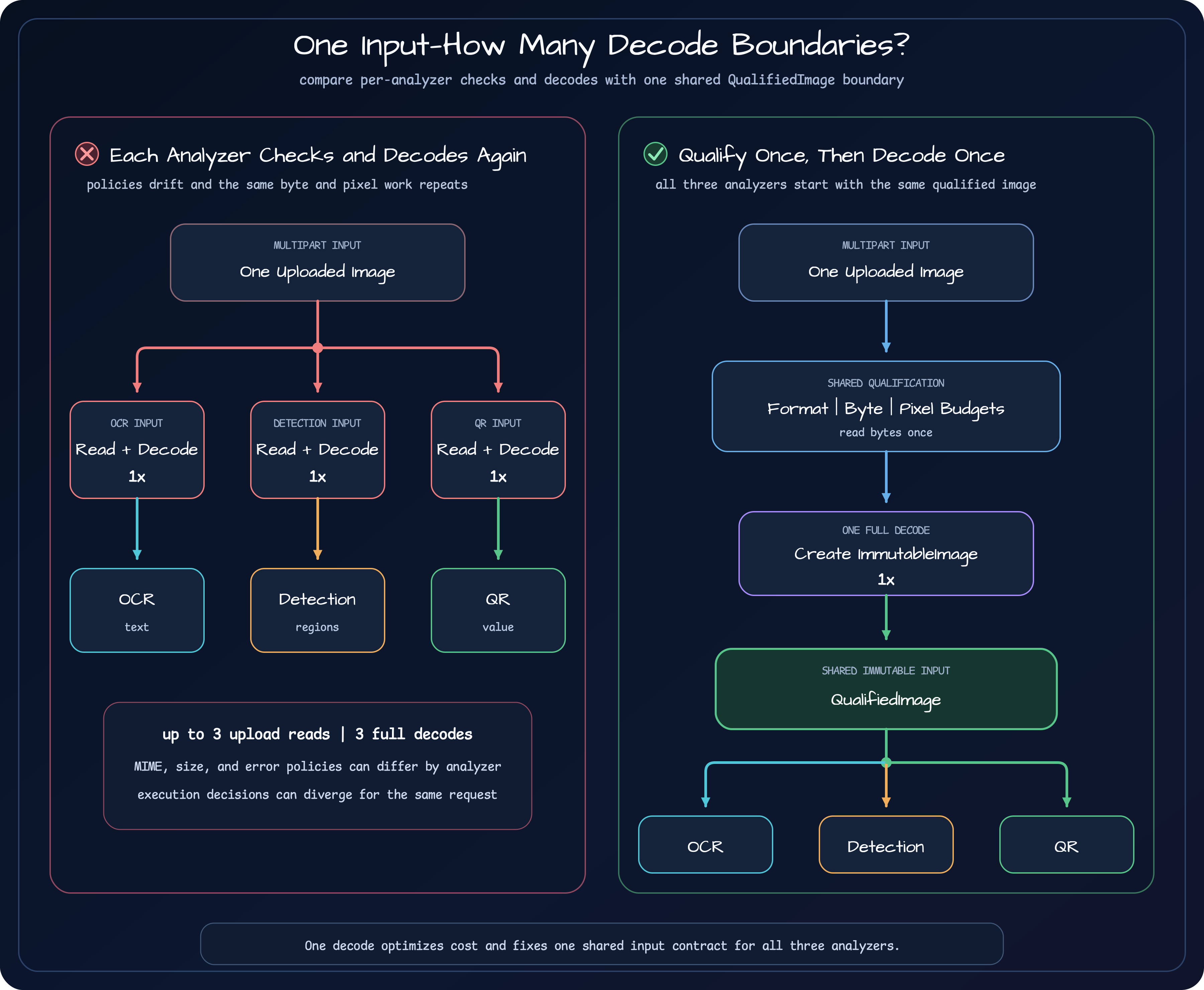
QualifiedImage contains the actual media type, width and height, and the decoded immutable image.
ImageIntelligenceWorkflow passes that image object to the OCR, object-detection, and barcode or QR providers. They produce
different results without reopening the multipart upload or the original bytes.
“Decode once” does not mean “no additional copy can ever occur.” A native OCR engine or image library may convert or copy the image into its own input representation. The invariant here is narrower: the service does not repeat shared upload qualification or full-image decoding for each analyzer.
Map failures to stable input reasons
Section titled “Map failures to stable input reasons”An input-stage failure is different from an analyzer’s Empty or Failed result. Analysis never began, so the API returns a
stable reason code for an input problem that the client may be able to correct.
| Failure | Reason code | HTTP status |
|---|---|---|
| Empty file | empty_input | 400 |
| Unsupported declared MIME type | unsupported_media_type | 400 |
| Unsupported actual file format | unsupported_image_format | 400 |
| Declared MIME type does not match the actual format | media_type_mismatch | 400 |
| Dimensions cannot be read or the full decode fails | image_not_decodable | 400 |
| Upload bytes cannot be read | image_read_failed | 400 |
| Compressed size, side length, or total pixel limit exceeded | payload_too_large | 413 |
The decoder’s exception text is not copied into the response. It can contain internal file paths, native-library details, or
diagnostic data. The example normalizes the external response to image_not_decodable and a message safe for clients.
Coroutine CancellationException is handled differently. A cancelled request or terminated parent job is not a damaged
image. If cancellation occurs while reading or decoding, the service rethrows it instead of changing it to
image_read_failed or image_not_decodable, preserving the request lifecycle.
Tests must verify execution boundaries, not only responses
Section titled “Tests must verify execution boundaries, not only responses”An HTTP 400 or 413 response does not prove that the expensive work was skipped. For that reason,
ImageUploadQualifierTest
also checks the number of decoder calls.
var decodeCalls = 0val qualifier = qualifierWithDecoder { bytes ->    decodeCalls += 1    decodeImage(bytes)}
val qualified = qualifier.qualify(validPng)
assertThat(qualified.mediaType).isEqualTo("image/png")assertThat(decodeCalls).isEqualTo(1)
Rejected inputs verify the opposite boundary:
assertThrows<InvalidImageUploadException> {    qualifier.qualify(oversizedOrMismatchedImage)}
assertThat(decodeCalls).isZero()| Test case | Expected decode count | Boundary proved |
|---|---|---|
| Valid PNG | 1 | A qualified input is decoded exactly once |
| MIME and signature mismatch | 0 | Actual-format validation stops the request early |
| Compressed-size limit exceeded | 0 | Oversized byte input is rejected before decoding |
| Side or total-pixel budget exceeded | 0 | Oversized pixel input is rejected before a full decode |
Separate tests also verify that cancellation propagates unchanged and that a decoder’s internal error does not appear in the public response. The goal is not to add another happy-path response example. It is to prove how far execution proceeded and which operations did not run.
What this boundary does not guarantee
Section titled “What this boundary does not guarantee”Shared input qualification defines the starting conditions for analysis; it is not the complete upload-security design.
| What the example decides | What needs a separate design |
|---|---|
| Supported formats, actual signature, and decodability | Malware scanning and content disarm and reconstruction |
| Compressed bytes, maximum side, and total-pixel budget | Per-user and per-tenant request and storage quotas |
| One decoded image shared by analyzers | Original-image retention, deletion, and encryption |
| Stable input-error codes | EXIF privacy removal and audit history |
Passing qualification also does not guarantee OCR accuracy or object-detection quality. A blurred photo or a tiny QR code can
be a valid image while producing Empty or Failed. Those outcomes belong to the analysis paths and policy layer.
Apply the same boundary to other image-processing tasks
Section titled “Apply the same boundary to other image-processing tasks”The responsibility of qualification changes little when the service processes shipping labels or product labels instead of visitor passes:
- Define supported image formats, compressed-size limits, and pixel budgets for the service.
- Place shared qualification before business-specific analyzers.
- Decode the qualified bytes once into an immutable input object.
- Let each analyzer read that object and return only its own result.
- Keep input errors, analysis outcomes, and business-policy decisions in separate contracts.
Limits and extra security steps will vary by workload. Reuse the order from low-cost checks to expensive operations, the single-decode invariant, and the stable failure contract—not the example’s numbers.
Continue the series
Section titled “Continue the series”- Part 1: Extracting Multiple Signals from One Image
- Part 2: Qualify Before You Analyze
- Part 3: Connect the OCR path to the combined response
- Part 4: Separate Detection Facts from Processing Policy
- Part 5: A Barcode and QR Contract Unlike OCR
- Part 6: Represent parallel execution and partial failure in the response contract
- Part 7: Walk through the complete visitor-pass image API
Part 3 will follow a qualified ImmutableImage into the OCR provider and show how the combined response preserves native
runtime availability, timeouts, empty results, and processing failures.
Implementation and further reading
Section titled “Implementation and further reading”- Spring Boot Image Intelligence API: See the complete execution path from shared qualification through three analyzers and visitor-pass policy.
ImageUploadQualifier.kt: Implements compressed-size, signature, pixel-budget, and single-decode ordering.ImageUploadQualifierTest.kt: Verifies one decode for valid input and zero decodes for rejected input.ImageIntelligenceService.kt: Shows the service boundary that passes one qualified image to the workflow.- Operating an OCR service in production: Explains large-image limits, native OCR operation, and failure-response contracts.
- Kotlin API input boundaries: Covers multipart and in-memory budgets as general API boundaries.
- From Pure JVM to libvips: Compares image-backend cost and operating conditions with measured results.
Comments
Leave a note or reaction with your GitHub account.