
Using bluetape4k-dependencies: Combining Multiple Libraries

projects, exposed, aws, image, text, graph, leader, and javers. Import the BOM first, then choose the modules it needs.Using one bluetape4k library is simple enough. An application may add bluetape4k-core and stop there. Real services
usually do not stay that small.
A more realistic combination looks like this:
- common Kotlin/JVM helpers from
projects - database access through
exposed - AWS integration through
aws - batch or scheduler ownership through
leader - search text or blockword handling through
text
At that point the developer’s question becomes practical:
What should go in
build.gradle.kts, and which versions should the application manage directly?
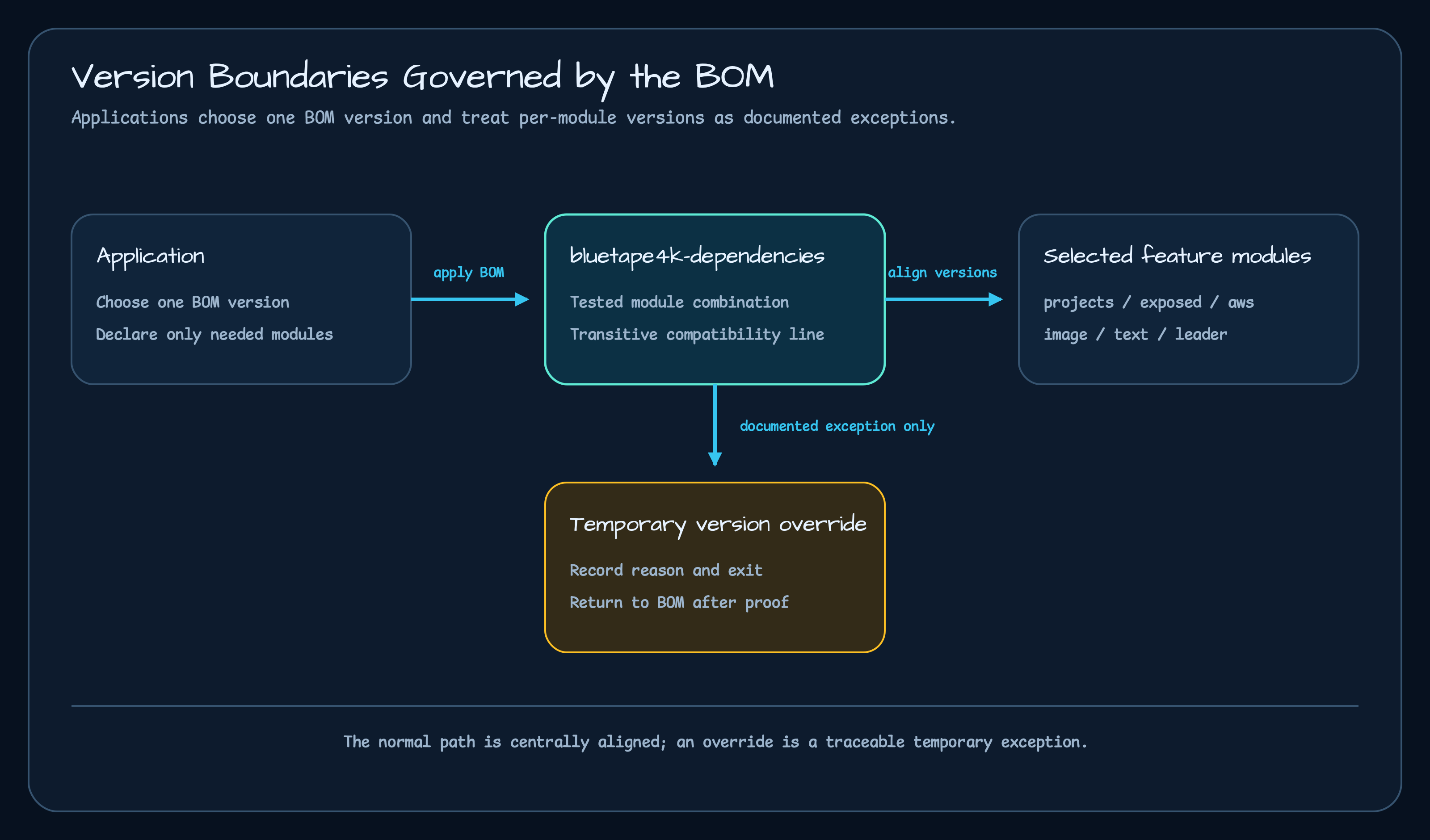
The short answer is: import the bluetape4k-dependencies BOM first, then omit versions from bluetape4k modules.
Start This Way in Gradle
Section titled “Start This Way in Gradle”With the Kotlin DSL, import the BOM with platform(...).
dependencies {    implementation(platform("io.github.bluetape4k:bluetape4k-dependencies:1.4.0"))
    implementation("io.github.bluetape4k:bluetape4k-core")    implementation("io.github.bluetape4k:bluetape4k-coroutines")    implementation("io.github.bluetape4k.exposed:bluetape4k-exposed-jdbc")    implementation("io.github.bluetape4k.aws:bluetape4k-aws-java")    implementation("io.github.bluetape4k.leader:bluetape4k-leader-core")}
The important line is the first one:
implementation(platform("io.github.bluetape4k:bluetape4k-dependencies:1.4.0"))After that, declare the modules without versions. Adding versions again makes the BOM less useful.
// Prefer not to write this when the BOM is already imported.implementation("io.github.bluetape4k.exposed:bluetape4k-exposed-jdbc:1.11.0")implementation("io.github.bluetape4k.aws:bluetape4k-aws-java:0.4.0")dependencies 1.4.0 manages a tested combination such as projects 1.12.1, exposed 1.12.1, aws 0.5.0,
image 0.4.0, text 0.3.0, graph 0.6.0, leader 0.5.0, and javers 0.3.0. The application only chooses the BOM
version.
Import It with dependencyManagement in Maven
Section titled “Import It with dependencyManagement in Maven”In Maven, import the BOM under dependencyManagement.
<dependencyManagement> <dependencies> <dependency> <groupId>io.github.bluetape4k</groupId> <artifactId>bluetape4k-dependencies</artifactId> <version>1.4.0</version> <type>pom</type> <scope>import</scope> </dependency> </dependencies></dependencyManagement>Then omit versions from the dependencies themselves.
<dependencies> <dependency> <groupId>io.github.bluetape4k</groupId> <artifactId>bluetape4k-core</artifactId> </dependency> <dependency> <groupId>io.github.bluetape4k.exposed</groupId> <artifactId>bluetape4k-exposed-r2dbc</artifactId> </dependency></dependencies>Gradle and Maven follow the same rule.
Put the version on the BOM.Do not put versions on individual bluetape4k modules.Why Not Version Every Module?
Section titled “Why Not Version Every Module?”Writing every module version can look clearer at first.
dependencies { implementation("io.github.bluetape4k:bluetape4k-core:1.11.0") implementation("io.github.bluetape4k.exposed:bluetape4k-exposed-r2dbc:1.10.0") implementation("io.github.bluetape4k.aws:bluetape4k-aws-spring-boot:0.4.0")}But now the application owns the compatibility matrix. core may be new while exposed is old. The AWS module may
expect a different Spring Boot or Ktor line. If the mismatch is obvious, the build breaks. If it is less obvious, the
runtime classpath gets the surprise.
The symptoms often look simple:
NoSuchMethodErrorClassNotFoundExceptionBeanCreationExceptiondependency resolution failedThe investigation is the expensive part. Is the application code wrong? Is the Exposed line too old? Did the Spring Boot line move? Did a transitive dependency win resolution? At that point the work is no longer feature development; it is cleanup.
The BOM at least keeps the bluetape4k library family on one intended combination, so the application can focus on its own service dependencies.
Choose Modules by the Job
Section titled “Choose Modules by the Job”It is easier to choose dependencies by the boundary the service needs.
| Job | Example dependency |
|---|---|
| Common Kotlin/JVM foundation | io.github.bluetape4k:bluetape4k-core, bluetape4k-coroutines, bluetape4k-logging |
| Exposed JDBC/R2DBC | io.github.bluetape4k.exposed:bluetape4k-exposed-jdbc, bluetape4k-exposed-r2dbc |
| Exposed in Spring Boot | io.github.bluetape4k.exposed:bluetape4k-exposed-spring-boot-jdbc, bluetape4k-exposed-spring-boot-r2dbc |
| AWS SDK helpers | io.github.bluetape4k.aws:bluetape4k-aws-java, bluetape4k-aws-kotlin |
| AWS with Ktor or Spring Boot | io.github.bluetape4k.aws:bluetape4k-aws-ktor, bluetape4k-aws-spring-boot |
| Image processing | io.github.bluetape4k.image:bluetape4k-images, bluetape4k-images-ocr, bluetape4k-images-vips-api |
| Korean/Japanese text handling | io.github.bluetape4k.text:tokenizer-korean, tokenizer-japanese, text-search, lingua |
| Leader election | io.github.bluetape4k.leader:bluetape4k-leader-core, bluetape4k-leader-redis-lettuce, bluetape4k-leader-spring-boot |
| GraphDB integration | io.github.bluetape4k.graph:bluetape4k-graph-core, bluetape4k-graph-neo4j, bluetape4k-graph-memgraph |
| Audit and diff storage | io.github.bluetape4k.javers:javers-core, javers-exposed, javers-persistence-redis |
No version appears in that table because the BOM is already imported.
For example, a Spring Boot service using Exposed, AWS, and leader election can start this way:
dependencies {    implementation(platform("io.github.bluetape4k:bluetape4k-dependencies:1.4.0"))
    implementation("io.github.bluetape4k:bluetape4k-spring-boot-core")    implementation("io.github.bluetape4k.exposed:bluetape4k-exposed-spring-boot-jdbc")    implementation("io.github.bluetape4k.aws:bluetape4k-aws-spring-boot")    implementation("io.github.bluetape4k.leader:bluetape4k-leader-spring-boot")}
A Ktor service that adds AWS and text processing can start with this:
dependencies {    implementation(platform("io.github.bluetape4k:bluetape4k-dependencies:1.4.0"))
    implementation("io.github.bluetape4k.aws:bluetape4k-aws-ktor")    implementation("io.github.bluetape4k.text:tokenizer-korean")    implementation("io.github.bluetape4k.text:text-search")}
Upgrade the BOM First
Section titled “Upgrade the BOM First”If an existing application uses 1.2.0, start by changing only the BOM version.
dependencies {    implementation(platform("io.github.bluetape4k:bluetape4k-dependencies:1.2.0"))    implementation(platform("io.github.bluetape4k:bluetape4k-dependencies:1.4.0"))
    implementation("io.github.bluetape4k:bluetape4k-core")    implementation("io.github.bluetape4k.exposed:bluetape4k-exposed-jdbc")}
Then check the boundaries the service actually uses.
./gradlew compileTestKotlin./gradlew test./gradlew dependencyInsight --dependency exposed --configuration runtimeClasspath./gradlew dependencyInsight --dependency spring-boot --configuration runtimeClasspathNot every project needs dependencyInsight on every upgrade. It is worth checking when dependencies close to the
service boundary move together: Exposed, Spring Boot, Ktor, Jackson, AWS SDK, and similar runtime lines. If something
breaks, the resolved dependency graph after the BOM upgrade is already visible.
Keep Individual Overrides Exceptional
Section titled “Keep Individual Overrides Exceptional”Sometimes a service needs to pin one module temporarily: a security fix, an upstream regression, or a patch that has not yet landed in the BOM.
That override should stay explicit and temporary.
dependencies {    implementation(platform("io.github.bluetape4k:bluetape4k-dependencies:1.4.0"))
    implementation("io.github.bluetape4k:bluetape4k-core")
    // Temporary override: remove after the fix is included in the BOM.    implementation("io.github.bluetape4k.text:text-search:0.3.0")}
An override left without a comment is ambiguous later. Was it intentional? Is it safe to remove? What condition clears it? If an override is necessary, leave both the reason and the removal condition.
Most Users Do Not Need the Catalog
Section titled “Most Users Do Not Need the Catalog”Gradle Version Catalogs are useful for maintaining bluetape4k repositories and workshops. They keep aliases aligned and make build scripts look similar across repositories.
Application developers using bluetape4k-dependencies do not need to understand the catalog structure first. They need
four rules:
- Import the
io.github.bluetape4k:bluetape4k-dependenciesBOM. - Do not put versions on bluetape4k module dependencies.
- The more bluetape4k libraries are used together, the more useful the BOM becomes.
- If an individual version is overridden, document why and when to remove it.
That is enough. The catalog is mainly for the side that builds bluetape4k. The application side imports the BOM and chooses the modules it needs.
Maven Central Does Not Have a Rollback Button
Section titled “Maven Central Does Not Have a Rollback Button”One background detail helps explain the release behavior: a released artifact on Maven Central cannot be overwritten with the same version.
So if a BOM version has a problem, the usual fix is not to re-upload the same version. A problem in 1.3.0 becomes a
new patch version such as 1.3.1.
A published BOM version is wrong -> do not wait for the same version to be overwritten -> look for the next patch BOM versionUsers do not need the whole release procedure to use the BOM. This point answers the common question: “why not just republish 1.3.0?” Maven Central does not have a rollback button.
Read Next
Section titled “Read Next”This is the basic usage path for application developers. The following posts look at what changed in the libraries when
moving from 1.2.0 to 1.3.x, and which bugs or technical debt were removed along the way.
- bluetape4k-dependencies 1.3.0 in Practice Part 1: Features and Cleanup
- bluetape4k-dependencies 1.3.0 in Practice Part 2: Selecting Modules by Service Boundary
- bluetape4k-dependencies 1.3.0 in Practice Part 3: Production Signals
- bluetape4k-dependencies 1.3.0 in Practice Part 4: Input Boundaries
Comments
Leave a note or reaction with your GitHub account.