
Bluetape4k Cache Part 4: Getting a Feel for Cache Strategies with Workshop Examples

This is Part 4 of the Bluetape4k Cache series. The full series includes Part 1: cache module overview, Part 2: Near Cache, Part 3: Near Cache + Exposed strategies, and Part 4: workshop examples.
This post is about working examples. bluetape4k-workshop has several
Spring Boot cache examples.
The goal is not to repeat “cache is good.” The goal is to see what shape each strategy gives the code, what cost it hides, and what operational contract it asks you to accept.
Example Locations
Section titled “Example Locations”The relevant examples are below.
| Example | Role |
|---|---|
| cache-caffeine | Spring Cache + Caffeine local cache |
| cache-redis | Spring Data Redis + Lettuce |
| cache-resilience | Caffeine fallback when Redis is unavailable |
Caffeine: The Closest Cache
Section titled “Caffeine: The Closest Cache”The cache-caffeine example connects Caffeine to Spring Cache abstraction.
@Configurationclass CaffeineConfig {    @Bean    fun cacheManager(caffeine: Caffeine<Any, Any>): CacheManager {        return CaffeineCacheManager("cache:countries", "cache:cities").apply {            setCaffeine(caffeine)        }    }
    @Bean    fun caffeineBean(): Caffeine<Any, Any> = caffeine {        maximumSize(10_000)        expireAfterWrite(30.minutes)    }}
Full source: CaffeineConfig.kt
This works well for single-instance read-heavy caching. It is fast and simple. The drawback is also simple: if there are two instances, there are two caches. They do not talk to each other. An alarming number of problems begin with “they do not talk to each other.”
Redis: The Shared Cache
Section titled “Redis: The Shared Cache”The cache-redis example connects Redis to Spring Cache and RedisTemplate.
@Beanfun redisCacheManager(connectionFactory: RedisConnectionFactory): CacheManager = RedisCacheManager.builder(connectionFactory) .cacheDefaults( RedisCacheConfiguration.defaultCacheConfig() .entryTtl(Duration.ofDays(1)) ) .build()Full source: LettuceRedisCacheConfiguration.kt
Redis lets multiple instances see the same values. The cost is that every read has a remote hop. As Part 2 showed, if hot reads dominate, Near Cache becomes a candidate.
Canonical Cache Strategies: Exposed Workshop Chapter 11
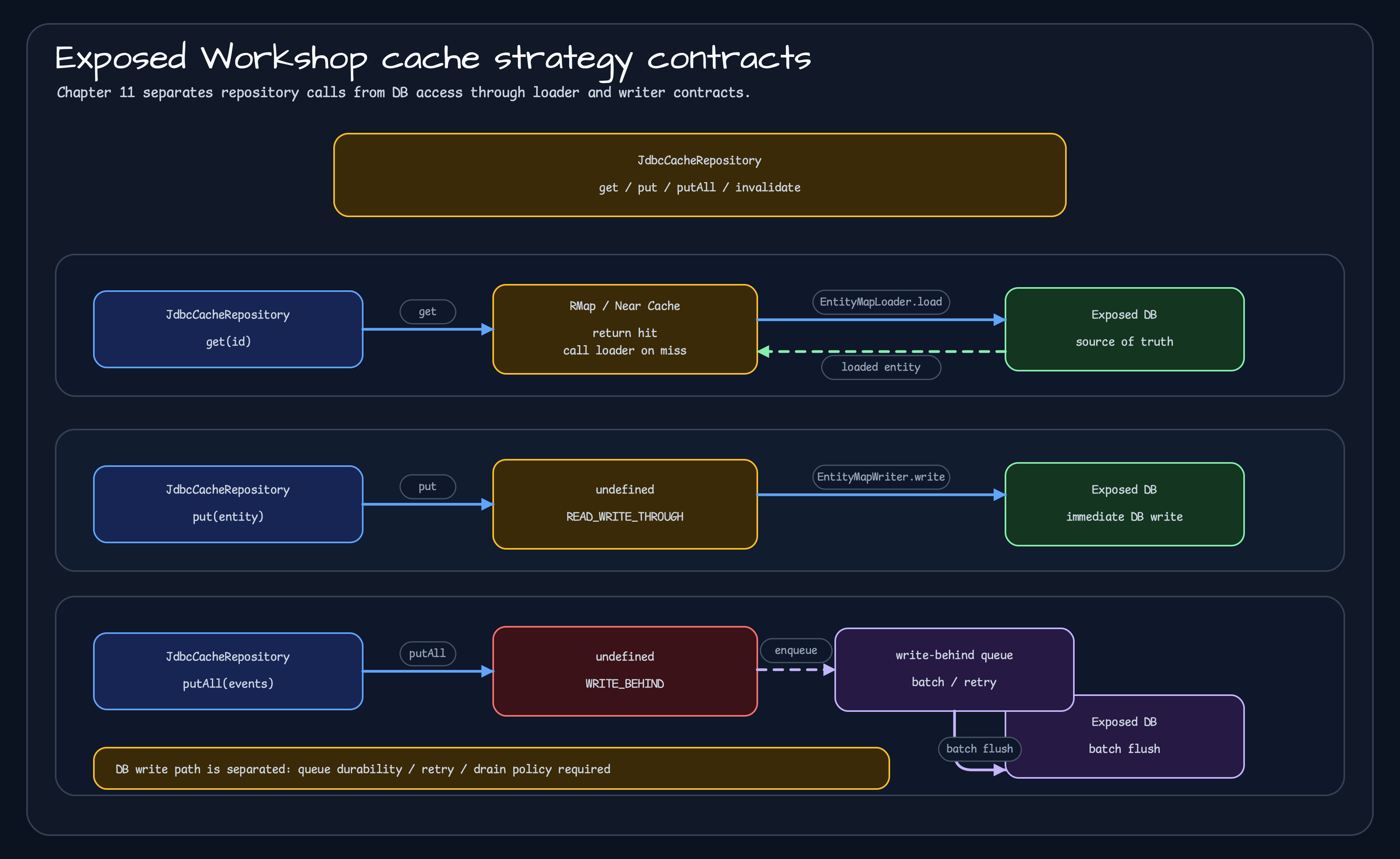
Section titled “Canonical Cache Strategies: Exposed Workshop Chapter 11”Read-through, write-through, and write-behind do not mean that an application service manually sequences cache and DB access. The application uses the cache map, and the cache owns DB access through a loader or writer.
Exposed Workshop chapter 11, 01-cache-strategies, implements that contract directly. UserCacheRepository uses READ_WRITE_THROUGH_WITH_NEAR_CACHE, while UserEventCacheRepository uses WRITE_BEHIND_WITH_NEAR_CACHE. EntityMapLoader and EntityMapWriter own the actual DB reads and writes.
References
Section titled “References”- Exposed Workshop chapter 11 cache strategies
- RedissonConfig.kt
- UserCacheRepository.kt and UserCacheRepositoryTest.kt
- UserEventCacheRepository.kt and UserEventCacheRepositoryTest.kt
- AbstractJdbcRedissonRepository.kt
- EntityMapLoader.kt and EntityMapWriter.kt
resilience: Do Not Let Cache Failure Become Service Failure
Section titled “resilience: Do Not Let Cache Failure Become Service Failure”cache-resilience uses Redis as the primary cache and Caffeine as fallback.
suspend fun getProduct(id: String): String? {    val redisKey = "$REDIS_KEY_PREFIX$id"
    return SuspendDecorators.ofSupplier {        redisTemplate.opsForValue().get(redisKey)    }        .withCircuitBreaker(circuitBreaker)        .withFallback { localCache.getIfPresent(id) }        .invoke()}
Full source: ResilientProductService.kt
This example matters operationally. Cache was added for performance. If Redis is briefly unstable and the whole service is affected, something is off. Cache is support infrastructure. When support infrastructure becomes the main outage path, the design needs another look.
Practical Checklist
Section titled “Practical Checklist”Before adding cache to a service, answer at least these questions.
| Question | Why It Matters |
|---|---|
| What is baseline latency? | You need to know whether cache improves anything |
| What hit ratio do we need? | Low hit ratio can add cost without benefit |
| How much staleness is acceptable? | Core contract for Near Cache and write-behind |
| What is the write failure policy? | Choose throw, retry, queue, or best effort |
| What is the invalidation scope? | Single key, bulk, prefix, and clear-all differ |
| What is the fallback on failure? | Redis failure should not become service failure |
| What do we observe? | hit/miss, latency, queue depth, circuit state |
Wrap-up
Section titled “Wrap-up”The conclusion of this series is not “always use Near Cache.”
It is more precise than that.
- For single-JVM hot reads, Caffeine is the simplest answer.
- When multiple instances must share state, a remote cache such as Redis is needed.
- When remote reads become the bottleneck, consider Near Cache.
- When connecting cache to an Exposed repository, separate read and write strategy.
- A cache without failure behavior is not fully designed.
Cache is both a performance optimization and an operational contract. Operational contracts have a way of returning very clearly when written casually. Usually at night.
Comments
Leave a note or reaction with your GitHub account.