
bluetape4k Flow Extensions: Turning Stream Plumbing into Named Operational Contracts

Kotlin Flow code often starts small: create a MutableSharedFlow, collect it in a launch, cancel a Job when the
screen or request ends. That works until the flow has to handle real behavior: autocomplete bursts, fallback sources,
callback bridges, metric sampling, event replay, or parallel enrichment. At that point, hand-written plumbing starts
hiding the answers to important questions: who cancels the work, whether only the latest value matters, whether a failure
is a value or a terminal exception, and how much buffering the stream is allowed to keep.
The Flow extensions examples in bluetape4k-workshop pull those decisions into named operators. This post introduces the
six examples by the contract each one makes visible, not by treating the API as a flat catalog.
| Example | Problem | Main Flow extensions |
|---|---|---|
| Search Pipeline | Fast input, settings snapshot, latest search only | bufferingDebounce, withLatestFrom, flatMapLatest, takeUntil |
| Race and Fallback | Fastest healthy source, ordered fallback, partial merge | race, amb, concat, concatArrayEager, concatMapEager, merge |
| Subject Bridge | Callback streams as events, state, history, fan-out, or work queue | PublishSubject, BehaviorSubject, ReplaySubject, MulticastSubject, UnicastWorkSubject |
| Event Aggregation | Order event replay, windows, grouping, accumulated state | chunked, windowed, groupBy, scanWith, bufferUntilChanged, zipWithNext |
| Parallel Enrichment | Independent per-order enrichment on parallel rails | parallel, sequential |
| Metrics Sampling | Fast alert previews and stable dashboard samples from bursty metrics | throttleLeading, throttleTrailing, pairwise, takeUntil, mapResultCatching |
ReactiveX operator documentation classifies buffer, groupBy,
scan, and window as different transformation operators, while Reactor’s
Three Sorts of Batching
compares grouping, windowing, and buffering together. Their output shapes still differ. scan belongs to the
accumulator/state family: each event combines with the previous state to produce the next state.
The diagrams below use the marble-diagram convention common in RxJava documentation and tutorials: the top timeline is usually the input Flow, the middle box is the operator, and the bottom timeline is the output Flow. For parallel rails, the same visual language shows the split and fold-back points.
Start with Input and Output
Section titled “Start with Input and Output”The snippets below compress the behavior pinned by the workshop tests. The real modules include more failure, cancellation, and validation cases in their READMEs and tests.
// 1. Search Pipeline// input: "r", "re", "red" in one typing burstval results = pipeline.search(    queries = flowOf("r", "re", "red"),    settings = flowOf(settings(tenantId = "tenant-a")),    sessionClosed = flowOf(),    debounce = 100.milliseconds,).toList()// output: one request, query == "red", tenantId == "tenant-a"
// 2. Race / Fallback// input: cache(200ms), replica(20ms), remote(120ms)val winner = catalog.fastestHealthy(listOf(cache, replica, remote)).take(1).toList()// output: [CatalogSource.REPLICA], cache/remote collectors are cancelled
// 3. Subject Bridge// input: early event before subscription, then active event after subscriptionbridge.publishEvent(DeviceEvent("event-01", "device-01", CONNECTED, "early"))val received = async { bridge.events.take(1).toList() }bridge.awaitEventSubscribers()bridge.publishEvent(DeviceEvent("event-02", "device-01", TELEMETRY, "temperature=22"))// output: only event-02 is received by PublishSubject subscribers
// 4. Event Aggregation// input: sampleEvents() == five order eventsval chunked = pipeline.chunkedActivity(sampleEvents().asFlow(), chunkSize = 2).toList()// output chunk sizes: [2, 2, 1]
val windows = pipeline.rollingActivity(sampleEvents().asFlow(), size = 3, step = 2).toList()// output window sizes: [3, 3, 1]
val groups = pipeline.groupedByOrder(sampleEvents().asFlow()).toList().associateBy { it.key }// output groups://   order-1 -> [OrderCreated, LineAdded, PaymentAuthorized]//   order-2 -> [OrderCreated, ShipmentStarted]
val states = pipeline.readModels(sampleEvents().asFlow()).toList()// output: state snapshots; final order-1 == PAID, final order-2 == SHIPPED
// 5. Parallel Enrichment// input: O-1001 customer-1001, item suit-01 x2val enriched = pipeline.enrichInParallel(flowOf(order), parallelism = 3) { dispatchers[it] }    .toList()// output: O-1001 -> loyaltyGrade=GOLD, discountPercent=10, fulfillable=true
// 6. Metrics Sampling// input: cpu.usage values 10,20,30,...,100 every 200msval leading = pipeline.leadingPreview(highFrequencyCpuSamples(), 501.milliseconds).toList()val trailing = pipeline.dashboardSamples(highFrequencyCpuSamples(), 501.milliseconds).toList()// output leading values:  [10.0, 40.0, 70.0, 100.0]// output trailing values: [30.0, 60.0, 90.0, 100.0]
Search Pipeline: Separate Input Bursts from Current Settings
Section titled “Search Pipeline: Separate Input Bursts from Current Settings”Autocomplete has more policy than it first appears to have. Blank input should be ignored. If a user types quickly, only the final query in that burst matters. Tenant settings and feature flags should be read at the moment a search request is formed. When the session closes, waiting work should stop.
The example centers the pipeline on that shape:
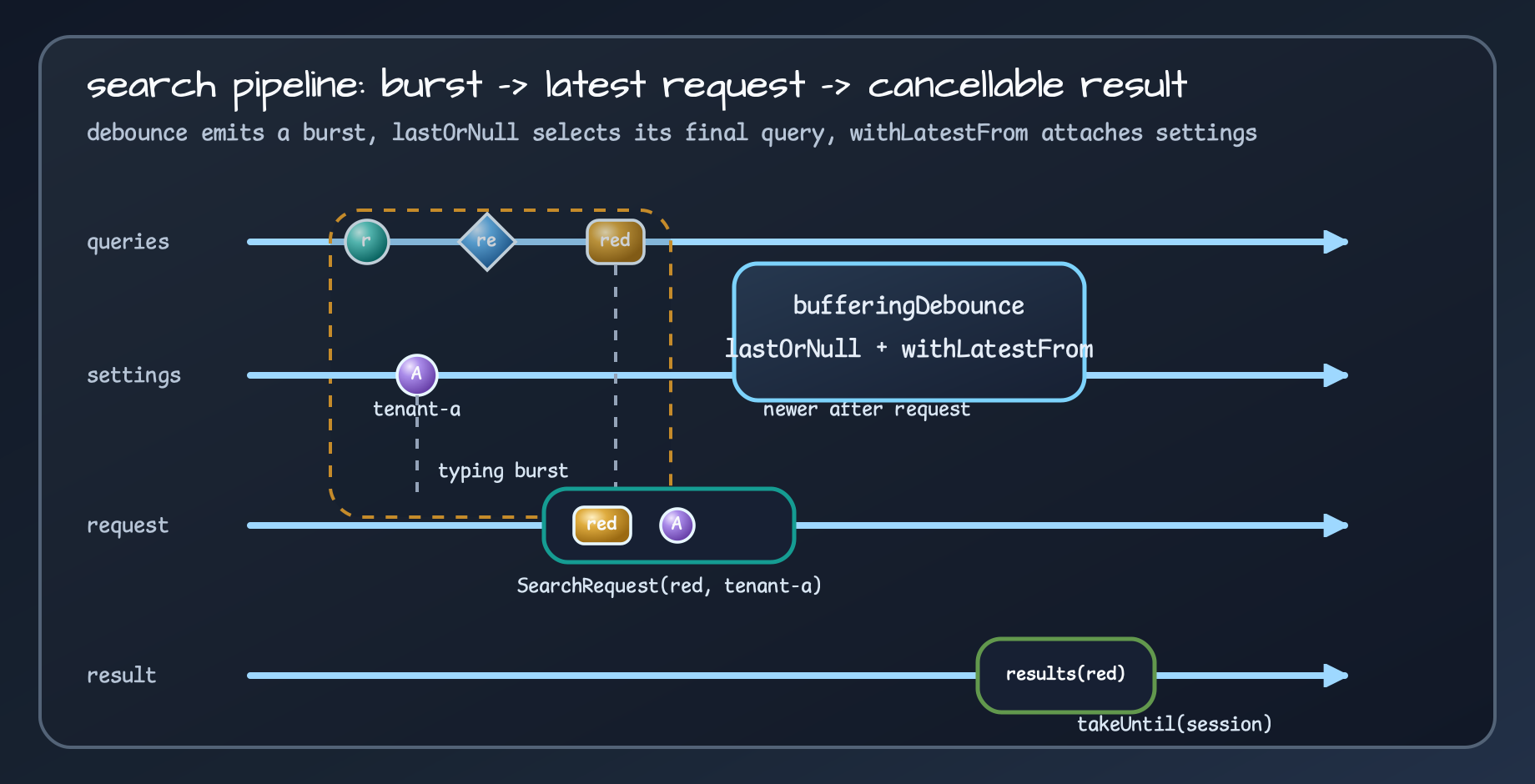
queries .map(String::trim) .filter(String::isNotBlank) .bufferingDebounce(debounce) .mapNotNull { burst -> burst.lastOrNull()?.let(::SearchQuery) } .withLatestFrom(settings) { query, latestSettings -> SearchRequest(query, latestSettings) } .flatMapLatest { request -> adapter.search(request) } .takeUntil(sessionClosed)bufferingDebounce emits each burst as a List<String>, so mapNotNull must select the final item and wrap it as a
SearchQuery. withLatestFrom then attaches the latest settings snapshot when the request is built, and
flatMapLatest cancels an older search when a newer query arrives.
Cancellation is part of the contract. The search adapter must rethrow CancellationException; otherwise the operator
chain looks clean while the runtime keeps stale work alive. The tests pin that behavior down explicitly.
Race/Fallback: Fastest Source and Highest-Priority Source Are Not the Same
Section titled “Race/Fallback: Fastest Source and Highest-Priority Source Are Not the Same”When a service can read from a cache, a local replica, a remote API, and a backup endpoint, “the first value to arrive” is not always the right policy. Some views only need the fastest healthy response. Some commands must respect strict fallback order. Some enrichment flows should accept partial contribution from multiple sources.
The race/fallback example makes that choice visible:
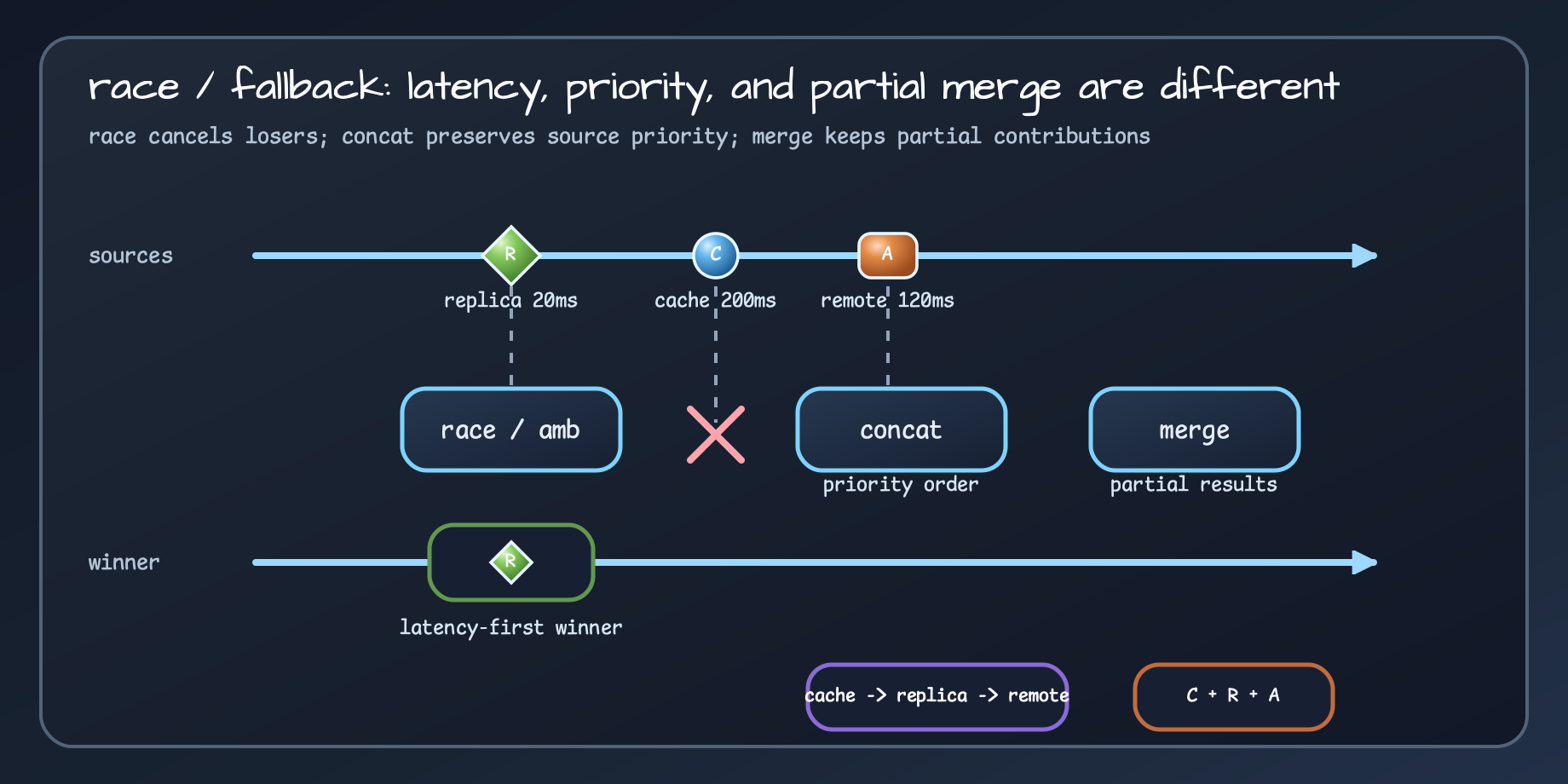
race/amb chooses the first normally emitting source and cancels losers. concat preserves source priority, while merge keeps partial contributions.| Choice | Meaning |
|---|---|
race / amb | The first normally emitting source wins; losers are cancelled |
concat | Preserve strict fallback order |
concatArrayEager | Start sources eagerly but preserve output order |
concatMapEager | Start dynamic sources eagerly and preserve outer order |
merge | Combine partial contributions from several sources |
materialize / dematerialize | Observe failures as values before converting to terminal errors |
The point is not that manual select or async code is forbidden. The point is that latency-first, priority-first, and
partial-merge strategies should look different in code.
Subject Bridge: Callback Streams Have Different Subscription Contracts
Section titled “Subject Bridge: Callback Streams Have Different Subscription Contracts”Wrapping an external SDK callback in Flow is only half the design. Late subscribers may or may not receive old events. They may need the latest state first. A producer may need to wait for a known fan-out count. Work items may need to be consumed once by a single worker.
The Subject bridge example names those cases:
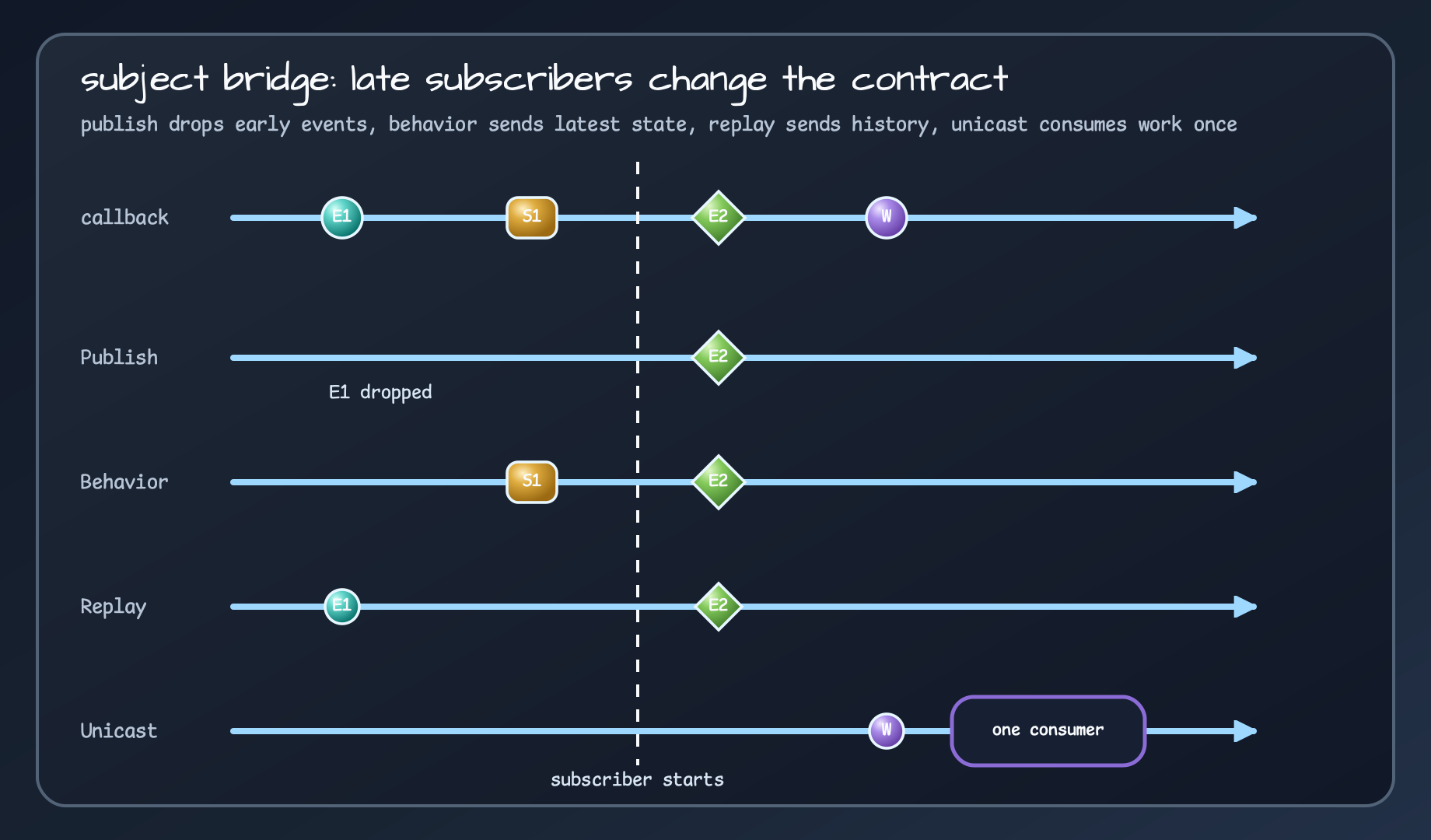
| Subject | Use |
|---|---|
PublishSubject | Send events only to active subscribers |
BehaviorSubject | Send the newest state first to late subscribers |
ReplaySubject | Replay a bounded event history |
MulticastSubject | Coordinate fan-out to the expected subscriber count |
UnicastWorkSubject | Treat work items as a single-consumer queue |
That distinction matters in tests. The example checks late-subscriber behavior, latest-state delivery, replay history, and single-consumption work semantics separately. “Converted to Flow” is not the contract. “Converted to which subscription model” is the contract.
Aggregation and Sampling: Windows Are Memory Contracts
Section titled “Aggregation and Sampling: Windows Are Memory Contracts”The event aggregation example uses chunked, windowed, groupBy, and scanWith to replay order events. The metrics
sampling example uses throttleLeading and throttleTrailing to separate alert previews from dashboard samples.
Both examples treat windows as memory and latency contracts, not convenience wrappers.
chunked: Repackage Events into Concrete Batches
Section titled “chunked: Repackage Events into Concrete Batches”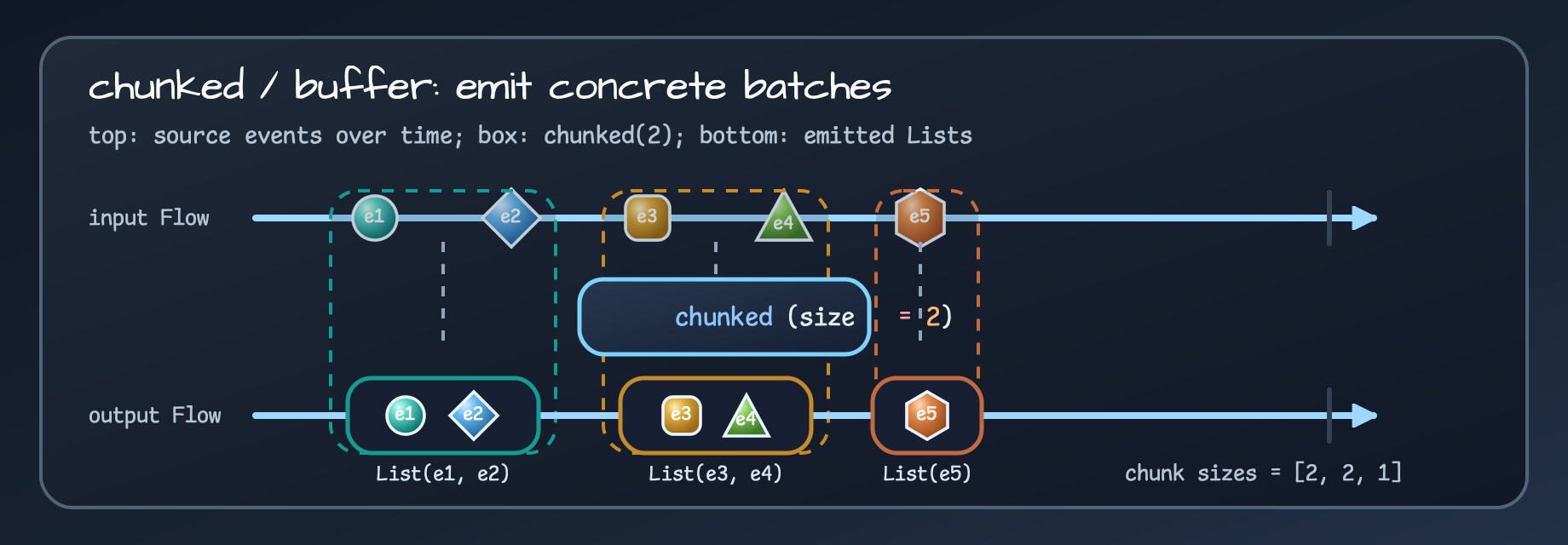
chunked(2) slices the timeline into concrete List-like batches. With partial windows enabled, the trailing [e5] is emitted too.events .chunked(chunkSize, partialWindow = true) .map { chunk -> summarize(chunk) }For the e1, e2, e3, e4, e5 input used by the example, the emitted batch sizes are [2, 2, 1]. Choosing this operator
also means naming the maximum batch memory the stream can hold.
windowed: Emit Overlapping Windows
Section titled “windowed: Emit Overlapping Windows”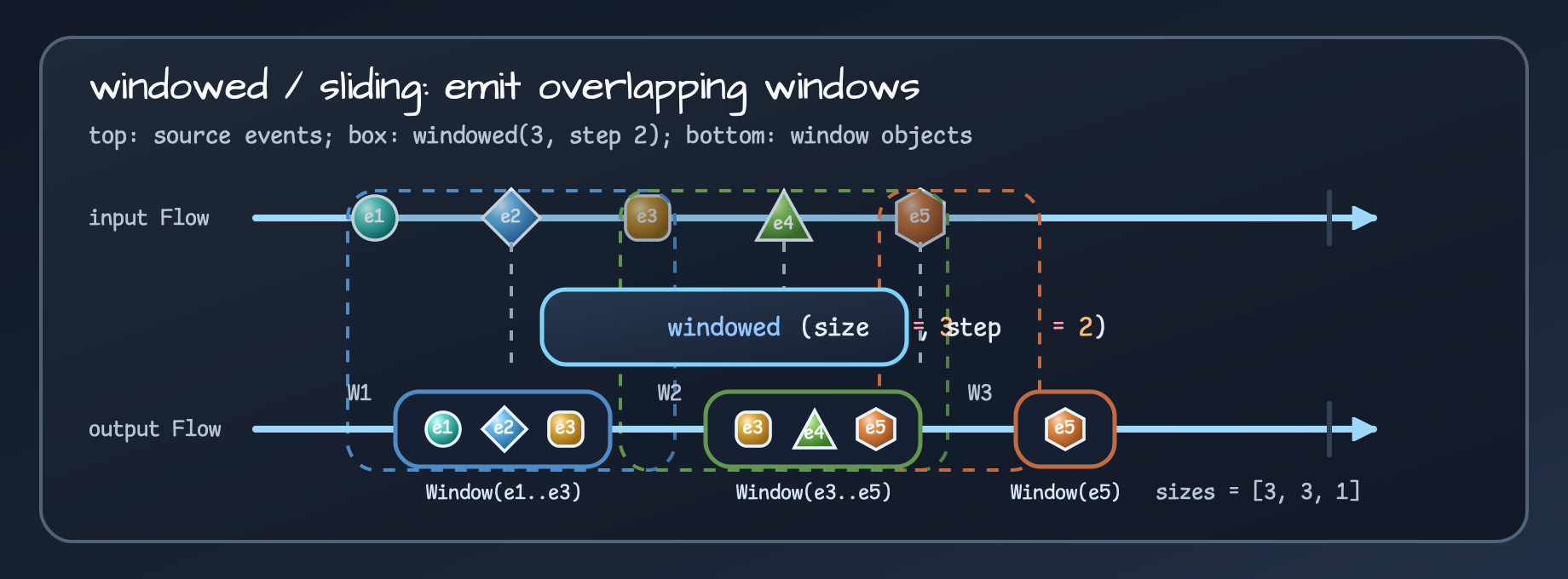
windowed(size = 3, step = 2) can overlap. One input event can appear in more than one output window.With sampleEvents(), the first window is [e1, e2, e3], the second is [e3, e4, e5], and the partial trailing window
is [e5]. The output sizes are [3, 3, 1], but those are window sizes, not batch sizes.
groupBy: Partition by Key, Not by Time or Size
Section titled “groupBy: Partition by Key, Not by Time or Size”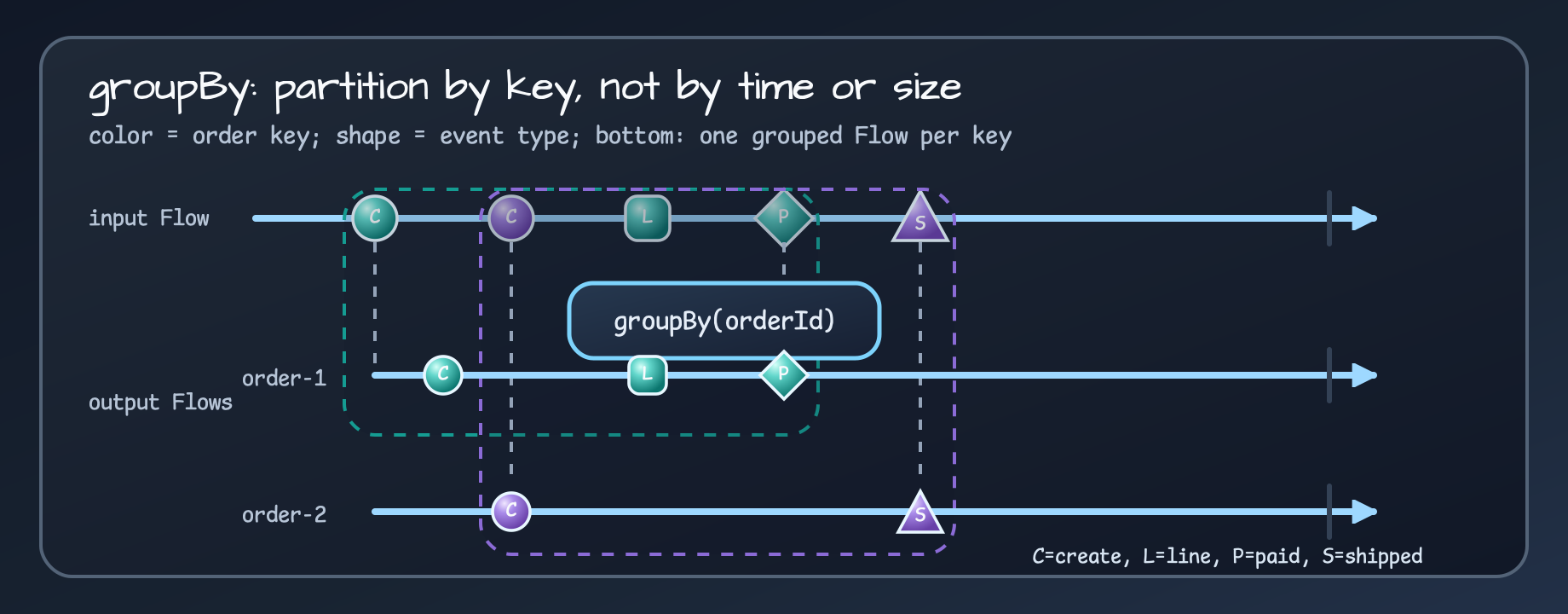
groupBy(orderId) does not cut the timeline. It routes each event into the grouped stream for its key.order-1 becomes a Created, LineAdded, PaymentAuthorized stream. order-2 becomes a Created,
ShipmentStarted stream. The important question is not “how many batches were emitted” but “how do grouped stream
lifecycles close.”
scanWith: Accumulate State Snapshots
Section titled “scanWith: Accumulate State Snapshots”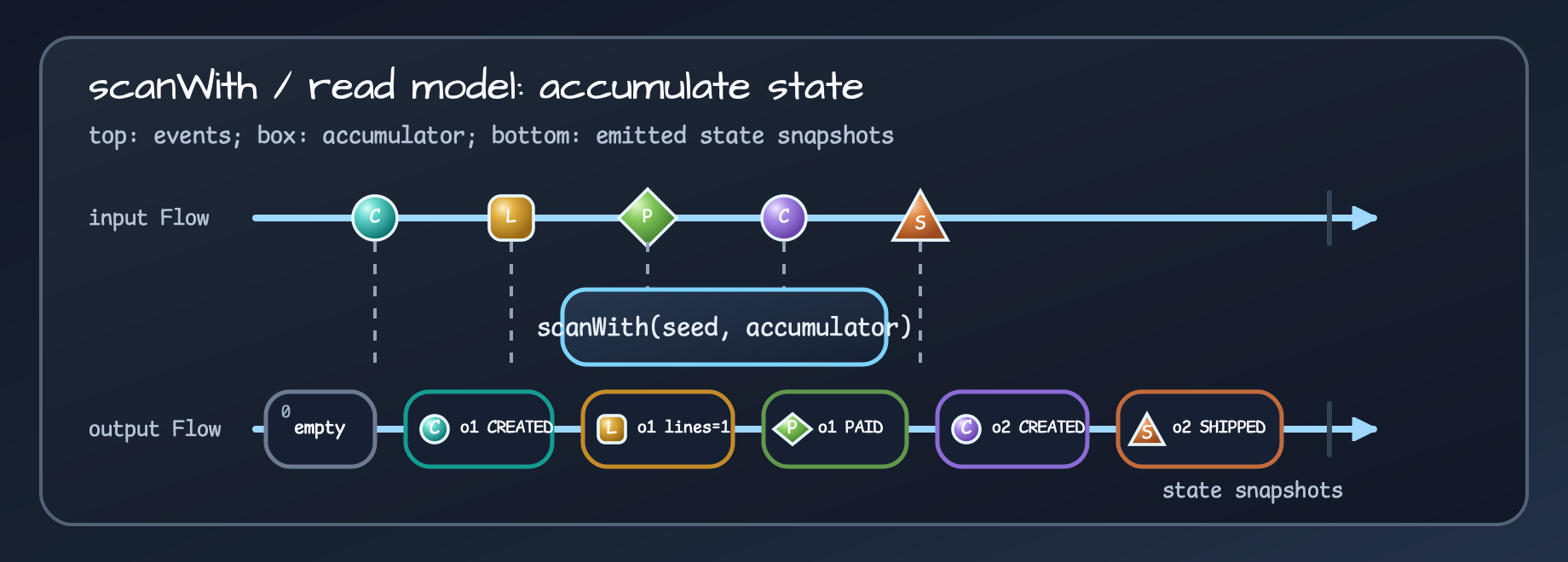
scanWith(seed, accumulator) does not group events into batches. It combines the previous state and the current event to emit the next read-model snapshot.readModels(sampleEvents()) emits a state snapshot stream. In the final state, order-1 is PAID and order-2 is
SHIPPED.
metrics .throttleLeading(window) .filter { it.value >= alertThreshold }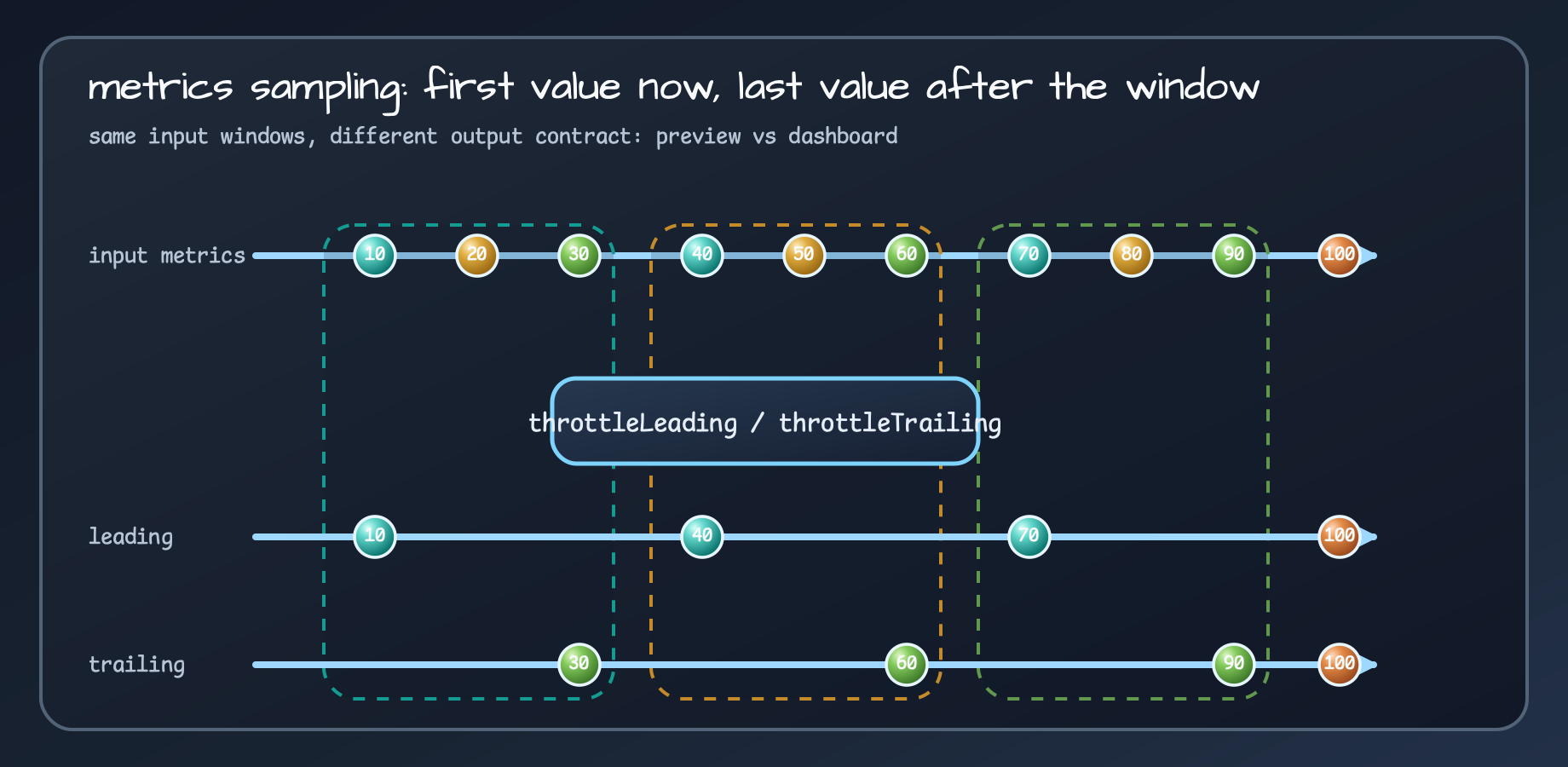
throttleLeading emits the first value in each window quickly. throttleTrailing waits for the window to settle and emits the final value.throttleLeading fits alert previews because it emits the first value in a window quickly. throttleTrailing fits
dashboard tiles because it waits for the window to settle and then emits the last value.
The examples also keep validation close to the stream boundary. Invalid IDs, negative amounts, control characters,
non-finite metric values, and invalid thresholds fail before collection. Diagnostic rendering and Flow<T>.log() are
written with redaction in mind so raw secrets and payloads do not leak through logs.
Parallel Enrichment: Use Rails Only for Independent Work
Section titled “Parallel Enrichment: Use Rails Only for Independent Work”flow-extensions-parallel-enrichment splits order enrichment into parallel rails: customer lookup, inventory checks, and
discount calculation. Each order can be enriched independently, then the rails are folded back into one stream with
sequential().
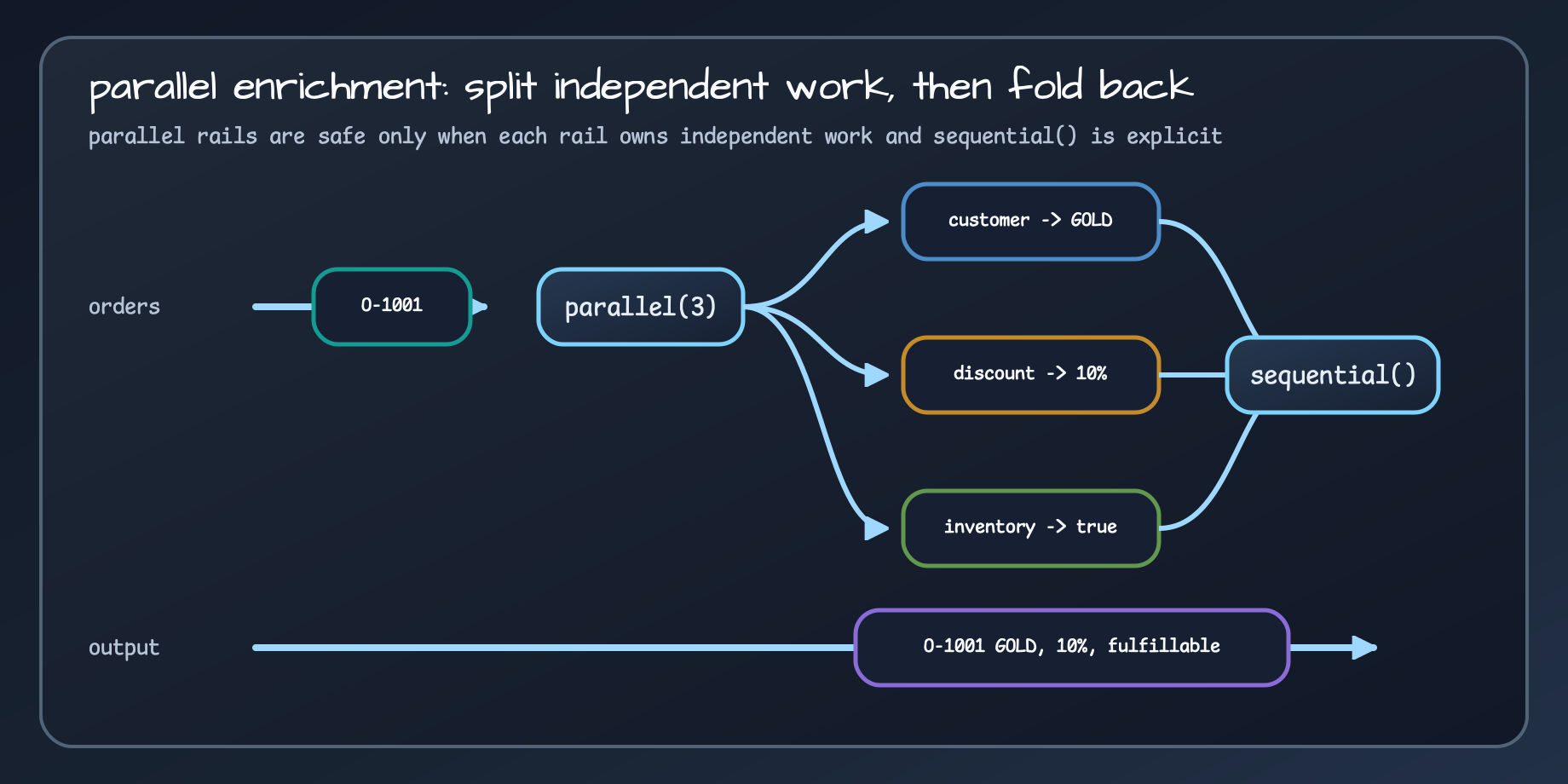
parallel(3) splits independent enrichment into rails, and sequential() folds the enriched result back into a single output stream.orders .parallel(parallelism, runOn) .map { rail -> enrich(rail) } .sequential()The criterion for using parallel rails is not “this might be faster.” Each rail should avoid shared mutable state, and the place where the stream becomes sequential again should be obvious. Without that, a tidy operator chain can hide a race condition.
What to Watch in Production Code
Section titled “What to Watch in Production Code”Flow extensions do not change the coroutine operating model. They should make it easier to see:
- rethrow
CancellationExceptionaround suspend work; - put lifecycle termination behind an explicit boundary such as
takeUntil; - decide between latency-first, priority-first, and partial-merge fallback before choosing operators;
- explain every window, chunk, and group as a memory and latency bound;
- redact secrets, tokens, passwords, and raw payloads in debug rendering;
- use parallel rails only for work with a clear independence boundary.
These examples are useful because they avoid presenting Flow as a prettier chain. Each operator is tied to a failure, cancellation, subscriber, window, or backpressure contract, and the README/tests keep those contracts visible.
Comments
Leave a note or reaction with your GitHub account.