
Bluetape4k AWS Part 4: Comparing with Spring Cloud AWS

This is Part 4 of the bluetape4k-aws series. Part 1 covered the
repository overview and mental model, Part 2 mapped the
core modules and AWS service coverage, and
Part 3 covered Spring Boot and Ktor integration.
This post compares bluetape4k-aws with Spring Cloud AWS, one of the best-known AWS integration libraries
in the Java and Spring ecosystem.
The two libraries start at different boundaries. bluetape4k-aws approaches the problem differently from Spring Cloud AWS.
Spring Cloud AWS is a Spring-first integration layer that makes AWS managed services easier to use inside
Spring Boot applications. bluetape4k-aws starts from the AWS Java SDK v2 and AWS Kotlin SDK, then provides
helpers for repeated Kotlin/JVM service work. Those shared helpers are then connected to Spring Boot 4 or
Ktor 3.
The useful comparison is therefore not feature count. It is which layer owns client creation, message consumption, transfer behavior, and dependency selection.
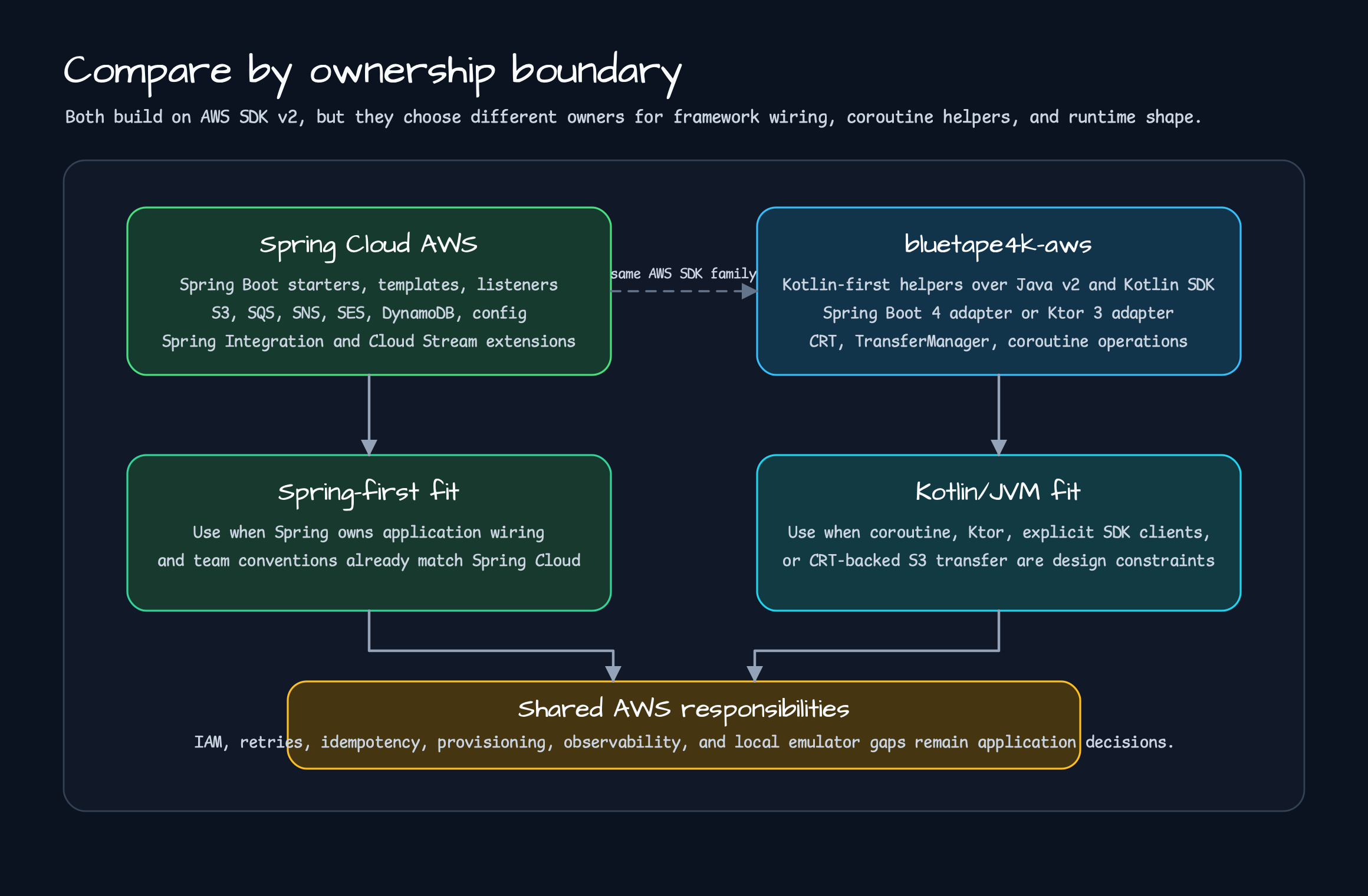
How to Read This Comparison
Section titled “How to Read This Comparison”If a service is Spring Boot-only, the team already knows Spring Cloud conventions, and the templates, listeners, and external configuration features in Spring Cloud AWS are enough, Spring Cloud AWS is the obvious first option. It has established documentation and ecosystem fit, and it explains AWS integration through Spring Boot auto-configuration.
bluetape4k-aws chooses a different starting point. Spring Cloud AWS first improves the Spring application
experience. bluetape4k-aws first builds Kotlin/JVM helpers, then places Spring Boot 4 or Ktor 3 adapters
on top. On the Java SDK v2 side, it makes CRT-backed HTTP clients and S3 TransferManager usage easy to adopt.
On the AWS Kotlin SDK side, the shared engine provider defaults to CRT while still allowing callers to inject
a different HttpClientEngine. Clients that omit the parameter let the SDK own its engine lifecycle.
So this post is not a verdict that one library should replace the other. Their current boundaries are different.
Ktor services, coroutine-first
helpers, CRT-backed large S3 transfers, Exposed database registry support, and local-emulator testing make
the bluetape4k-aws boundary clearer.
Same Problem, Different Ownership
Section titled “Same Problem, Different Ownership”Both libraries reduce the amount of AWS SDK work application code repeats. The difference is what the framework owns and what the application must choose explicitly.
| Comparison point | Spring Cloud AWS | bluetape4k-aws |
|---|---|---|
| Starting point | Make AWS managed services easy in the Spring Boot and Spring Cloud ecosystem. | Reduce repeated AWS SDK work in Kotlin/JVM services. |
| Framework scope | Spring Boot starters, auto-configuration, Spring templates, annotation listeners. | Shared aws-java, aws-kotlin, and aws-exposed helpers with Spring Boot 4 or Ktor 3 adapters. |
| SDK stance | Connect AWS Java SDK v2 to Spring Boot auto-configuration. | Cover AWS Java SDK v2 and AWS Kotlin SDK with Kotlin extensions, coroutines, and DSL builders. |
| Async support | Wrap AWS SDK async clients through Spring messaging, listener, and container abstractions. | Connect CompletableFuture, suspend, and Flow explicitly so application code can stay coroutine-shaped. |
| Large S3 transfer | Provide S3 integration and template/resource models. | Emphasize CRT clients and S3 TransferManager helpers, exposed through S3TransferOperations in the Spring Boot adapter. |
| Ktor | Not a target framework. | Provide Ktor 3 plugins, SigV4, S3 REST client, SQS consumer, DynamoDB plugin, and Exposed plugin. |
| Dependency policy | Starters bring the auto-configuration and dependencies a Spring Boot application needs. | Core and Spring Boot service SDKs are mostly compileOnly and supplied by consumers. The Ktor module exposes several service SDKs through api for its plugins. |
| Local testing | Provides spring-cloud-aws-testcontainers and LocalStack service connections. | Uses Floci first, LocalStack for coverage gaps, and Testcontainers-backed examples. |
The important distinction is not feature count. If Spring should own AWS integration inside a Spring Boot
application, Spring Cloud AWS is a good fit. If a service should start from Kotlin/JVM AWS helpers and then
choose Spring Boot 4 or Ktor 3 on top, bluetape4k-aws fits that direction. Dependency ownership differs
between its modules, so consumers should also inspect the selected module’s build file.
Where Spring Cloud AWS Fits Well
Section titled “Where Spring Cloud AWS Fits Well”Spring Cloud AWS is designed around Spring Cloud and Spring Boot applications. Its current compatibility table targets Spring Cloud AWS 4.x at Spring Boot 4.0.x, Spring Framework 7.0.x, and AWS Java SDK 2.x. Its documentation covers S3, SNS, SES, Parameter Store, Secrets Manager, SQS, CloudWatch, DynamoDB, Spring Integration AWS, and Kinesis Stream Binder.
It is the right first library to evaluate when:
- The application is Spring Boot-centered and should manage AWS integration through Spring beans, properties, and starters.
- SQS consumers should be explained through
@SqsListenerand Spring message conversion. - S3 should be used with
S3Template, resource abstractions, and Spring Boot configuration properties. - Secrets Manager or Parameter Store should become Spring external configuration.
- The team already works with Spring Cloud release trains, starter BOMs, actuator, and observability conventions.
Feature count is not the real advantage. A Spring Boot team can explain AWS integration using language it already knows. Spring Cloud AWS reduces repeated setup and opens extension points in a familiar Spring style.
What bluetape4k-aws Solves Differently
Section titled “What bluetape4k-aws Solves Differently”bluetape4k-aws starts in a different place. It has a Spring Boot adapter, but the center of the project is
the repeated work Kotlin/JVM services face when they use AWS SDKs directly. Core modules come first, and
framework adapters sit on top. Its current feature set is therefore not a one-to-one copy of Spring Cloud AWS.
The first difference is SDK choice. bluetape4k-aws-java gives AWS Java SDK v2 services sync, async, and
coroutine extensions. For S3, it can create CRT-backed S3AsyncClient instances and provides upload/download
helpers around S3TransferManager. Large-file transfer often needs more than small object APIs, so this is
treated as a primary usage path. S3ClientFactory also provides virtual-thread executor support when creating
transfer managers.
The second difference is AWS Kotlin SDK support. bluetape4k-aws-kotlin keeps native suspend APIs and DSL
builders. Its shared engine provider defaults to CRT, and callers can inject another HttpClientEngine.
When client helpers omit the engine parameter, the SDK owns the engine lifecycle; externally supplied shared
engines remain application-owned.
The third difference is Ktor. Spring Cloud AWS targets Spring applications, while bluetape4k-aws provides
a separate Ktor 3 adapter. AwsSigV4Plugin, S3KtorClient, SqsConsumer, DynamoDbKtorPlugin, and
AwsExposedPlugin do not imitate Spring Boot auto-configuration. They connect AWS work through Ktor’s
install(...), route helper, and lifecycle event model.
The fourth difference is dependency ownership. Service SDK dependencies in aws-java, aws-kotlin, and
aws-spring-boot are mostly compileOnly, so consumers add the SDK modules they use. aws-ktor is different:
it exposes several Java and Kotlin service SDKs through api for its plugins. Dependency policy must therefore
be checked per module rather than generalized across the repository.
SQS and S3 Show the Difference
Section titled “SQS and S3 Show the Difference”SQS shows the personality of both libraries. Spring Cloud AWS provides SqsTemplate,
SqsMessageListenerContainer, @SqsListener, message conversion, acknowledgement, batch processing, and
observability features. In Spring Boot applications, the queue listener can be described inside the Spring
bean lifecycle.
bluetape4k-aws-spring-boot also provides @SqsListener and coroutine listener containers. Today it is not
trying to claim full Spring Cloud AWS abstraction parity. It focuses on reducing repeated SQS receive, delete,
visibility timeout, retry, and manual acknowledgement code in Kotlin coroutine handlers. On the Ktor side,
SqsConsumer remains a plugin that manages polling through application start and stop lifecycle events.
S3 follows the same pattern. Spring Cloud AWS is convenient when a Spring application wants to handle S3
through templates and resource abstractions. bluetape4k-aws goes one level closer to SDK execution. Small
object operations use coroutine templates and helpers, while large file transfers use CRT-backed async clients
and S3TransferManager. The Spring Boot adapter exposes that through S3TransferOperations, and the core
module provides transfer manager extensions.
This goes beyond performance. In production code, it matters whether the service can state which HTTP
client and transfer runtime its S3 path uses. bluetape4k-aws keeps that decision in configuration, client
factories, and operation helpers instead of hiding it completely inside the framework.
Can They Be Used Together?
Section titled “Can They Be Used Together?”Yes, but one AWS boundary should have one owner. If the same Spring Boot application lets Spring Cloud AWS and
bluetape4k-aws-spring-boot both manage the same SQS queue listener, ownership of receive loops, ack, retry,
and visibility timeout becomes unclear.
Reasonable combinations look like this:
- Let Spring Cloud AWS own Spring-centered SQS/S3/config integration in a Spring Boot application.
- Use only
bluetape4k-aws-javaorbluetape4k-aws-kotlinin modules that need Kotlin helpers. - Use
bluetape4k-aws-ktorin Ktor services while sharing AWS helper conventions with Spring Boot services. - Put large S3 transfers that need CRT and TransferManager behind a separate
bluetape4k-aws-javaboundary.
The key is to avoid duplicate ownership. The same queue, bucket operation, or configuration source should not be owned by both libraries at once.
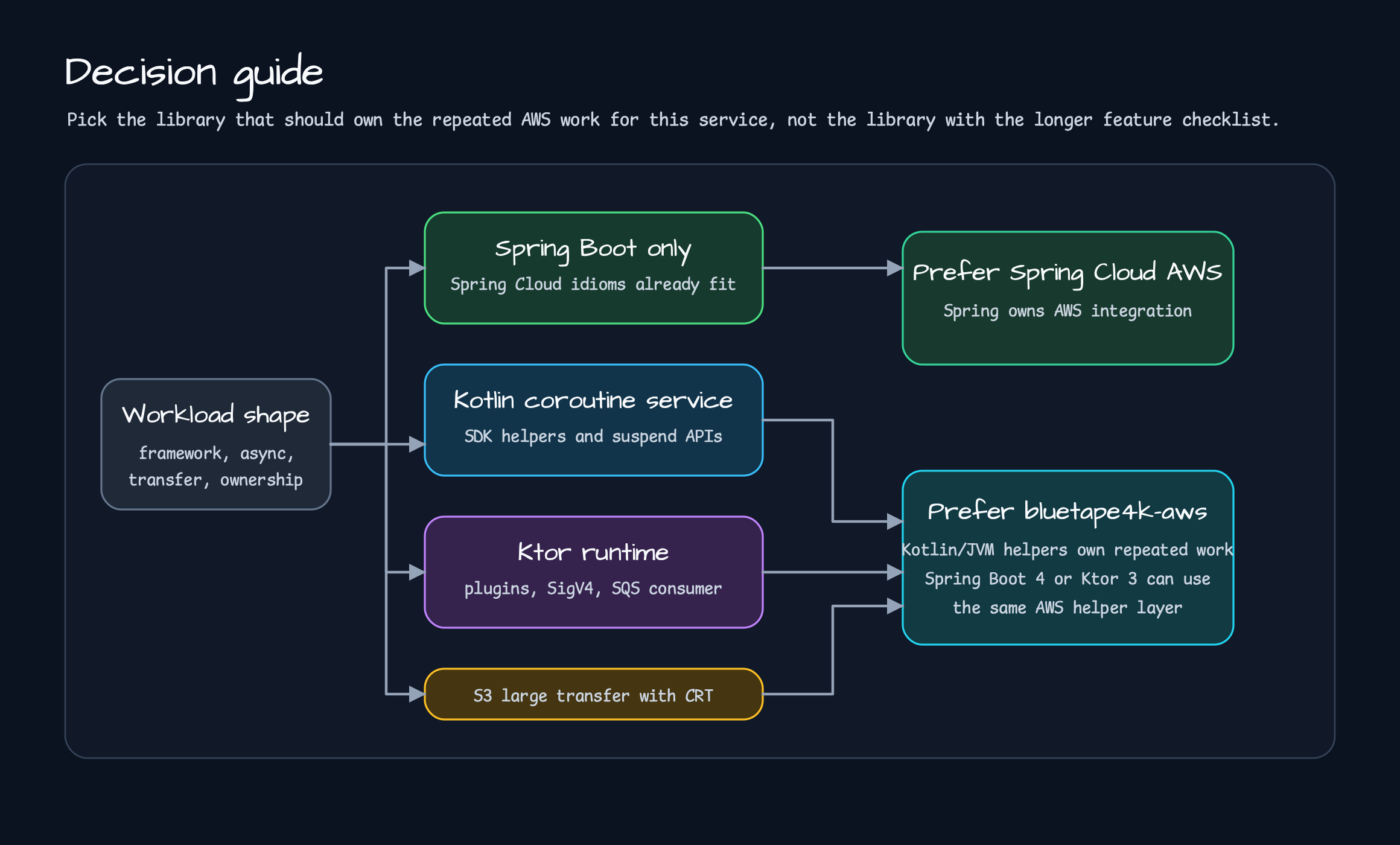
Decision Guide
Section titled “Decision Guide”Use these as current starting points.
| Situation | First option to evaluate |
|---|---|
| The application is Spring Boot-based and Spring Cloud conventions are already the team standard. | Spring Cloud AWS |
| AWS integration should be described through Spring starters, properties, templates, and listeners. | Spring Cloud AWS |
| AWS Java SDK v2 async clients need coroutine-centered helpers. | bluetape4k-aws-java |
| AWS Kotlin SDK should use CRT by default with DSL helpers. | bluetape4k-aws-kotlin |
| A Spring Boot 4 service or Ktor 3 service should sit on the same AWS helper rules. | bluetape4k-aws |
| Ktor needs SigV4, an S3 REST client, SQS consumer, or DynamoDB plugin. | bluetape4k-aws-ktor |
| Large S3 file transfer should explicitly use CRT and TransferManager. | bluetape4k-aws-java / bluetape4k-aws-spring-boot |
| Exposed database registry should connect to AWS Secrets Manager or Parameter Store. | bluetape4k-aws-exposed / bluetape4k-aws-spring-boot |
This table is not a ranking. Spring Cloud AWS fits applications that want Spring to own AWS integration.
bluetape4k-aws fits Kotlin/JVM services that want shared AWS helpers across Spring Boot 4 and Ktor 3.
Operational Responsibilities Remain
Section titled “Operational Responsibilities Remain”No library removes AWS operational responsibility. IAM policy, encryption, timeout, retry, idempotency, queue ordering, DLQs, S3 multipart thresholds, DynamoDB capacity, table migration, and gaps between local emulators and real AWS still belong to the application and its operating environment.
For SNS HTTP endpoints in particular, signature validation must remain an application responsibility.
SnsHttpMessageParser in bluetape4k-aws-spring-boot reads message type, topic ARN, token, and payload,
and validates some fields and the certificate URL shape. It does not verify the cryptographic signature.
Applications must validate the expected topic ARN, certificate chain, and signature before trusting the
message. The same trust-boundary principle applies when using Spring Cloud AWS.
Source Links
Section titled “Source Links”- Spring Cloud AWS: GitHub README
- Spring Cloud AWS 4.0.2: Reference documentation
- bluetape4k-aws: GitHub repository
- bluetape4k-aws:
aws-spring-bootREADME - bluetape4k-aws:
aws-ktorREADME
The next post will use real examples from examples/ and bluetape4k-workshop/aws in more detail.
This post set the selection criteria; Part 5 will show how those criteria turn into code.
Comments
Leave a note or reaction with your GitHub account.