
Bluetape4k Graph Part 3: Graph I/O and Benchmark Interpretation

Graph data often needs to leave the database: migration, snapshots, analytics, and reproducible test fixtures all need
export and import paths. At some point a team asks, “Can we dump this graph and reproduce the case locally?” That is
where ad hoc console copying stops being reliable. graph-io splits the work into file formats and I/O decorators.
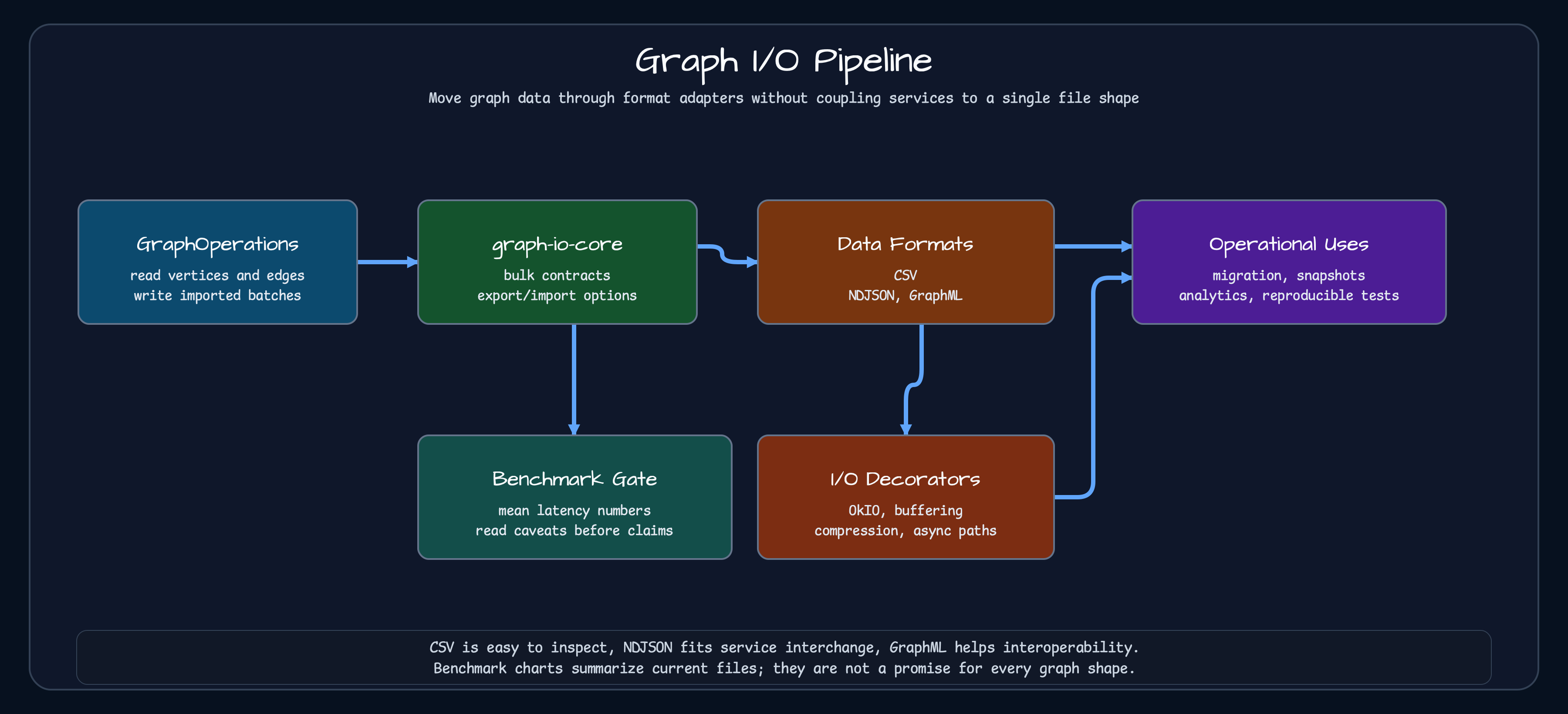
| Format | Good fit |
|---|---|
| CSV | Small fixtures and human inspection |
| Jackson2 NDJSON | Compatibility with existing Jackson2 services |
| Jackson3 NDJSON | New line-delimited service interchange |
| GraphML | Interoperability with graph tools |
OkIO is not a format. bluetape4k-io and bluetape4k-okio provide buffering, compression, encryption, and async I/O
paths around the existing formats. High-level encryption helpers directly support the single-stream NDJSON and GraphML
formats. CSV keeps vertices and edges in separate files, so its high-level encrypted helper is rejected; encrypted CSV
requires a custom paired-file layout built from lower-level path wrappers. Keeping file format and I/O path separate
pays off when a later requirement adds compression or atomic file writes without changing the graph format itself.
The shared contracts live in graph-io-core, and each format provides synchronous, virtual-thread, and coroutine
suspend variants. The execution model should be selected from the file I/O, parser, graph-store write cost, and graph
size rather than from a blanket preference for one concurrency model.
Benchmark implementation
Section titled “Benchmark implementation”The values in this article come from the committed quick run dated April 18, 2026. The benchmark remains implemented in
BulkGraphIoBenchmark and BulkGraphIoBenchmarkState, but its current execution settings differ from that historical
run.
@State(Scope.Benchmark)open class BulkGraphIoBenchmarkState {    @Param("small", "medium")    var sizeName: String = "small"
    lateinit var ops: GraphOperations    lateinit var tempDir: Path}
The state creates a temporary directory and a TinkerGraph in-memory graph. The small dataset has 1,000 Person vertices
and 2,000 KNOWS edges with a fixed random seed. Benchmark methods export that graph to CSV, NDJSON, or GraphML files or
import the files back into TinkerGraph.
@Benchmarkfun csvSyncExport(s: BulkGraphIoBenchmarkState) { val sink = CsvGraphExportSink( GraphExportSink.PathSink(s.tempDir.resolve("v.csv")), GraphExportSink.PathSink(s.tempDir.resolve("e.csv")), ) CsvGraphBulkExporter().exportGraph(sink, s.ops, exportOpts)}The committed run used Mac mini Pro M4, 48GB memory, and Java 25. This Graph I/O quick run does not start a graph DB Docker container because it uses TinkerGraph and temporary files. Graph DB comparison benchmarks and integration tests use Docker/Testcontainers.
# Current full JMH run./gradlew :graph-io-benchmark:benchmark
# CI wiring and report-generation check./gradlew :graph-io-benchmark:smokeBenchmark
Benchmark results
Section titled “Benchmark results”The April 18 record used @Fork(0), one one-second warmup, and two one-second measurements. It is evidence for a quick
regression check, not a precise performance claim. Current source uses @Fork(1), three three-second warmups, and five
three-second measurements. The current smokeBenchmark task verifies representative CSV, Jackson3 OkIO, and GraphML
OkIO round trips and report generation with a smoke dataset; its output must not be interpreted as a format
performance comparison.
The chart below summarizes the historical quick run for 1,000 vertices and 2,000 edges. JMH mode is AverageTime, the
unit is ms/op, and lower is better. When variance matters, rerun the current full benchmark and retain its raw JSON.
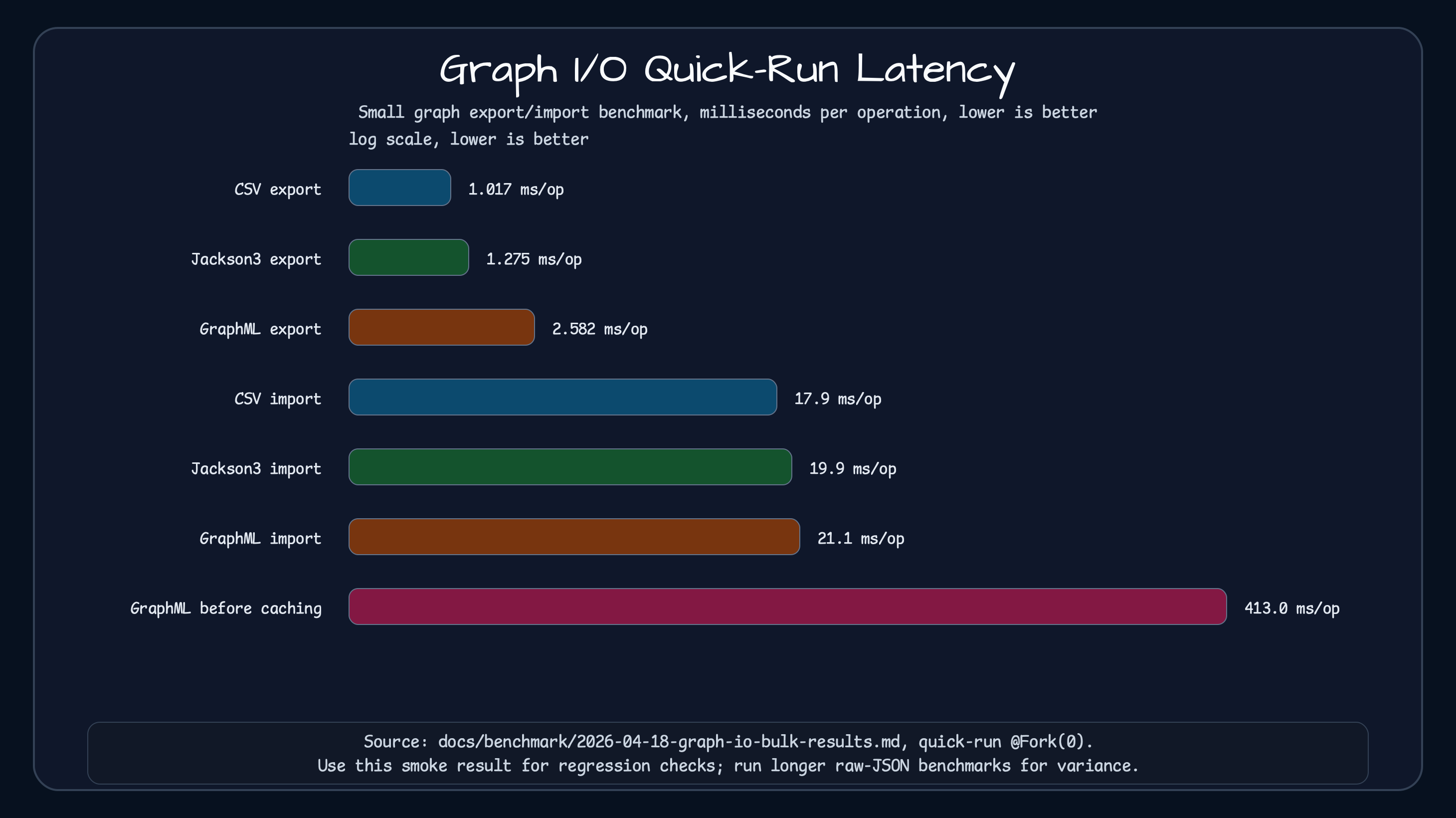
| Operation | Mean latency (ms/op) |
|---|---|
| CSV export | 1.017 |
| Jackson2 NDJSON export | 1.194 |
| Jackson3 NDJSON export | 1.275 |
| GraphML export | 2.582 |
| CSV import | 17.854 |
| Jackson2 NDJSON import | 18.831 |
| Jackson3 NDJSON import | 19.852 |
| GraphML import | 21.111 |
The same historical report measured GraphML export at roughly 413 ms before factory reuse and buffered streams, and
roughly 2.5 ms after those changes. The current implementation still reuses singleton XMLInputFactory and
XMLOutputFactory instances and buffers I/O. This comparison shows that the execution path can matter more than the
format name, but it does not establish the same improvement ratio for every current environment.
The historical run also measured Jackson2 and Jackson3 coroutine suspend imports at 151.415 ms and 155.279 ms. Its
report suggested that Dispatchers.IO initialization inside runBlocking may have contributed to the outliers. That
is a hypothesis about the benchmark harness, not proof of coroutine performance in a production service.
For fixtures, start with CSV or NDJSON. CSV is easy when a human needs to open the file and inspect vertices and edges. NDJSON is a better fit for service interchange and snapshot replay. GraphML is the interoperability option when graph tools need a standard XML format.
For larger files, the I/O path may matter more than the data format. OkIO adapters can compose buffering, compression, decompression guards, atomic writes, and virtual-thread or coroutine paths. Treat encryption separately: the single-stream helpers cover NDJSON and GraphML, while CSV requires an explicit paired-file design.
Sources
Section titled “Sources”- graph-io core README
- CSV graph I/O
- Jackson2 graph I/O
- Jackson3 graph I/O
- GraphML graph I/O
- OkIO graph I/O
- BulkGraphIoBenchmark
- BulkGraphIoBenchmarkState
- Graph I/O benchmark result
Comments
Leave a note or reaction with your GitHub account.