
Bluetape4k AWS Part 3: Spring Boot and Ktor Integration
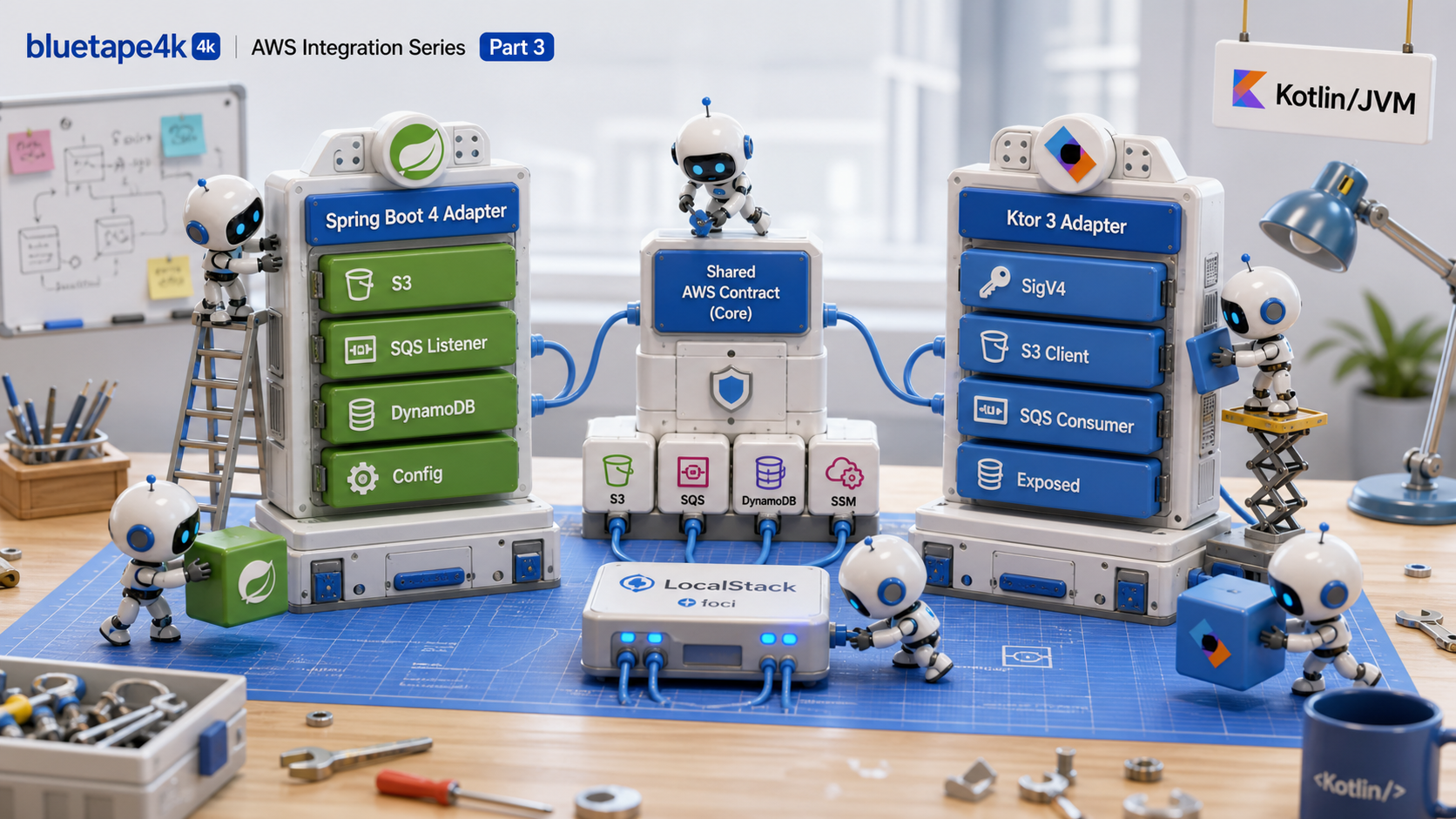
This is Part 3 of the bluetape4k-aws series. Part 1 covered the
repository overview and mental model, and Part 2 mapped the
core modules and AWS service coverage.
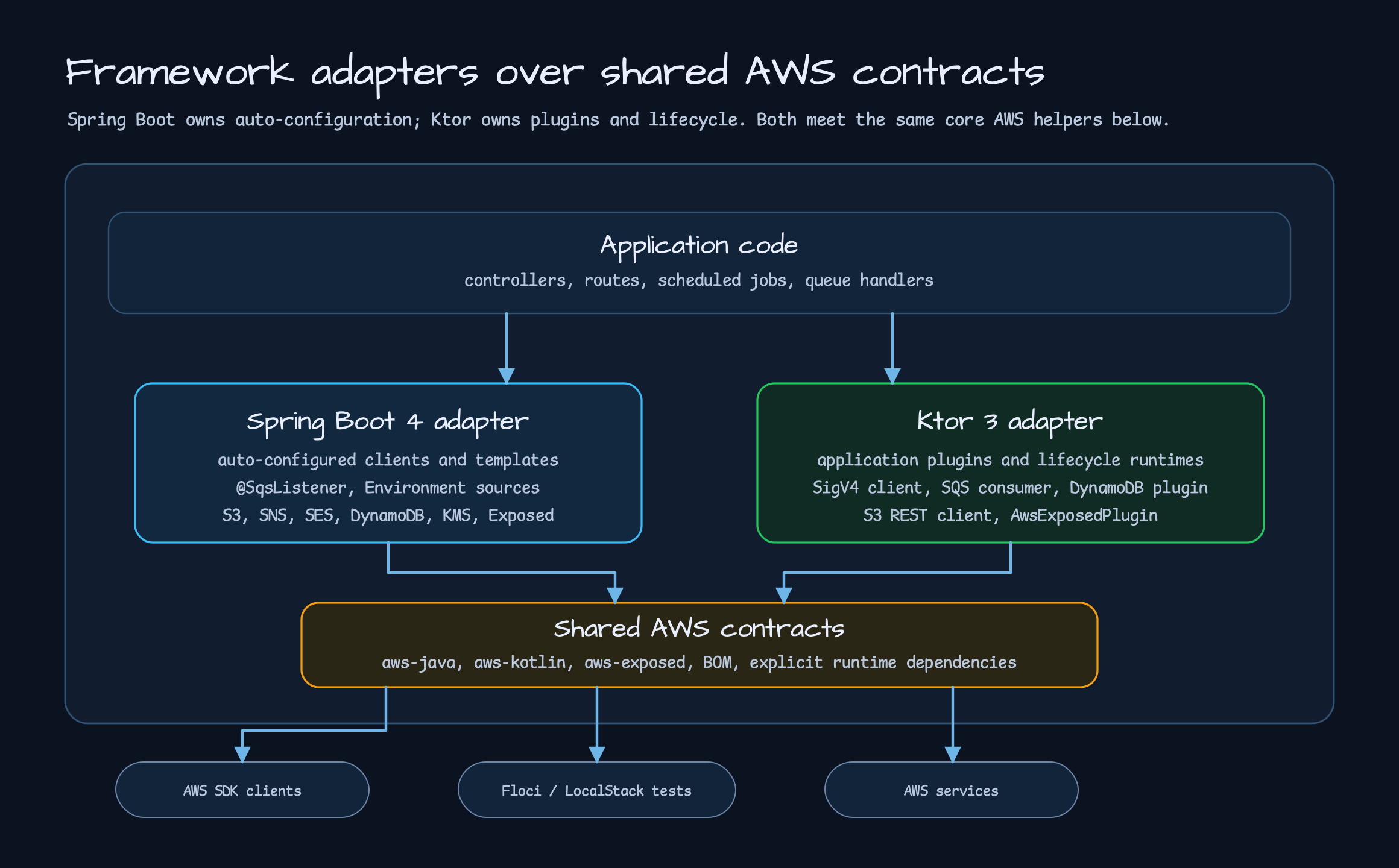
This post moves one layer up: how Spring Boot 4 and Ktor 3 connect to those shared helpers.
The point is not to force both frameworks into the same API shape. Spring Boot integrates through
Spring-native pieces such as @ConfigurationProperties, auto-configuration, EnvironmentPostProcessor,
and annotation listeners. Ktor integrates through ApplicationPlugin, lifecycle events, route helpers,
and coroutine runtimes. They solve the same AWS problems, but application code expects different entry
points.
What Lightweight Adapters Do
Section titled “What Lightweight Adapters Do”Part 2’s core modules reduced repeated work between the AWS SDKs and coroutines. In a real application, creating a client is still not enough.
- The application needs a place to read configuration from.
- Something must own the client lifecycle and close it.
- Queue listeners need concurrency, visibility timeout, and retry rules.
- S3 and DynamoDB helpers must reach controllers, routes, and repositories.
- Local emulators and real AWS endpoints should be switchable through configuration.
bluetape4k-aws-spring-boot and bluetape4k-aws-ktor own that wiring. They are closer to removing
framework glue than to reimplementing SDK calls. The Spring Boot module starts from the Spring-friendly
experience popularized by Spring Cloud AWS, then reshapes it for Spring Boot 4 and Kotlin coroutine
code. The Ktor module connects the same AWS helpers through Ktor 3 plugins and lifecycle events.
Spring Boot 4 Style
Section titled “Spring Boot 4 Style”The Spring Boot side starts with auto-configuration. When bluetape4k.aws.enabled=true and service
settings are present, the module conditionally registers the required beans. Shared settings such as
bluetape4k.aws.region, bluetape4k.aws.endpoint-override, and credentials web identity configuration
are reused across services. Service-specific settings override the shared defaults when present.
The main features fall into three groups.
| Area | Provided features | Application code no longer repeats |
|---|---|---|
| Client/template | S3, SNS, SES, SQS, DynamoDB, KMS clients and coroutine templates | SDK builders, async bridges, default options |
| Listener/runtime | @SqsListener, listener containers, retry/visibility/ack settings | Receive loops, delete-on-success, failure visibility handling |
| Configuration | S3 config, Secrets Manager, Parameter Store, Exposed database registry | Remote property loading, secret binding, database pool wiring |
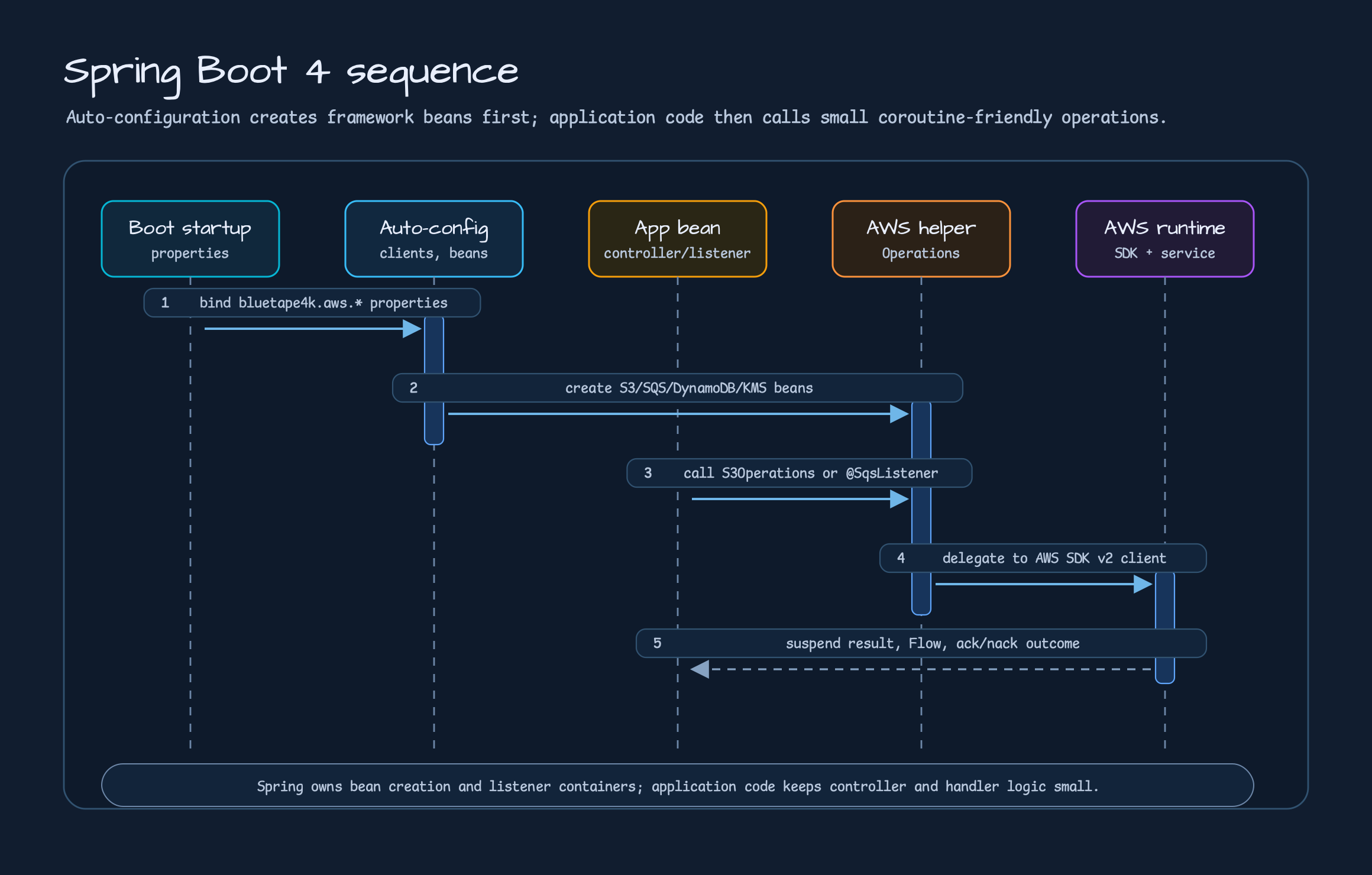
The Spring Boot S3 example shows the direction clearly. The controller injects S3Operations and uses
upload, download, list, and presigned URL operations as suspend functions or Flow.
@RestController@RequestMapping("/s3/documents")class S3DocumentController(    private val s3: S3Operations,    private val encryptedS3Provider: ObjectProvider<S3ClientSideEncryptionOperations>,) {    @PutMapping(consumes = [MediaType.APPLICATION_OCTET_STREAM_VALUE])    suspend fun upload(        @RequestParam bucket: String,        @RequestParam key: String,        @RequestBody bytes: ByteArray,        @RequestHeader(HttpHeaders.CONTENT_TYPE, required = false) contentType: String?,    ): S3DocumentUploadResponse {        val response = s3.upload(bucket = bucket, key = key, bytes = bytes, contentType = contentType)        return S3DocumentUploadResponse(bucket, key, response.eTag())    }
    @GetMapping("/objects")    fun listObjects(        @RequestParam bucket: String,        @RequestParam(required = false) prefix: String?,    ): Flow<S3DocumentObjectResponse> =        s3.listFlow(bucket = bucket, prefix = prefix)            .map { S3DocumentObjectResponse(key = it.key(), size = it.size()) }}
The important part is that the controller does not need to know about the S3 client builder. Endpoint override, path-style access, presigned URL duration, client-side encryption, and TransferManager usage belong to configuration and auto-configuration. The controller keeps the domain API.
SQS has a larger gap. When application code talks to SQS directly, it keeps dealing with receive loops,
visibility timeout, delete timing, retry, and shutdown drain. The Spring Boot adapter moves that work to
the framework boundary with @SqsListener and coroutine listener containers.
@Componentclass OrderMessageListener(    private val store: ReceivedOrderStore,) {    @SqsListener(queue = "\${example.aws.sqs.listener-queue:orders}", maxMessages = 1, waitTimeSeconds = 1)    fun handle(message: String) {        store.record(message)    }
    @SqsListener(id = "typed-order-listener", queue = "\${example.aws.sqs.typed-listener-queue:typed-orders}")    suspend fun handleTyped(order: OrderPayload, acknowledgement: SqsAcknowledgement) {        store.record(order)        acknowledgement.acknowledge()    }}
A listener method can receive String, AWS SDK Message, SqsReceivedMessage, or a typed payload. If it
accepts SqsAcknowledgement, it switches to manual ack. A successful handler deletes the message; an
exception leaves it visible for later redelivery. error-visibility-timeout-seconds and retry settings
make the redelivery timing explicit.
DynamoDB builds coroutine repositories over DynamoDbEnhancedAsyncClient. The example repository defines
only the table name and key mapping. Repeated operations such as save, findById, scan, and query
stay in AbstractCoroutinesDynamoDbRepository.
@Repositoryclass OrderRepository(    enhancedClient: DynamoDbEnhancedAsyncClient,    tableNameResolver: DynamoDbTableNameResolver,) : AbstractCoroutinesDynamoDbRepository<Order, String>(    enhancedClient = enhancedClient,    tableNameResolver = tableNameResolver,    entityClass = Order::class.java,) {    override val tableName: String = "orders"
    override fun keyFromId(id: String): Key =        Key.builder().partitionValue(id).build()
    override fun keyFromItem(item: Order): Key =        Key.builder().partitionValue(item.id).build()}
The module still does not take over table creation. Table provisioning belongs to migrations, deployment automation, or test setup. The library reduces repository repetition and helps with naming rules such as table prefixes.
Remote configuration is another important Spring Boot difference. S3 objects, Secrets Manager secrets,
and Parameter Store parameters can be read as startup Environment sources, with lazy refresh when the
application needs it. @SecretsValue and @ParameterStoreValue are small annotations layered over Spring
@Value. Values such as database passwords can then feed into the bluetape4k-aws-exposed registry.
Ktor 3 Style
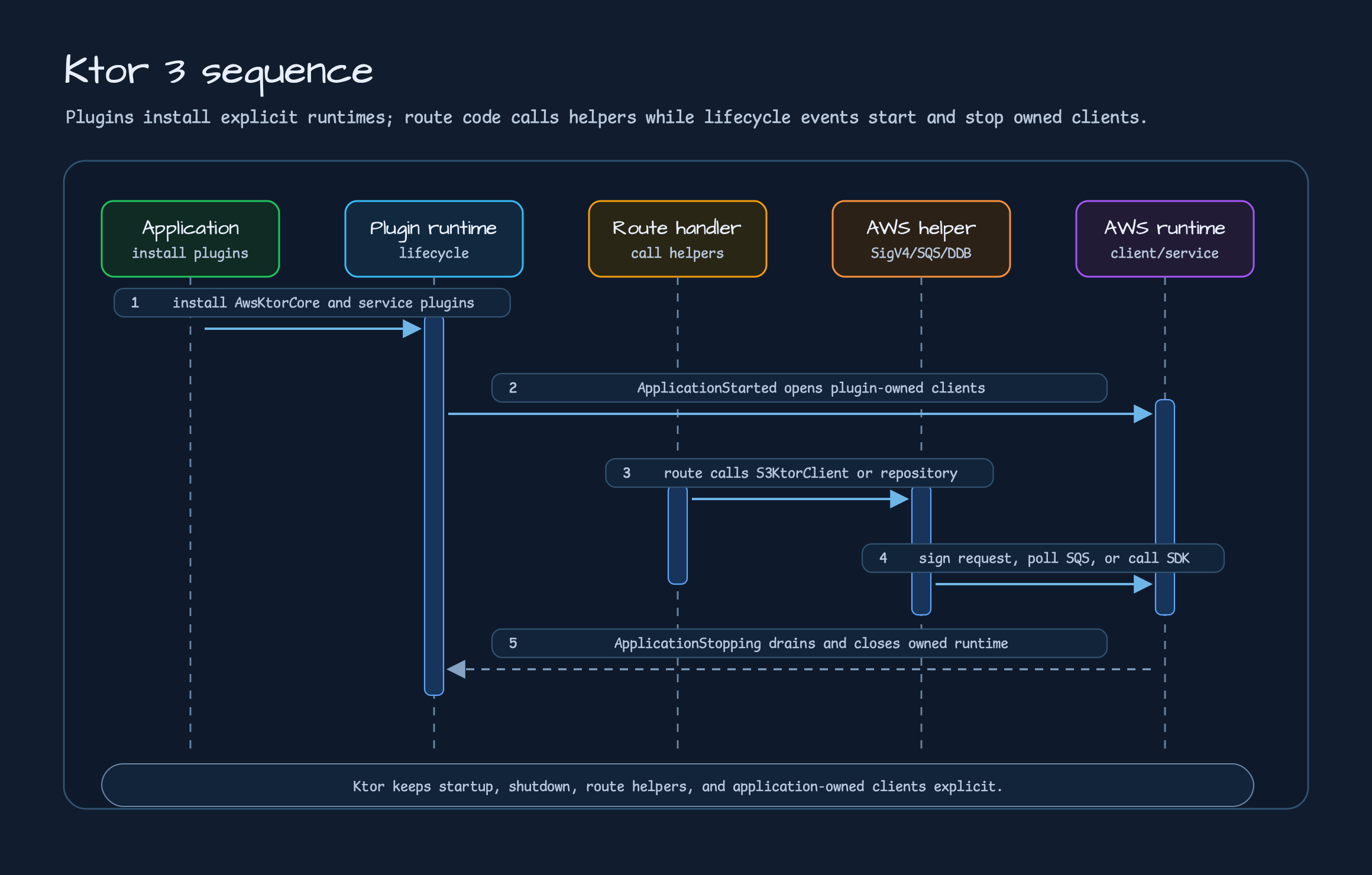
Section titled “Ktor 3 Style”The Ktor module does not imitate Spring Boot auto-configuration. It uses the Ktor-native pieces:
install(...), route helpers, and application lifecycle events. AwsKtorCore establishes shared defaults
such as region, endpoint, credential provider, and signing clock. S3KtorClient, SqsConsumer, and
DynamoDbKtorPlugin inherit those defaults when needed.
For S3, S3KtorClient sits on top of AwsSigV4Plugin. It calls the S3 REST API through Ktor HttpClient
and provides path-style endpoints, presigned URLs, streaming download, config objects, server-side
encryption headers, and client-side envelope encryption helpers.
fun Route.s3DocumentRoutes(    s3: S3KtorClient,    bucket: String,) {    put("/s3/objects/{key...}") {        val key = call.s3KeyParameter()        val bytes = call.receive<ByteArray>()        val response = s3.putObject(            bucket = bucket,            key = key,            bytes = bytes,            contentType = call.request.headers["Content-Type"],        )        call.respondText(            text = """{"bucket":${bucket.jsonString()},"key":${key.jsonString()},"eTag":${response.eTag.jsonOrNull()}}""",            contentType = ContentType.Application.Json,        )    }
    get("/s3/presigned-get/{key...}") {        val presigned = s3.presignGetObject(bucket, call.s3KeyParameter(), Duration.ofMinutes(15))        call.respondText(            text = """{"method":"${presigned.method}","url":${presigned.url.toString().jsonString()}}""",            contentType = ContentType.Application.Json,        )    }}
Ktor SQS uses an ApplicationPlugin instead of Spring annotation listeners. SqsConsumer starts the
polling runtime on application start and drains receive loops plus in-flight handlers on stop. Inside the
handler, application code can call ack() or nack(timeoutSeconds) directly. Interceptors and observers
can watch receive, invoke, ack, and nack events.
fun Application.sqsExampleModule(    sqsClient: SqsAsyncClient,    queueUrl: String,) {    install(SqsConsumer) {        sqsAsyncClient = sqsClient        this.queueUrl = queueUrl        coroutines = 2        maxMessages = 10        deleteOnSuccess = false
        onMessage<String> { body ->            if (body.startsWith("retry-once:")) {                nack(timeoutSeconds = 0)                return@onMessage            }
            handleOrder(body)            ack()        }    }}
DynamoDB binds the AWS Kotlin SDK client to the Ktor lifecycle. DynamoDbKtorPlugin closes a plugin-created
client on shutdown and leaves an application-owned client alone. In local development,
autoCreateTables=true with table { } can create missing tables, but it does not replace production
schema verification or migration.
fun Application.dynamoDbExampleModule( endpointUrl: Url, region: String, credentialsProvider: CredentialsProvider,) { install(DynamoDbKtorPlugin) { this.endpointUrl = endpointUrl this.region = region this.credentialsProvider = credentialsProvider autoCreateTables = true table( tableName = "orders", keySchema = listOf(partitionKeyOf("id")), attributeDefinitions = listOf(stringAttrDefinitionOf("id")), ) }}Exposed follows the same rule. AwsExposedPlugin binds the bluetape4k-aws-exposed registry to the Ktor
lifecycle, and routes run Exposed JDBC work through call.awsExposedTransaction { ... }. The plugin
preserves remote config source descriptors and delegates the final JDBC value resolution to
AwsDatabaseSettingsResolver. This lets a Ktor application explicitly choose how local properties and
AWS config sources are resolved.
fun Application.exposedExampleModule(database: ExampleDatabaseConfig) {    install(AwsExposedPlugin) {        defaultDatabase {            url = database.url            driverClassName = database.driverClassName            username = database.username            password = database.password        }    }
    routing {        get("/exposed/orders") {            val orders = call.awsExposedTransaction {                OrderRepository.findAll()            }            call.respond(orders)        }    }}
What The Examples Show
Section titled “What The Examples Show”Part 3 is not a deep guide to every example. It is a map. Part 5 will cover the real application
flow from examples/ and bluetape4k-workshop/aws in more detail. Here, the useful question is which
framework and service combinations are already verified as working examples.
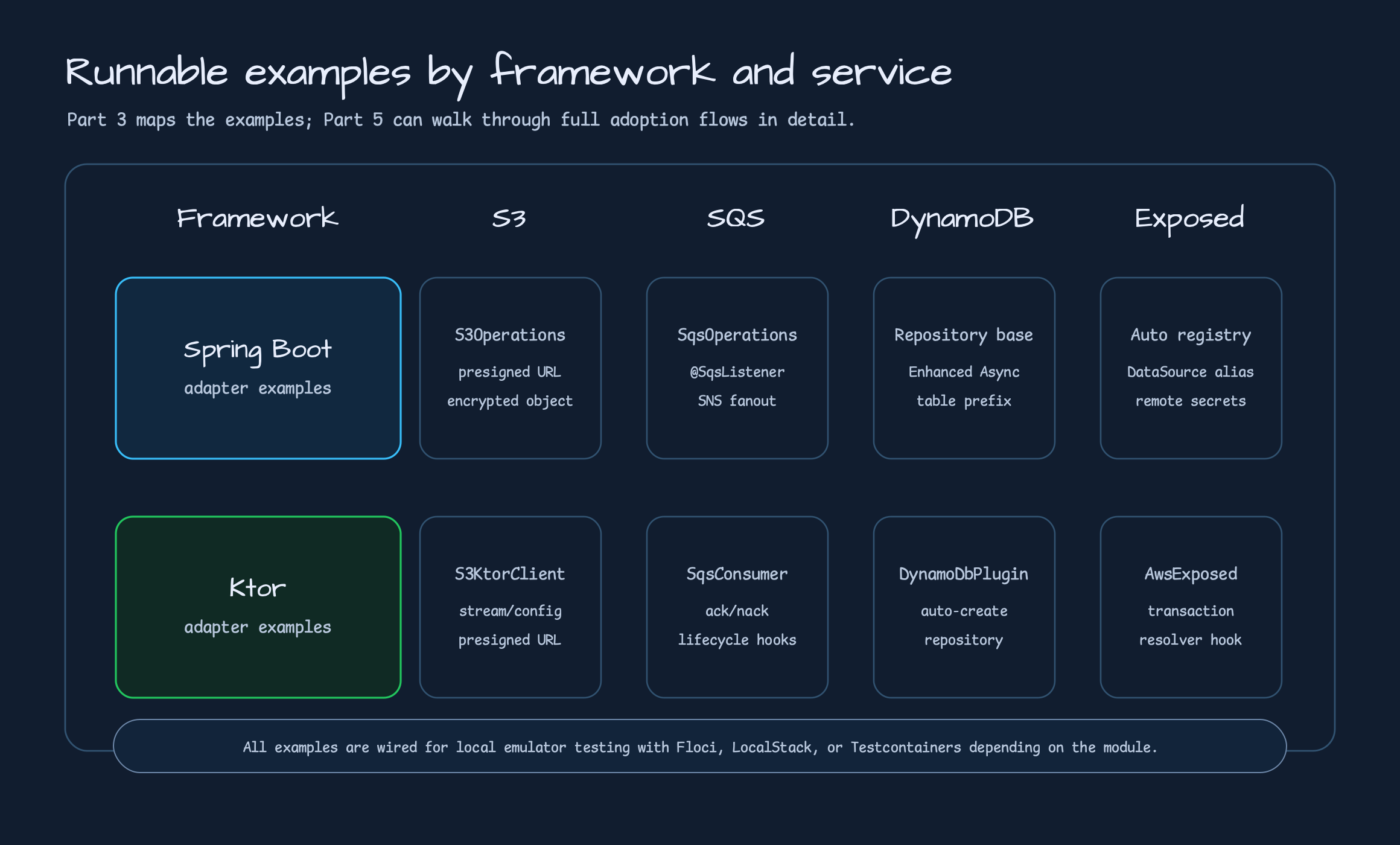
| Example | Framework | What it shows |
|---|---|---|
aws-spring-boot-s3-examples | Spring Boot | S3Operations, presigned URL, object list, optional client-side encryption |
aws-spring-boot-sqs-examples | Spring Boot | SqsOperations, SNS fanout, @SqsListener, typed payload, retry listener |
aws-spring-boot-dynamodb-examples | Spring Boot | AbstractCoroutinesDynamoDbRepository, Enhanced Async table, controller API |
aws-spring-boot-exposed-examples | Spring Boot | AWS-backed Exposed registry, DataSource/Database wiring |
aws-ktor-s3-examples | Ktor | S3KtorClient, streaming/config object, presigned URL |
aws-ktor-sqs-examples | Ktor | SqsConsumer, manual ack/nack, interceptor, observer |
aws-ktor-dynamodb-examples | Ktor | DynamoDbKtorPlugin, auto-create table, repository helper |
aws-ktor-exposed-examples | Ktor | AwsExposedPlugin, suspend transaction helper |
The point is not that the repository has many examples. The point is that the same AWS service should look
different in Spring Boot and Ktor code. Beans and annotations are natural in Spring Boot. Plugin
installation and route-local helpers are natural in Ktor. bluetape4k-aws does not erase that difference;
it reduces repeated wiring in each framework’s own vocabulary.
Operational Edges To Keep Visible
Section titled “Operational Edges To Keep Visible”Framework adapters reduce repetitive code, but they do not remove AWS operational concerns. Some decisions should stay visible.
- Secrets Manager and Parameter Store values affect application startup order. Decide what fallback is allowed when a remote source is slow or unavailable.
- SQS delete-on-success and manual ack have different meanings. Visibility settings should make redelivery timing explicit when a handler throws.
- SNS HTTP endpoint messages need more than parsing. Signature, certificate chain, and expected
TopicArnvalidation are part of the application security boundary. - DynamoDB table auto-create is a local/test convenience. Production schema management belongs to migration or deployment automation.
- Ktor must distinguish application-owned clients from plugin-owned clients. The plugin does not close a client that the application injected.
- LocalStack, Floci, and Testcontainers speed up the development loop, but they do not replace AWS IAM, network policy, quota, or encryption policy checks.
These edges do not mean the library is incomplete. They mark the boundary between framework adapter work and application operating policy. If that boundary gets blurry, convenience turns into production guesswork.
Source Links
Section titled “Source Links”- Repository: bluetape4k-aws
- Spring Boot README: aws-spring-boot/README.md
- Ktor README: aws-ktor/README.md
- Exposed README: aws-exposed/README.md
- Spring Boot S3 example: S3DocumentController.kt
- Spring Boot SQS listener example: ReceivedOrderStore.kt
- Spring Boot DynamoDB repository example: OrderRepository.kt
- Ktor S3 example: S3KtorServerExamples.kt
- Ktor SQS example: SqsExampleRoutes.kt
- Ktor DynamoDB example: DynamoDbExampleRoutes.kt
- Ktor Exposed design note: 2026-05-21-issue-76-ktor-exposed-plugin-design.md
Closing
Section titled “Closing”Spring Boot and Ktor integration is not about forcing the same AWS helper into one shared API. In Spring
Boot, auto-configuration, property binding, EnvironmentPostProcessor, and annotation listeners remove
repetition. In Ktor, ApplicationPlugin, lifecycle-bound runtime, SigV4 clients, and route helpers remove
repetition.
The Part 3 rule is simple. If the service is Spring Boot, attach AWS helpers through Spring’s wiring model. If the service is Ktor, attach them through Ktor’s plugin and lifecycle model. Core modules organize the SDK and coroutine boundary underneath. Examples prove that the combination actually runs on local emulators.
Part 4 will compare Spring Cloud AWS and bluetape4k-aws directly. The goal is not to count who has more
features. The goal is to explain why Spring-centered integration and Kotlin/Ktor-aware integration make
different tradeoffs.
Comments
Leave a note or reaction with your GitHub account.