
Bluetape4k Graph Part 4: Workshop Scenarios and Service Integration

This part maps the working bluetape4k-workshop graph examples. The goal is to help you recognize whether your service
has the same relationship shape, not to present production-ready algorithms. Each example explains its relationship
model, query path, and the boundary that still requires production validation.
| Example | Graph pattern | Takeaway |
|---|---|---|
| Abuser detection | User-to-identifier identity graph | Shared device/IP/phone/payment/referral traversal |
| Recommendation | Purchase graph and follow graph | Co-buyer and friends-of-friends candidates |
| Knowledge graph | Document, entity, concept relationships | Semantic relationships and hop traversal |
| Social network | Person/company and multi-hop relationships | FOAF, mutual connections, shortest paths |
Abuser detection
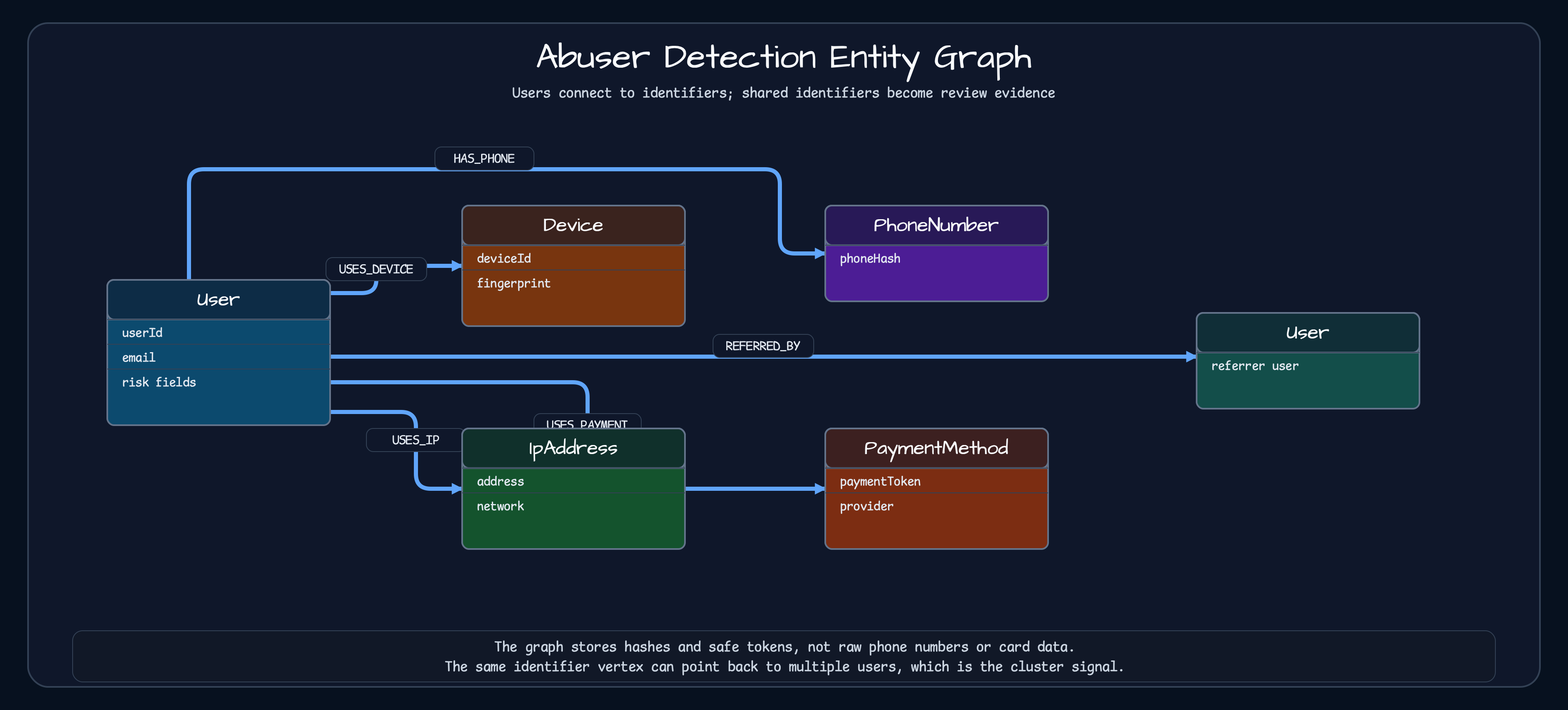
Section titled “Abuser detection”Abuser detection is one of the most natural fits for a graph. Start from one user, follow identifiers such as device, IP address, phone hash, payment token, or referral, then find other users sharing those identifiers. You can build this with relational joins, but the query grows awkward as identifier types multiply.
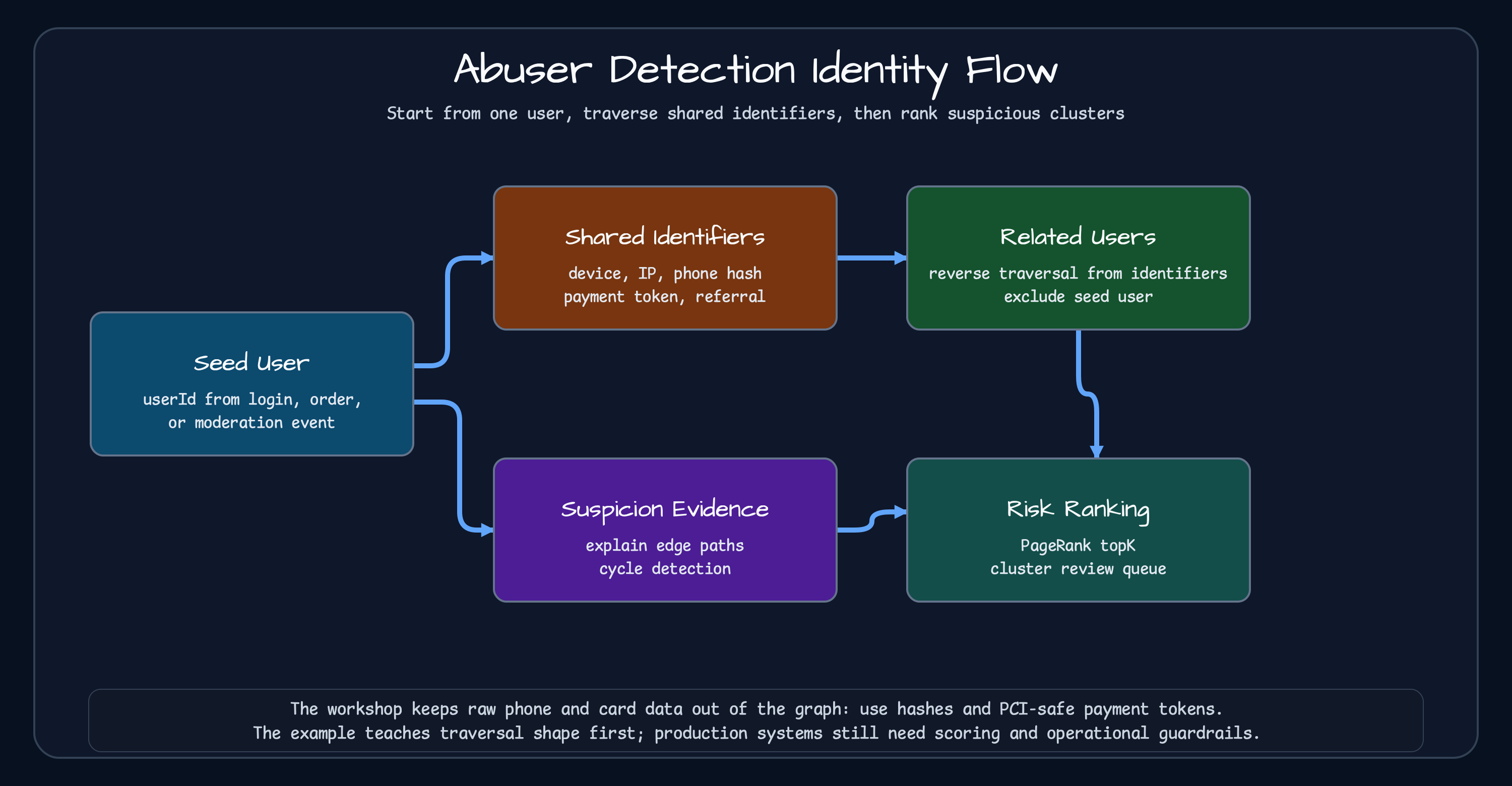
AbuserDetectionService.findAbuseCluster() returns an empty cluster when the seed user is missing. Otherwise, it follows
outgoing identifier edges, traverses back from those identifiers to related users, and excludes the seed user.
explainSuspicion() collects edge paths for evidence, detectReferralLoops() uses cycle detection, and
rankSuspiciousUsers() uses PageRank for the review queue. Phone values must be SHA-256 hashes of E.164 values, and
payment identifiers must be PCI-safe processor tokens.
Recommendation
Section titled “Recommendation”The recommendation example covers both product recommendations and follow recommendations.
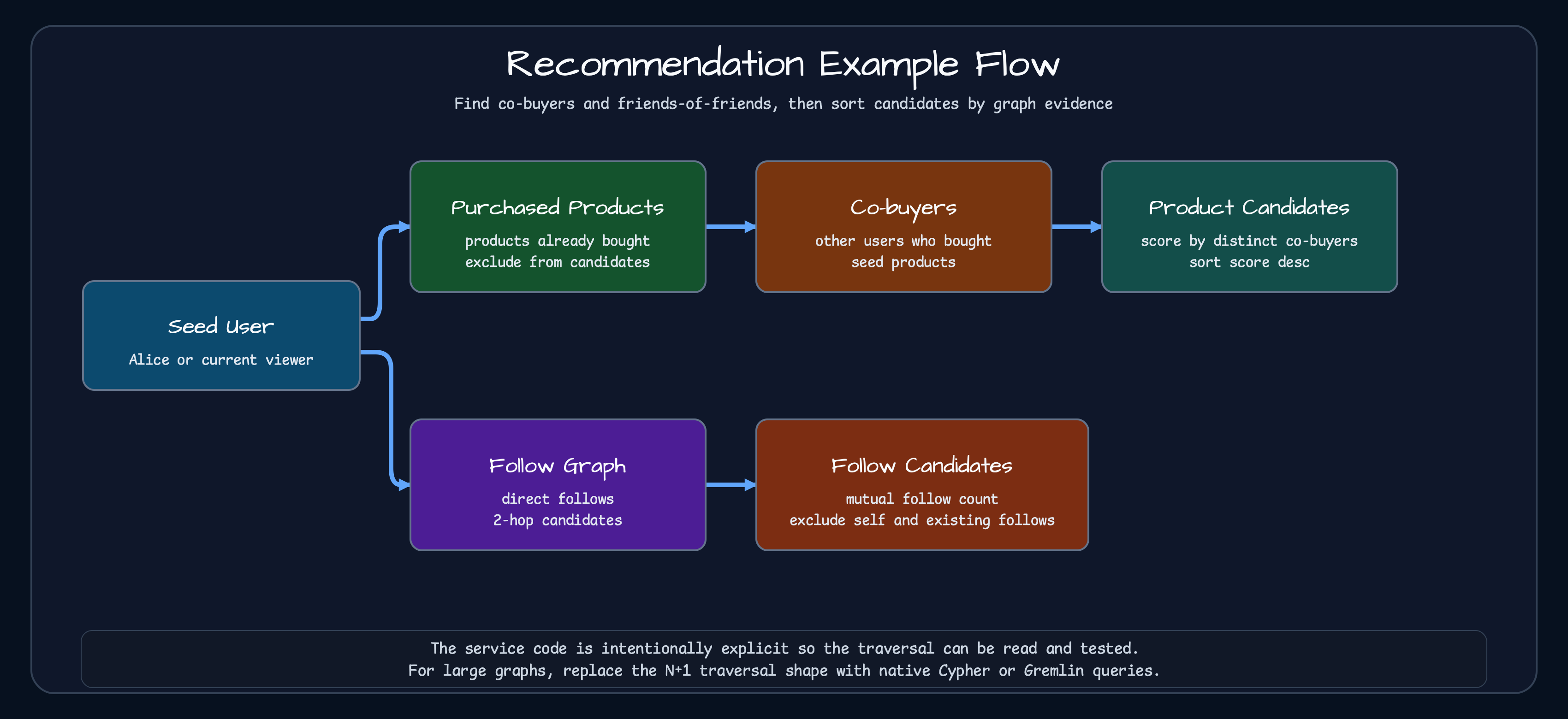
RecommendationService.recommendProducts() finds products bought by the seed user, finds co-buyers for those products,
then recommends other products bought by those co-buyers. Already purchased products are excluded, and candidates are
scored by distinct co-buyer count. recommendFollows() creates 2-hop follow candidates, excludes the seed user and
existing follows, then sorts by mutual follow count. This is not a complete recommendation engine. It is a small skeleton
for separating candidate generation from scoring. The implementation performs repeated neighbor lookups, so a large
graph can expose an N+1 traversal problem. Its limit bounds the returned candidates, not the number of graph calls.
Replace this explicit traversal with a native Cypher or Gremlin query for production-scale workloads. The common API
remains useful for contract tests and small traversals; it does not make the repeated calls efficient.
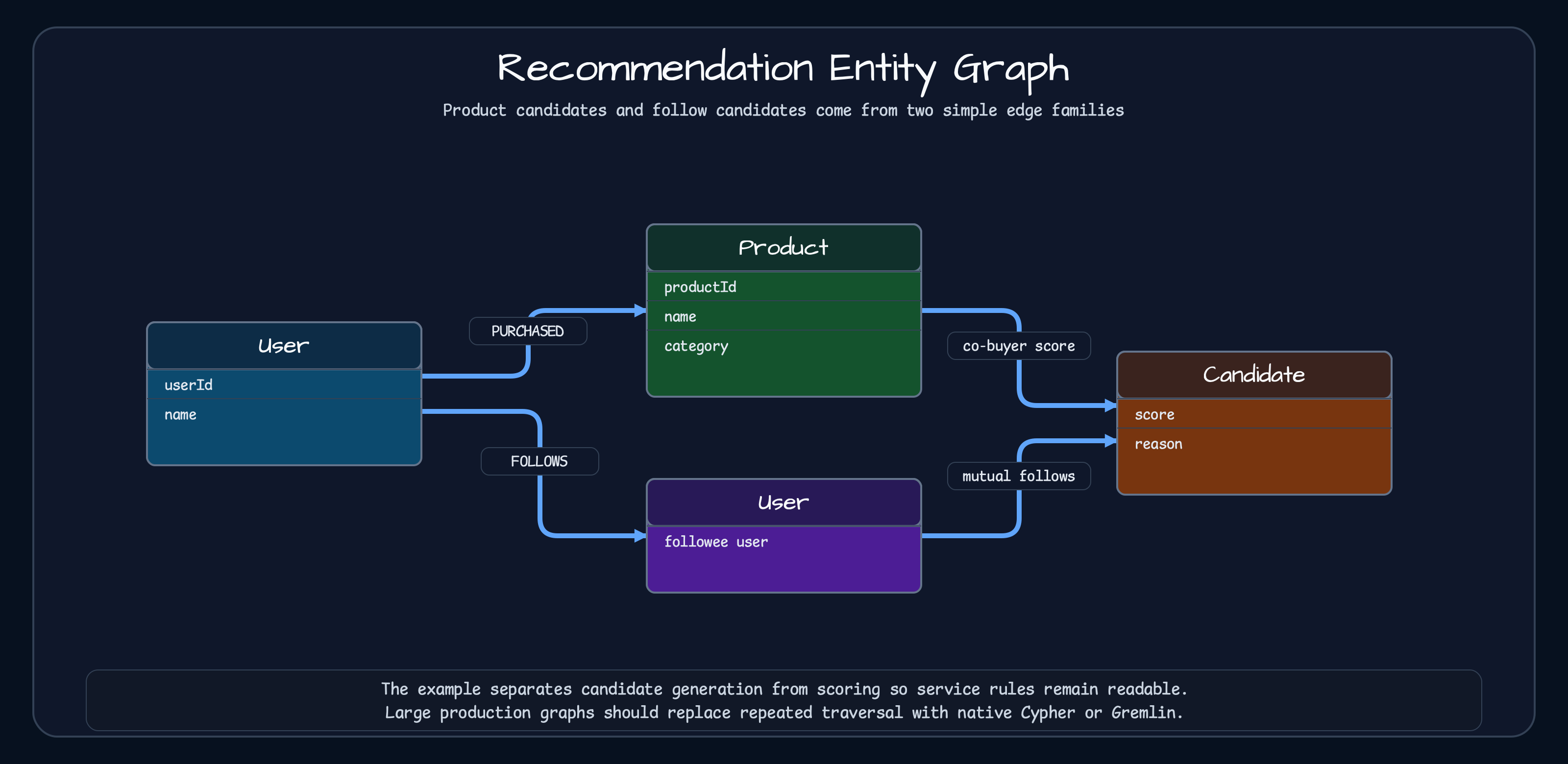
PURCHASED builds product candidates; FOLLOWS builds follow candidates. Candidate generation and scoring stay separate.Knowledge graph
Section titled “Knowledge graph”The knowledge graph example models Document, Entity, and Concept vertices. MENTIONS connects documents to
entities, RELATED_TO connects entities to other entities, and IS_A connects entities to concepts. The useful service
operations go beyond “search”: findMentionedEntities(documentId), findRelatedEntities(entityId, depth),
findConceptsForEntity(entityId), and inferRelationshipPaths(from, to) explain why two things are connected.
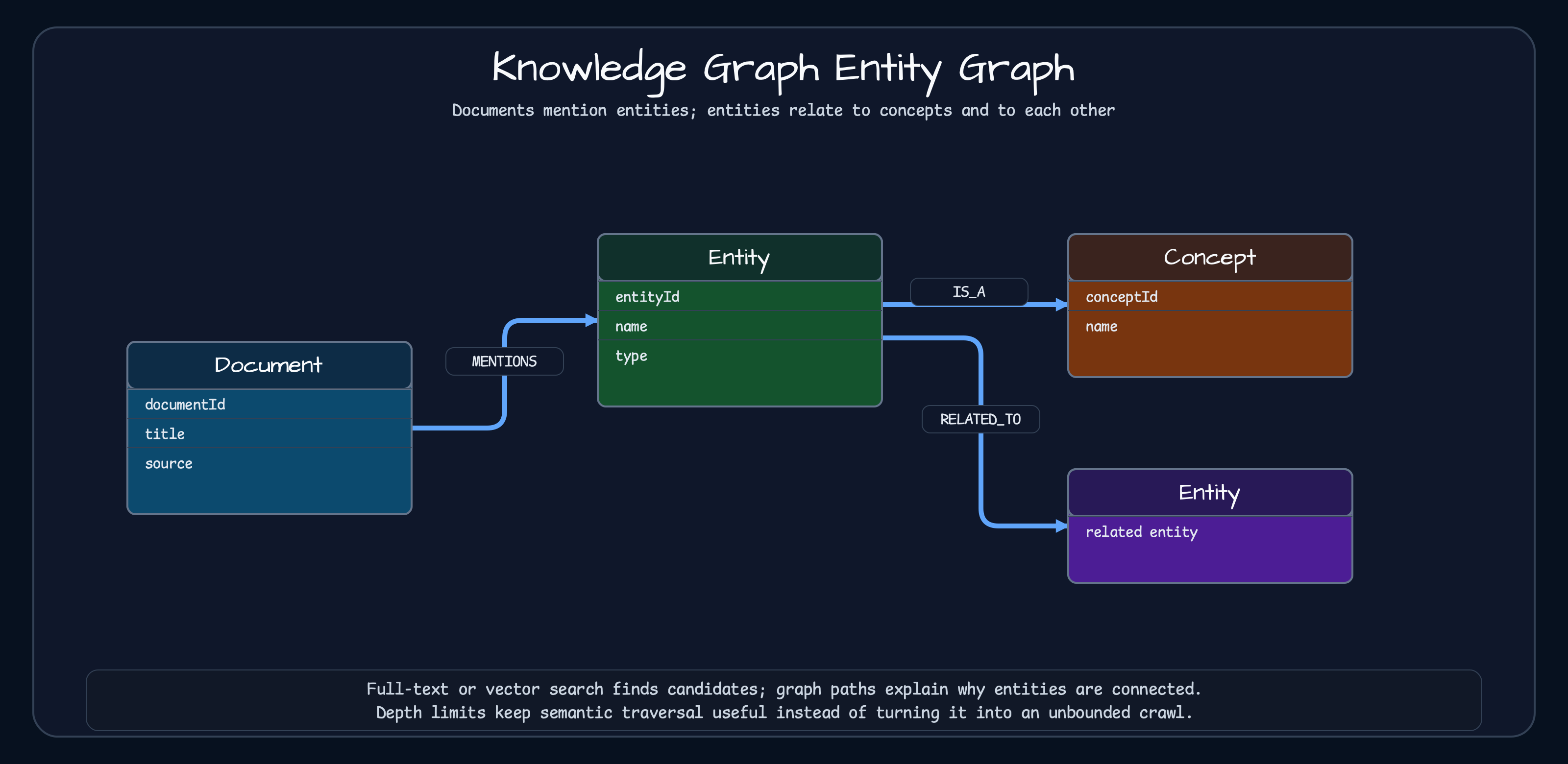
This fits search and RAG systems where full-text or vector search finds candidate documents, while graph paths explain semantic relationships. It does not mean every search problem should become a graph problem. Full-text search and vector indexes are still the right tools for document retrieval; graph paths help when relationships and explanations matter.
Social network
Section titled “Social network”The social network example keeps the classic graph problems concrete: Person and Company vertices, with KNOWS,
FOLLOWS, and WORKS_AT edges. It demonstrates direct connections, N-degree traversal, friends-of-friends candidates,
colleagues, shortest paths, all paths, and mutual connections. The example looks simple, but production code quickly adds
the unglamorous rules: exclude the seed user, exclude existing connections, cap depth, and decide whether a relationship
is directional.
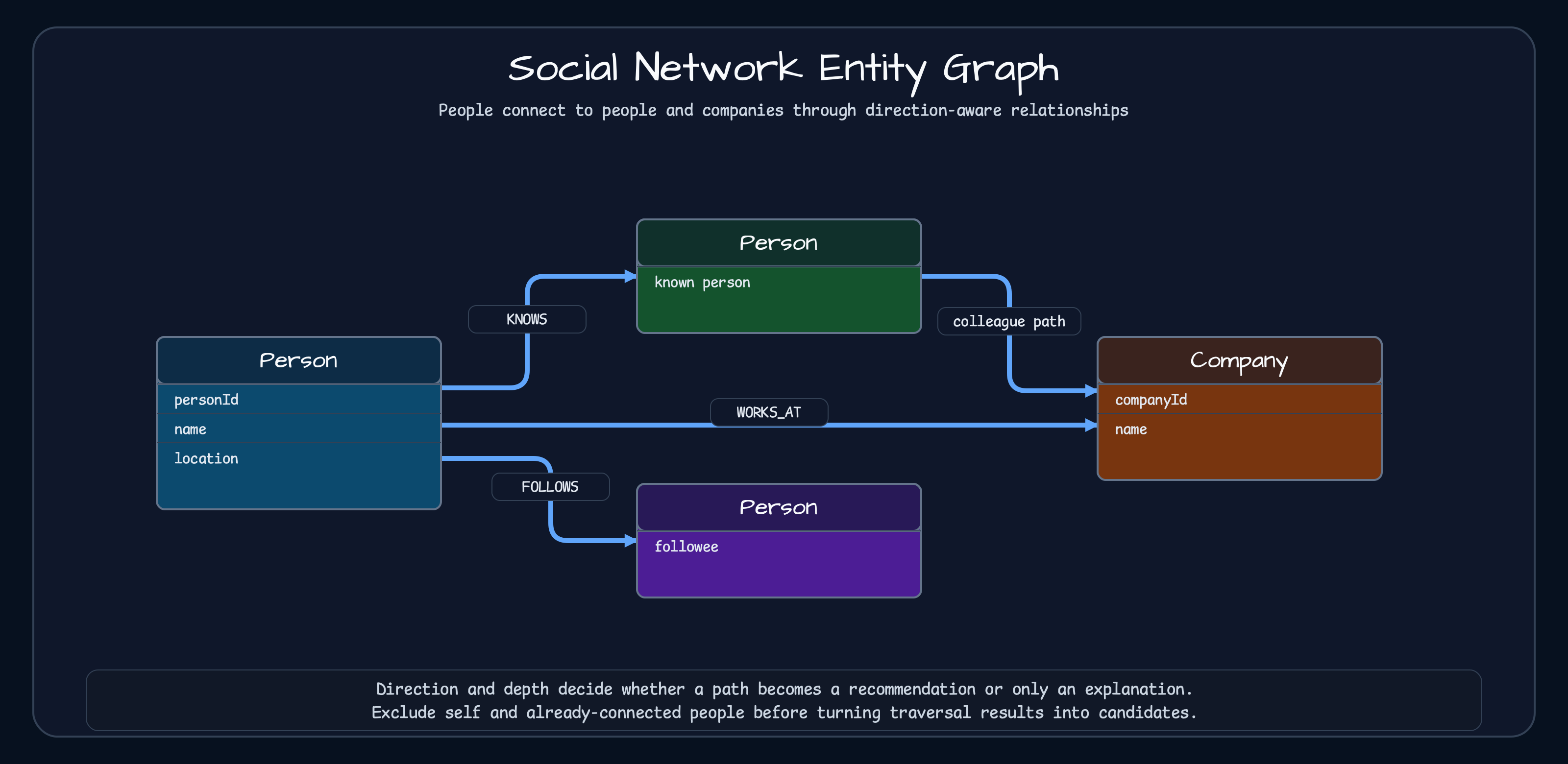
The important details are direction, depth, and exclusion rules. FOLLOWS is directional. The current
SocialNetworkService.connect() stores KNOWS as two directed edges, so callers must not add the same pair again with
reversed arguments. Recommendation queries should exclude the seed user plus existing connections.
Spring Boot and Ktor integration
Section titled “Spring Boot and Ktor integration”Spring Boot 4 users get a GraphOperations bean from graph-spring-boot. The suspend and virtual-thread beans are also
registered when their register-* properties are enabled. TinkerGraph is the default when
bluetape4k.graph.backend is missing, which keeps local tests and small examples self-contained.
bluetape4k: graph: backend: tinkergraphService code injects the operations and a graph name. Call initialize() once during application startup because the
workshop service contract requires the named graph to exist before other operations.
@Serviceclass AbuseReviewService(    private val graph: GraphOperations,    @Value("\${app.graph-name:abuse-review}") private val graphName: String,) {    private val service = AbuserDetectionService(graph, graphName)
    @PostConstruct    fun initialize() = service.initialize()
    fun cluster(seedUserId: GraphElementId): AbuseCluster =        service.findAbuseCluster(seedUserId)}
For Neo4j, keep the common service contract and change the storage properties. This does not make query planning, transactions, failure behavior, or performance equivalent. Verify the selected backend with integration tests and the real workload.
bluetape4k: graph: backend: neo4j neo4j: uri: bolt://localhost:7687 username: neo4j password: secret register-suspend: true register-virtual-thread: trueKtor 3 users install GraphPlugin in the application module. tinkerGraph() creates synchronous and coroutine
operations over one delegate and closes that delegate once on application stop. Route handlers should prefer
GraphSuspendOperations over blocking operations.
fun Application.module() {    install(GraphPlugin) {        tinkerGraph()    }
    routing {        get("/users/{id}/cluster") {            val graph = call.graphSuspendOperations()            val service = AbuserDetectionSuspendService(graph, "abuse-review")            service.initialize()            val cluster = service.findAbuseCluster(GraphElementId.of(call.parameters["id"]!!))            call.respond(cluster)        }    }}
The compact example initializes the named graph inside the request so every required step is visible. Production code
should initialize it during application startup and reuse the service. The current graphExists → createGraph sequence
is not atomic, so multi-instance startup requires a backend upsert or an external lock.
If DI or bootstrap code already created the operations pair, pass it directly. Keep the default caller-owned lifecycle,
or set closeOnStop = true only when the plugin should close both objects. When they share a delegate, the caller must
also ensure that closing is idempotent.
install(GraphPlugin) { operations(syncOps, suspendOps, closeOnStop = true)}Spring Boot integration is property-plus-bean injection. Ktor integration is plugin-plus-application lifecycle. Pick the one that matches the service runtime. In either case, make the repository creator, initialization point, and shutdown owner explicit.
Starting from a relational-database-centered service
Section titled “Starting from a relational-database-centered service”If you are starting from a relational-only service, do not move everything into a graph at once. Find the feature where variable-depth traversal, shortest path, shared identity, or recommendation candidate generation is making relational queries hard to read. Move that feature first, keep the relational database as source of truth when it already owns the business data, start contract tests with TinkerGraph, and verify Neo4j, Memgraph, AGE, or FalkorDB with backend-specific integration tests and the actual workload.
Choose a graph when relationships themselves are central to the work. bluetape4k-graph makes graph selection and
service integration repeatable on Kotlin/JVM, but it does not erase backend-specific operational behavior.
Sources
Section titled “Sources”- AbuserDetectionService
- AbuserDetectionSuspendService
- RecommendationService
- knowledge graph workshop
- social network workshop
- Spring Boot graph auto-configuration
- Ktor graph plugin
- GraphProperties
- GraphPluginConfig
Comments
Leave a note or reaction with your GitHub account.