
Bluetape4k AWS Part 5: Applying the Real Examples

This is Part 5 of the bluetape4k-aws series. Part 1 covered the
repository overview and mental model, Part 2 mapped the
core modules and AWS service coverage,
Part 3 covered Spring Boot and Ktor integration,
and Part 4 compared bluetape4k-aws with Spring Cloud AWS.
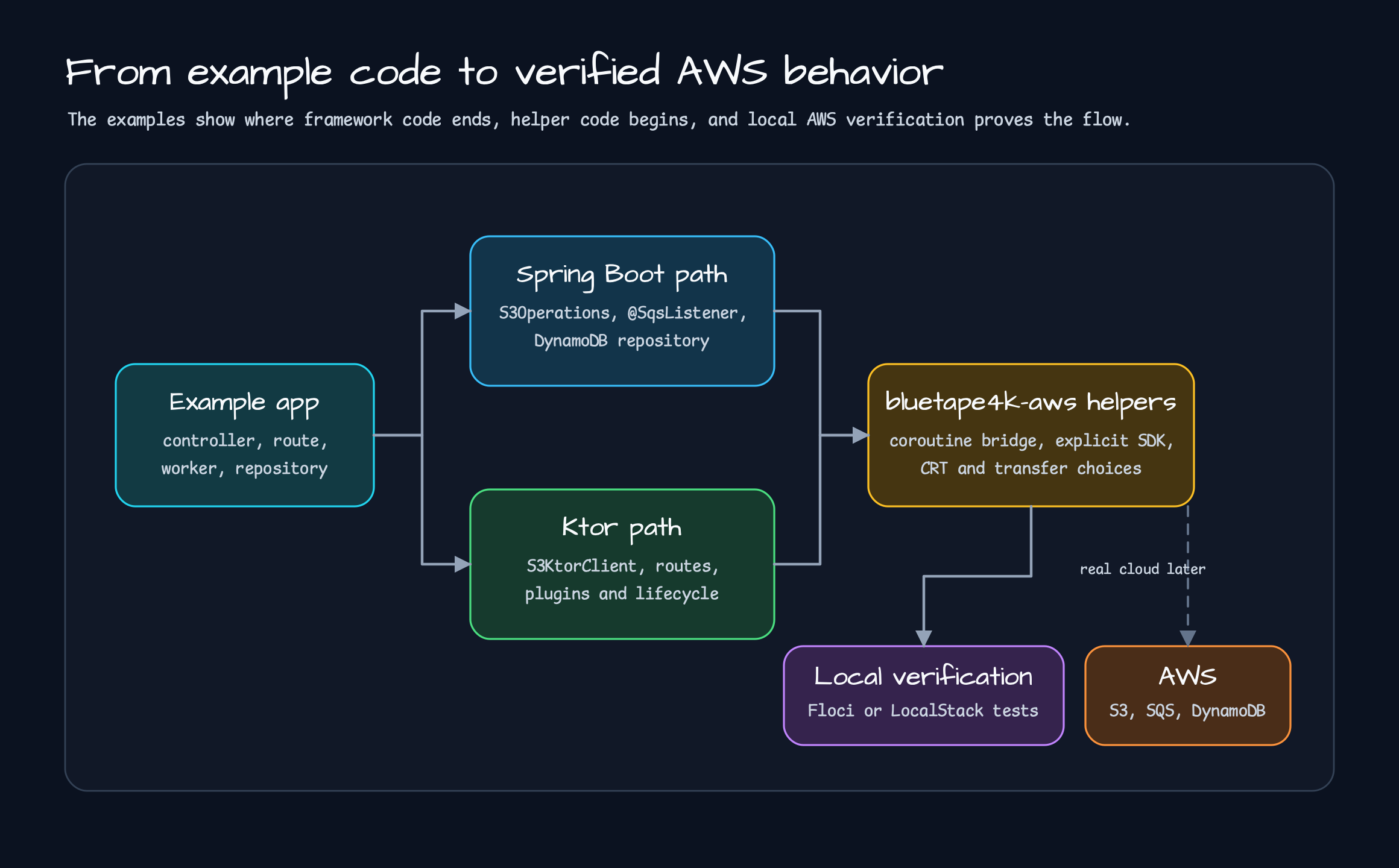
This post moves into working examples. bluetape4k-aws/examples/ contains Spring Boot 4 and Ktor 3
examples for S3, SQS, DynamoDB, and Exposed. bluetape4k-workshop/aws contains workshop examples that
show how application code can hide a storage backend behind one service contract.
The goal is not to skim a README catalog. The useful question is which example a team should read first, which work the library owns, and which choices still belong to the application.
Start With S3
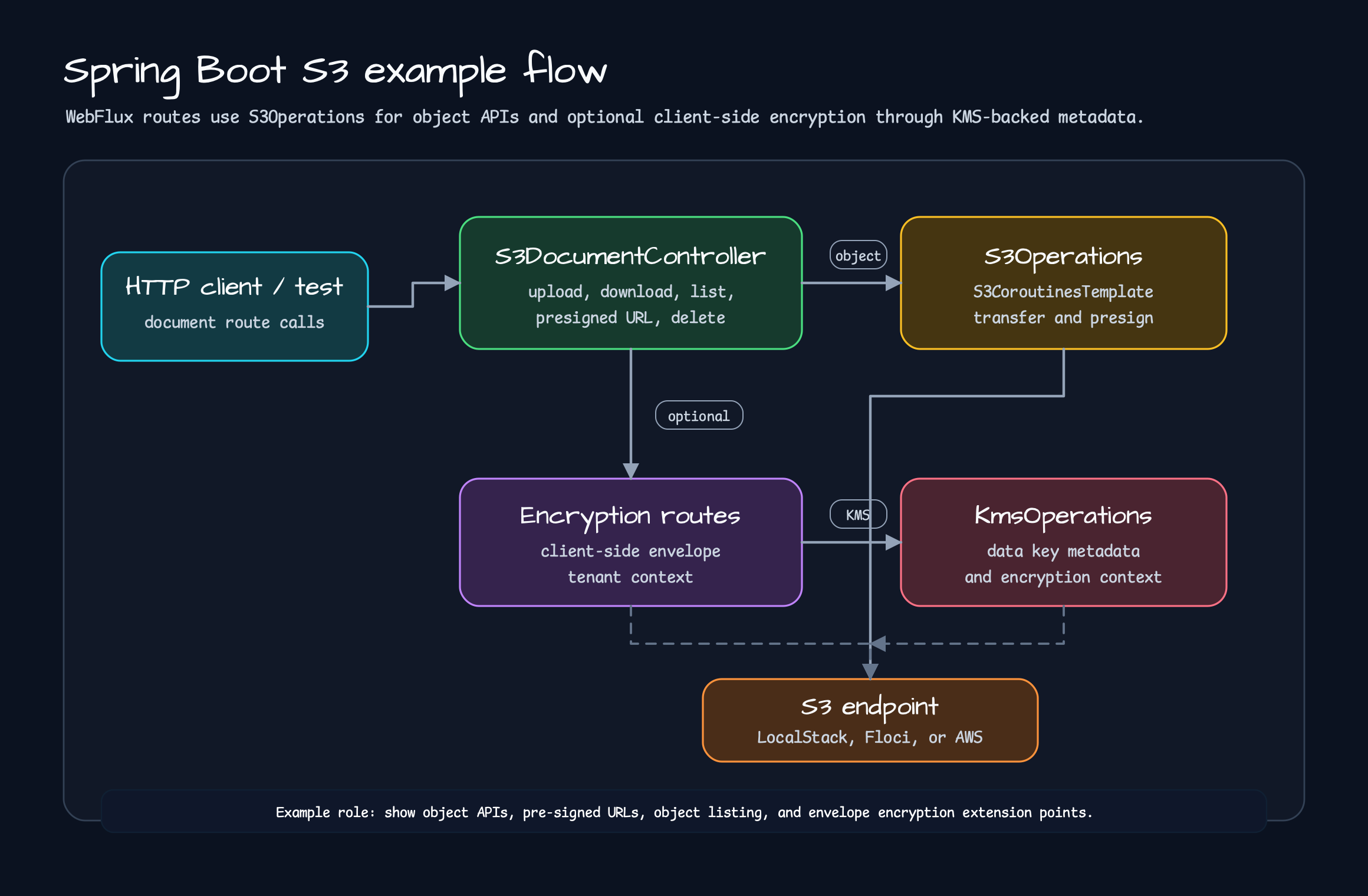
Section titled “Start With S3”S3 is the easiest first example to read. Upload, download, list, delete, presigned URL, and local emulator settings are all visible. A small object API can grow into content-type handling, streaming download, pre-signed URLs, and optional client-side encryption, so the repeated work removed by the library is easy to see.
The Spring Boot example starts with a WebFlux controller that injects S3Operations. The controller does
not need to know how to build S3Client, set an endpoint override, enable path-style access, or create a
presigner.
@RestController@RequestMapping("/s3/documents")class S3DocumentController( private val s3: S3Operations, private val encryptedS3Provider: ObjectProvider<S3ClientSideEncryptionOperations>,) { @PutMapping(consumes = [MediaType.APPLICATION_OCTET_STREAM_VALUE]) suspend fun upload( @RequestParam bucket: String, @RequestParam key: String, @RequestBody bytes: ByteArray, @RequestHeader(HttpHeaders.CONTENT_TYPE, required = false) contentType: String?, ): S3DocumentUploadResponse { val response = s3.upload(bucket = bucket, key = key, bytes = bytes, contentType = contentType) return S3DocumentUploadResponse(bucket = bucket, key = key, eTag = response.eTag()) }}The application sees S3Operations. The controller keeps domain API work: read request data, call an
operation, and return a response DTO. The same controller also has encrypted routes. It passes tenant
metadata and encryption context; S3ClientSideEncryptionOperations handles the envelope encryption work.
LocalStack or Floci settings are explicit:
bluetape4k: aws: s3: region: ap-northeast-2 endpoint-override: http://localhost:4566 path-style-access-enabled: true presign: duration: PT15M client-side-encryption: enabled: true key-id: alias/example-s3For real AWS, remove endpoint-override and use the AWS SDK credential chain. The tests create a bucket
and verify upload, download, list, presigned GET/PUT, delete, and deterministic test-KMS backed
client-side encryption helpers. This is executable proof that the calls work with the settings.
Read the S3 example in four steps:
PUT /s3/documentsuploads bytes. The controller receives the request body asByteArrayand passes theContent-Typeheader toS3Operations.upload().GET /s3/documentsdownloads the same key. The controller returnsdownloadBytes()as aResponseEntity<ByteArray>instead of handling SDK streams directly.GET /s3/documents/objectslists a prefix. In a real service, this often becomes a file listing API or a way to find batch targets.presigned-getandpresigned-putissue time-limited URLs while the object stays in S3.
curl -X PUT \  "http://localhost:8080/s3/documents?bucket=demo-bucket&key=docs/hello.txt" \  -H "Content-Type: text/plain" \  --data-binary "hello bluetape4k-aws"
curl \  "http://localhost:8080/s3/documents?bucket=demo-bucket&key=docs/hello.txt"
curl \  "http://localhost:8080/s3/documents/presigned-get?bucket=demo-bucket&key=docs/hello.txt"
The curl commands are not the point. The point is that SDK details do not leak into the business API.
The application still chooses bucket and key, but presigner creation, request builder assembly, local
endpoint settings, and path-style access move into helpers and auto-configuration.
The encryption route follows the same rule:
val response = encryptedS3().uploadEncrypted( bucket = bucket, key = key, bytes = bytes, metadata = mapOf("tenant" to tenant), encryptionContext = mapOf("tenant" to tenant), contentType = contentType,)Not every service should enable client-side encryption on day one. The example shows where the choice
lives. Normal upload/download routes stay simple, while encrypted routes use S3ClientSideEncryptionOperations
explicitly. The controller separates normal S3 storage from tenant-context encrypted storage, and the library
owns the envelope encryption implementation.
Ktor Connects The Same S3 Work Differently
Section titled “Ktor Connects The Same S3 Work Differently”The Ktor example does not copy the Spring Boot shape. Ktor connects S3KtorClient to routes, and route code
calls S3 REST helpers in a suspend flow.
fun Route.s3DocumentRoutes( s3: S3KtorClient, bucket: String,) { put("/s3/objects/{key...}") { val key = call.s3KeyParameter() val bytes = call.receive<ByteArray>() val response = s3.putObject( bucket = bucket, key = key, bytes = bytes, contentType = call.request.headers["Content-Type"], ) call.respondText("""{"key":"$key","eTag":"${response.eTag}"}""") }}The important detail is the tailcard path parameter. /s3/objects/{key...} preserves object keys that
contain slashes, such as docs/hello.txt. The same example includes getObjectStream, putConfigObject,
getConfigObject, presignGetObject, and presignPutObject, so a Ktor service can stay coroutine-first
without Spring beans.
For LocalStack-style endpoints, configure path-style addressing:
val s3 = s3KtorClientOf( region = "ap-northeast-2", endpointOverride = Url("http://localhost:4566"), addressingStyle = S3KtorAddressingStyle.Path,)As Part 3 argued, adapters do not need to look identical. Spring Boot fits auto-configuration and bean injection. Ktor fits routes, plugins, and lifecycle hooks. The same AWS problem should be expressed in each framework’s natural vocabulary.
Read SQS, DynamoDB, And Exposed Next
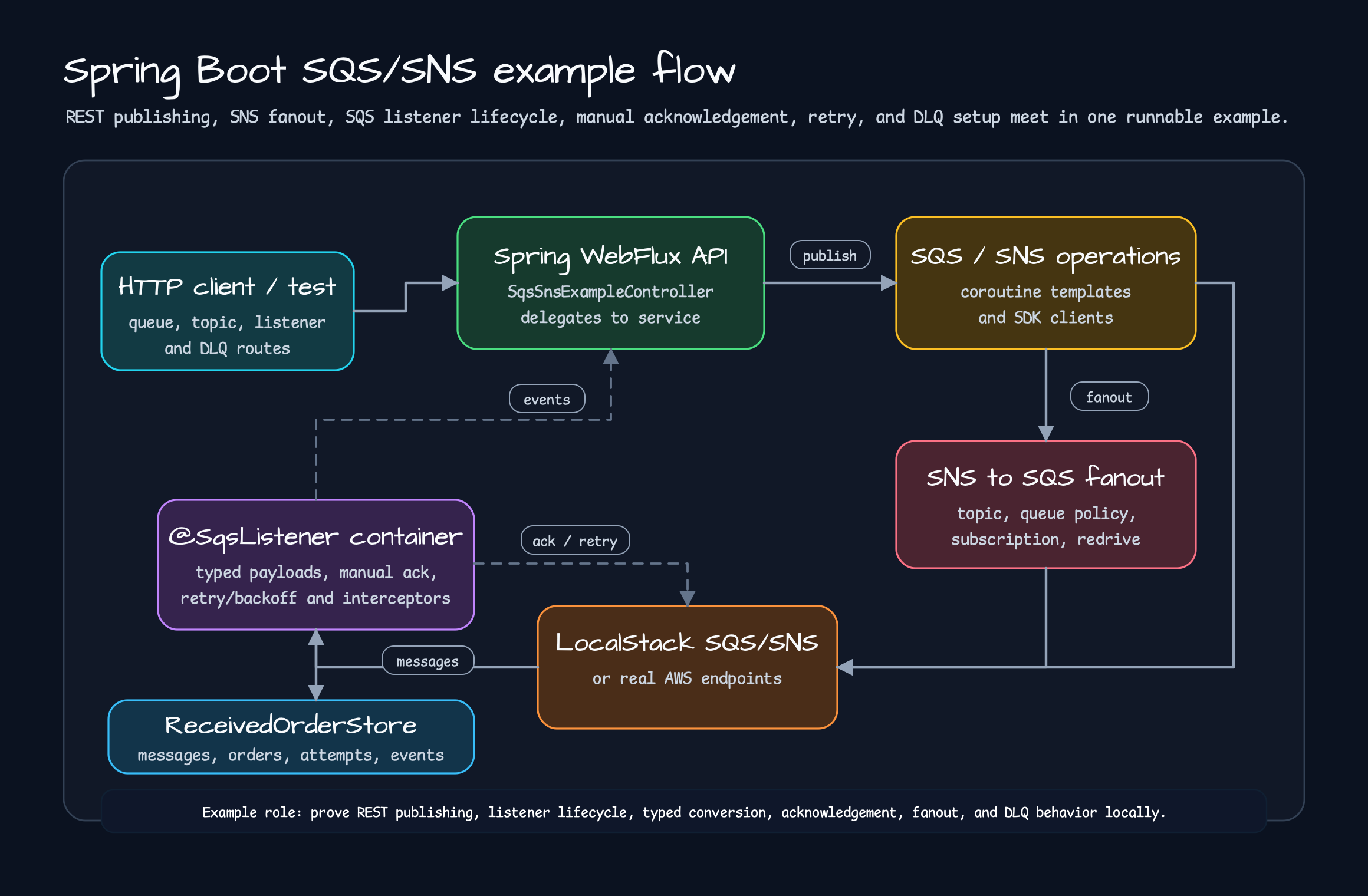
Section titled “Read SQS, DynamoDB, And Exposed Next”After S3, SQS is the next useful example. SQS goes beyond wrapping sendMessage. Receive loops,
visibility timeout, delete timing, retry, typed payload conversion, and manual acknowledgement all show up.
The Spring Boot SQS example exposes that boundary through @SqsListener.
@Componentclass OrderMessageListener(    private val store: ReceivedOrderStore,) {    @SqsListener(queue = "\${example.aws.sqs.listener-queue:orders}", maxMessages = 1, waitTimeSeconds = 1)    fun handle(message: String) {        store.record(message)    }
    @SqsListener(id = "typed-order-listener", queue = "\${example.aws.sqs.typed-listener-queue:typed-orders}")    suspend fun handleTyped(order: OrderPayload, acknowledgement: SqsAcknowledgement) {        store.record(order)        acknowledgement.acknowledge()    }}
Application code focuses on what to process. The listener container owns polling, handler invocation, acknowledgement, failed-message retention, and retry/backoff settings. The example also includes SNS to SQS fanout, DLQ redrive policy, and interceptor event recording, so it shows where metrics and tracing hooks can attach.
DynamoDB is a good repository example:
@Repositoryclass OrderRepository( enhancedClient: DynamoDbEnhancedAsyncClient, tableNameResolver: DynamoDbTableNameResolver,) : AbstractCoroutinesDynamoDbRepository<Order, String>( enhancedClient = enhancedClient, tableNameResolver = tableNameResolver, entityClass = Order::class.java,) { override val tableName: String = "orders" override fun keyFromId(id: String): Key = Key.builder().partitionValue(id).build() override fun keyFromItem(item: Order): Key = Key.builder().partitionValue(item.id).build()}This does not pretend DynamoDB is an ORM. Table name, partition key, and enhanced client mapping stay
explicit. Repeated coroutine repository flows such as save, findById, delete, scan, and query
move into the shared base class.
The Exposed example is where AWS meets the database registry. A service that reads AWS configuration or
secrets to build database connections needs aws-exposed plus a framework adapter. In this post, treat it
as another “configuration → helper → framework wiring → test” example rather than a full Exposed guide.
StorageService Workshop: Where Service Code Stabilizes
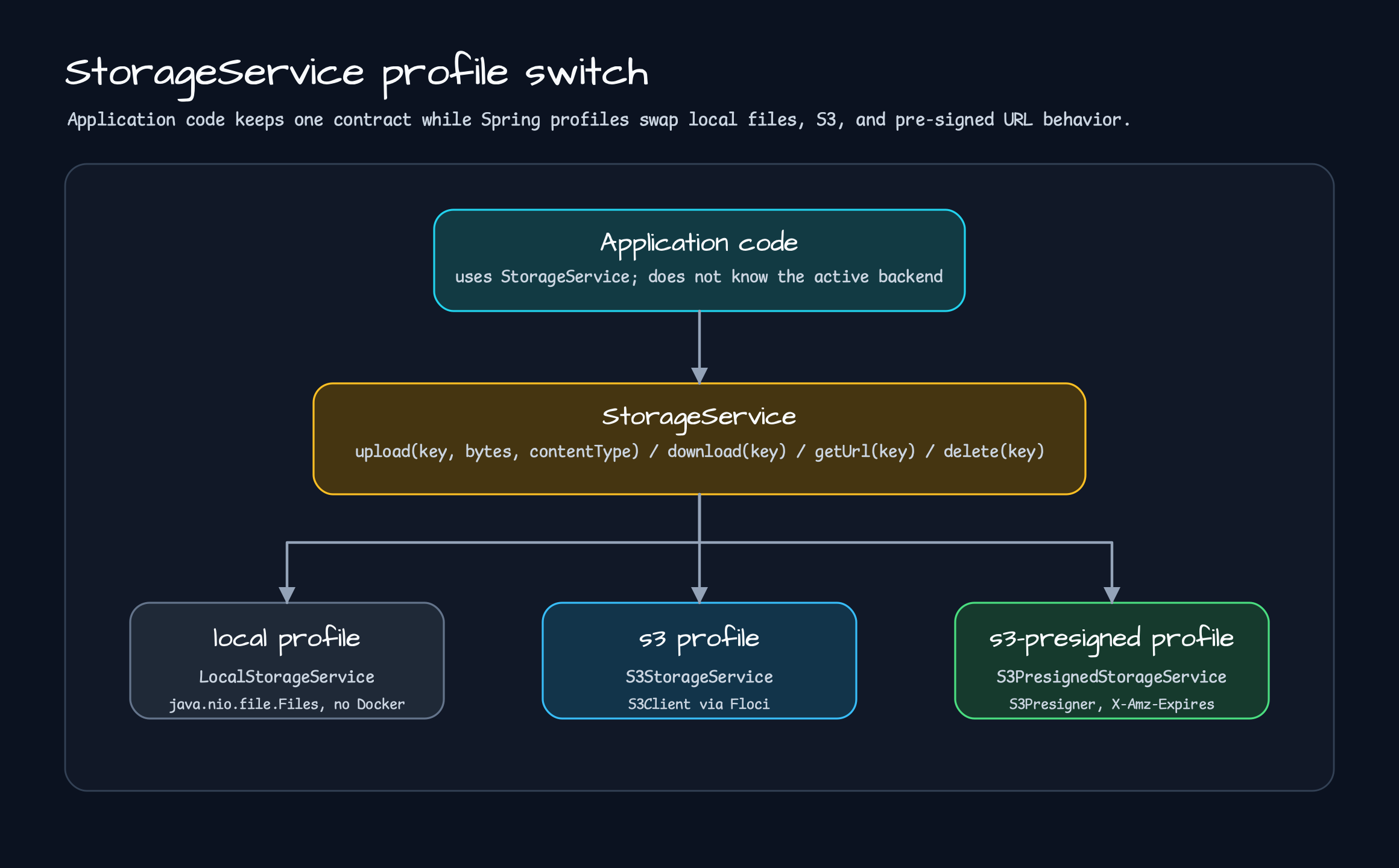
Section titled “StorageService Workshop: Where Service Code Stabilizes”bluetape4k-workshop/aws/storage-abstraction is the most service-shaped example. The application does not
know S3 directly. It depends on StorageService, and Spring profiles switch the backend.
interface StorageService { suspend fun upload(key: String, content: ByteArray, contentType: String): String suspend fun download(key: String): ByteArray suspend fun getUrl(key: String): String suspend fun delete(key: String)}There are three profiles:
| Profile | Implementation | Use |
|---|---|---|
local | LocalStorageService | Develop and test quickly without Docker. |
s3 | S3StorageService | Store data through S3Client in an S3-compatible backend. |
s3-presigned | S3PresignedStorageService | Store data in S3 and return pre-signed GET URLs from getUrl(). |
The module uses bluetape4k-aws and the AWS SDK for S3. It first defines the application boundary as
StorageService; then S3Config creates profile-specific S3Client and S3Presigner beans. The domain
contract stays stable while local files, S3, and pre-signed URLs move into infrastructure implementations.
S3Config uses FlociServer.Launcher.floci for tests and local runs:
@Configuration(proxyBeanMethods = false)@Profile("s3 | s3-presigned")class S3Config {    companion object {        val floci: FlociServer = FlociServer.Launcher.floci    }
    @Bean    fun s3Client(): S3Client =        S3Client.builder()            .endpointOverride(floci.awsEndpoint)            .region(Region.of(floci.regionName))            .credentialsProvider(staticCredentialsProviderOf(floci.awsAccessKey, floci.awsSecretKey))            .build()}
Because S3Client is blocking, implementations wrap calls with withContext(Dispatchers.IO). That detail
is worth keeping in the example. The example shows both how to use S3 and where blocking I/O belongs in a
Kotlin coroutine service.
override suspend fun upload(key: String, content: ByteArray, contentType: String): String = withContext(Dispatchers.IO) { ensureBucketExists() s3Client.putObject( { req -> req.bucket(bucketName).key(key).contentType(contentType) }, RequestBody.fromBytes(content) ) "https://s3.amazonaws.com/$bucketName/$key" }To move this pattern into a real service, start by depending on StorageService only:
@Serviceclass DocumentService( private val storage: StorageService,) { suspend fun saveDocument(documentId: String, bytes: ByteArray): String = storage.upload( key = "documents/$documentId.bin", content = bytes, contentType = "application/octet-stream", )}That code does not know whether local, s3, or s3-presigned is active. Most controller and service
tests can run with the local profile. S3 compatibility can be verified in separate integration tests.
./gradlew :aws-storage-abstraction:test
./gradlew :aws-storage-abstraction:bootRun \  --args='--spring.profiles.active=local'
./gradlew :aws-storage-abstraction:bootRun \  --args='--spring.profiles.active=s3-presigned'
Only the StorageService implementation changes. local writes to {basePath}/{key} and returns a
file:// URL. s3 stores the object in an S3-compatible backend and returns a normal S3 URL shape.
s3-presigned stores the same object in S3 but generates a time-limited GET URL from getUrl().
override suspend fun getUrl(key: String): String =    withContext(Dispatchers.IO) {        val presignRequest = GetObjectPresignRequest.builder()            .signatureDuration(Duration.ofMinutes(presignDurationMinutes))            .getObjectRequest { req -> req.bucket(bucketName).key(key) }            .build()
        s3Presigner.presignGetObject(presignRequest).url().toString()    }
That difference is small in code and large in production. An internal admin screen can read bytes directly
with download(). An external user flow can receive only a pre-signed URL from getUrl(). The service code
keeps one contract while deployment and security needs choose the implementation.
The test strategy is also practical. Not every test needs real AWS. The local profile verifies file-system
behavior quickly, while S3 profiles verify bucket creation and object I/O through Floci or a LocalStack-compatible
endpoint. Real AWS can remain a smoke test or environment check instead of slowing every development loop.
Where The Spring Cloud AWS Example Fits
Section titled “Where The Spring Cloud AWS Example Fits”bluetape4k-workshop/aws/s3-spring-cloud is also useful to read. It shows Spring Cloud AWS with S3Template
and Spring ResourceLoader.
s3Template.store("my-bucket", "hello.txt", "Hello, S3!")
val resource = resourceLoader.getResource("s3://my-bucket/hello.txt") as WritableResourceval content = resource.inputStream.bufferedReader().readText()
This does not repeat Part 4. It gives concrete code for the Spring Cloud AWS style: Spring resource
abstractions and templates. If a Spring Boot application should stay fully inside Spring conventions, that
flow is a good fit. If Ktor, coroutine helpers, explicit SDK dependencies, or a StorageService application
boundary comes first, the bluetape4k-aws examples are the faster path to read.
Which Example Should Run First?
Section titled “Which Example Should Run First?”You do not need to run everything at once. Pick the first example by the problem in front of you.
| Goal | First example | What to check |
|---|---|---|
| S3 upload/download/presigned URL | examples/aws-spring-boot-s3-examples | S3Operations, LocalStack/Floci settings, encryption route |
| S3 REST client in Ktor | examples/aws-ktor-s3-examples | S3KtorClient, slash-preserving key route, streaming download |
| SQS listener and retry/ack | examples/aws-spring-boot-sqs-examples | @SqsListener, typed payload, manual ack, interceptor event |
| DynamoDB coroutine repository | examples/aws-spring-boot-dynamodb-examples | enhanced async client, table name resolver, repository base class |
| Separate service code from storage backend | bluetape4k-workshop/aws/storage-abstraction | StorageService, local/s3/s3-presigned profile switch |
| Compare the Spring Cloud AWS style | bluetape4k-workshop/aws/s3-spring-cloud | S3Template, ResourceLoader, Spring-centered usage |
The conclusion is simple. When adopting bluetape4k-aws, do not start with “which AWS API can it call?”
Start with “how far can application code stay simple?” S3 controllers, Ktor routes, SQS listeners, DynamoDB
repositories, and StorageService profile switches all lead to that same question.
Repeated AWS wiring can move into helpers and adapters. Service code can keep the domain contract. The examples in Part 5 are the starting point for proving that boundary.
Source Links
Section titled “Source Links”- Spring Boot S3 example README: README.ko.md
- Spring Boot S3 controller: S3DocumentController.kt
- Ktor S3 example README: README.ko.md
- Ktor S3 routes: S3KtorServerExamples.kt
- Spring Boot SQS example README: README.ko.md
- SQS listener example: ReceivedOrderStore.kt
- Spring Boot DynamoDB example README: README.ko.md
- DynamoDB repository example: OrderRepository.kt
- Storage abstraction workshop: README.ko.md
- StorageService contract: StorageService.kt
- S3 profile configuration: S3Config.kt
- Spring Cloud AWS S3 workshop: README.ko.md
Comments
Leave a note or reaction with your GitHub account.