
Bluetape4k Text Part 4: Dictionary Updates and Quality Gates

Part 3 covered building a keyword dictionary into an Aho-Corasick automaton and scanning each input once. The matcher can be well designed, but its result still depends on the dictionary data that feeds it.
Dictionary files usually look plain: one word per line, a few resource files, and a few tests. That plainness is exactly why
they are easy to underestimate. “I only added one word” can become a false positive, a missed mask, or a changed tokenizer
result. This post explains how bluetape4k-text handles dictionary and blockword changes.
Dictionaries Are Code
Section titled “Dictionaries Are Code”bluetape4k-text stores dictionaries as classpath resources. Library users usually do not edit these files directly, but the
loading model matters when application code uses runtime dictionary APIs.
| Module | Resource root | Loader | What to check |
|---|---|---|---|
tokenizer-core | shared classpath resources | DictionaryProvider | file loading, .gz dictionaries, missing-file behavior |
tokenizer-korean | koreantext | KoreanDictionaryProvider | POS dictionaries, proper nouns, blockword severity |
tokenizer-japanese | japanesetext | JapaneseDictionaryProvider | Japanese blockwords and category fixtures |
DictionaryProvider reads UTF-8 resources and trims each line. .gz resources are decompressed through GZIPInputStream.
When a resource is missing, the loader throws IllegalStateException instead of silently returning an empty dictionary. That
failure mode is useful: a wrong resource path should fail loudly before odd tokenizer results reach production.
That does not mean applications are limited to dictionaries packaged inside the jar. The built-in dictionaries are currently
distributed as resources, but application code can read words from a database or a file and import them through the runtime
APIs. bluetape4k-text does not force one storage model for service-owned dictionaries.
Keep the Update Flow Boring
Section titled “Keep the Update Flow Boring”The update flow does not need to be complicated. It does need to be repeatable.
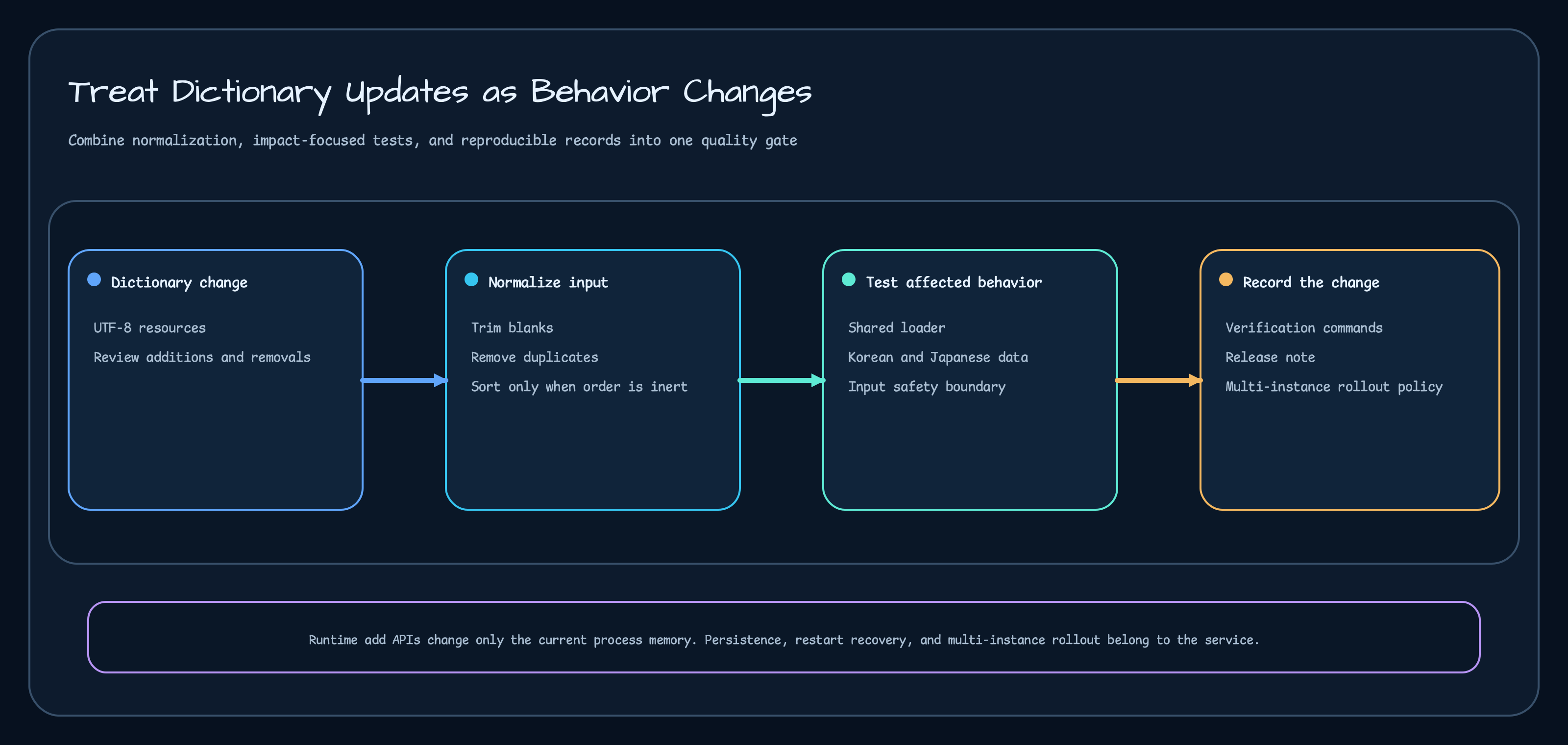
The practical workflow is:
| Step | Work | Reason |
|---|---|---|
| 1 | Prepare UTF-8 text files | keep classpath resource loading consistent |
| 2 | Trim whitespace and remove blank lines | avoid invisible fixture changes |
| 3 | Remove duplicates that have no semantic value | the same word twice does not improve matching |
| 4 | Sort only when order has no meaning | keep diffs small and reviewable |
| 5 | Run tests for the changed dictionary area | verify tokenizer and blockword behavior |
| 6 | Record release notes with the changed area and command | let the next maintainer repeat the check |
As Kotlin-shaped pseudocode:
val cleanedWords = lines.asSequence() .map(String::trim) .filter(String::isNotEmpty) .distinct() .sorted() .toList()Do not apply .sorted() blindly. Some dictionaries can have order-sensitive behavior. For those files, clean blanks and
duplicates, but preserve the meaningful order.
Runtime Additions Are Import Points
Section titled “Runtime Additions Are Import Points”The Korean tokenizer can add nouns at runtime.
KoreanProcessor.addNounsToDictionary("Bluetape4K", "WeekendSale")It can also add blockwords at runtime.
KoreanProcessor.addBlockwords(    words = listOf("걸레"),    severity = Severity.LOW,)
val response = KoreanProcessor.maskBlockwords(    BlockwordRequest("홈쇼핑 미니미는 무슨 걸.레 어쩌라구?"))
response.maskedText// "홈쇼핑 미니미는 무슨 ** 어쩌라구?"
response.blockWords// ["걸레"]
That API is useful for fast application-side response, and it can also be the import point for a service-owned dictionary. For example, an admin tool can store words in a database, then the application can load and inject them at startup or at a controlled refresh point.
interface DictionaryWordSource {    suspend fun loadNouns(): List<String>    suspend fun loadBlockwords(): List<String>}
suspend fun importDictionary(source: DictionaryWordSource) {    KoreanProcessor.addNounsToDictionary(source.loadNouns())    KoreanProcessor.addBlockwords(        words = source.loadBlockwords(),        severity = Severity.MIDDLE,    )}
A file-backed service can use the same boundary.
val words = Path("config/blockwords.txt")    .readLines()    .map(String::trim)    .filter(String::isNotEmpty)
KoreanProcessor.addBlockwords(words, Severity.HIGH)
But a runtime addition is not the same as publishing a classpath dictionary update. It is in-memory state inside that process. Applications can import from databases or files, but they still need a policy for propagation across instances, restart behavior, persistence, and removal. Versioned dictionary reload is intentionally outside the current feature surface covered here.
Blockwords Also Touch the Noun Dictionary
Section titled “Blockwords Also Touch the Noun Dictionary”KoreanProcessor.addBlockwords does not only update the blockword dictionary. It also adds the same words to the noun
dictionary and proper-noun set. That may look surprising at first.
The reason is tokenizer behavior. If a blockword appears inside a compound noun or a slightly changed input, the tokenizer has to expose that word as a candidate before masking can happen. A word that exists only in the blockword dictionary can still be missed if the tokenizer never segments it in a useful way.
The tests keep cases like this explicit.
KoreanProcessor.addBlockwords(    words = listOf("분수쑈"),    severity = Severity.LOW,)
KoreanProcessor.maskBlockwords(    BlockwordRequest("분수쑈를 진행합니다")).maskedText// "***를 진행합니다"
Blockword tests cannot use only polite examples. Real problematic input is often unpleasant, and the fixtures need to cover the unpleasant cases that the service must handle.
Severity Is Policy
Section titled “Severity Is Policy”Korean blockwords use LOW, MIDDLE, and HIGH severity. The requested severity determines which dictionaries are scanned.
| Requested severity | Scanned dictionaries |
|---|---|
LOW | LOW, MIDDLE, HIGH |
MIDDLE | MIDDLE, HIGH |
HIGH | HIGH |
That is a policy decision: lower filtering thresholds catch more words, while higher thresholds only catch the most severe entries. Tests should therefore pin expected output per severity, not only “a blockword was found.”
Mask length also needs tests.
val response = KoreanProcessor.maskBlockwords(    BlockwordRequest(        text = "걸.레 그리고 걸.레",        mask = "##",    ))
response.maskedText// "#### 그리고 ####"
response.blockWords// ["걸레", "걸레"]
If that result changes to "## 그리고 ##", the span contract changed. Masking is not just string replacement; it affects
display text, highlighting, moderation screens, and audit logs.
Stop Bad Input Before the Processor
Section titled “Stop Bad Input Before the Processor”Good dictionaries are not enough if the service boundary is weak. BlockwordRequest rejects blank text and oversized input.
The current maximum blockword text length is 100_000 characters.
The example module’s TokenizerSafetyHandler validates before calling the processor.
fun handleBlockword(text: String): SafetyResponse {    if (text.isBlank()) {        return SafetyResponse(400, "text is blank")    }    if (text.length > maxLength) {        return SafetyResponse(            status = 413,            body = "text too long: ${text.length} chars (max $maxLength)",        )    }
    return processor.mask(text)}
The tests verify the boundary directly.
| Case | Expected behavior |
|---|---|
| oversized input | 413, include length and max, do not echo raw input |
| blank input | 400, do not call the processor |
| processor failure | 500, return a sanitized message |
These tests are not glamorous, but they matter. If a blockword filter fails and the error path logs the raw submitted text, the problem is no longer only a filter problem.
Keep Validation Commands Specific
Section titled “Keep Validation Commands Specific”For dictionary updates, run the focused test for the changed area and record the command.
| Changed area | Validation command |
|---|---|
| shared dictionary loader | ./gradlew :tokenizer-core:test --tests "io.bluetape4k.tokenizer.utils.DictionaryProviderTest" |
| Korean noun/POS dictionaries | ./gradlew :tokenizer-korean:test |
| Korean blockwords | ./gradlew :tokenizer-korean:test --tests "io.bluetape4k.tokenizer.korean.block.KoreanBlockwordProcessorTest" |
| Japanese blockwords | ./gradlew :tokenizer-japanese:test --tests "io.bluetape4k.tokenizer.japanese.block.JapaneseBlockwordProcessorTest" |
| input safety example | ./gradlew :examples:tokenizer-safety-examples:test |
These tests are not a broad Korean or Japanese NLP accuracy benchmark. They are a source-controlled quality gate: dictionaries, fixtures, and input boundaries should keep behaving as expected.
Broad accuracy claims need datasets, metrics, and statistical analysis. The scope here is narrower and more useful for releases: “did this dictionary change break the behavior we already promised?”
Practical Rules for Application Code
Section titled “Practical Rules for Application Code”Application code can take these rules from the library.
| Rule | How to apply it |
|---|---|
| Treat dictionary edits as behavior changes | record the changed area and validation command |
| Use runtime additions as import points | load words from DB/file when needed, then define propagation and removal policy |
| Test tokenizer and blockword behavior together | verify masked text, detected words, and spans |
| Treat severity as policy | pin expected output per severity |
| Validate input before processing | reject blank/oversized input and never echo raw text in errors |
Dictionary changes often look small. In tokenizers and filters, one small line can decide whether a service misses an abusive term or blocks a normal sentence. Keep the files clean, keep the tests specific, and write down the command that proved the change.
Sources
Section titled “Sources”- DictionaryProvider
- DictionaryProviderTest
- KoreanDictionaryProvider
- KoreanProcessor
- KoreanBlockwordProcessorTest
- JapaneseBlockwordProcessorTest
- BlockwordRequest
- TokenizerSafetyExamples
- TokenizerSafetyExamplesTest
- Dictionary update pipeline plan
- Text quality gates lesson
Comments
Leave a note or reaction with your GitHub account.