
[Operations 5] Attendance and Treatment Completion Are Different Facts

Clicking CHECKED_IN in an appointment list does not mean that treatment is complete. Moving an appointment to
COMPLETED does not mean that the clinical or treatment service has confirmed the actual result. If those facts are
collapsed into one number, STAFF cannot tell what to do next, and partial work or refund follow-ups disappear.
The conclusion is simple:
CHECKED_INrecords attendance, and appointmentCOMPLETEDends the booking workflow. Actual treatment completion is recorded by a verifiedTreatmentFulfillmentEventfrom the clinical or treatment service.
This distinction matters for a laser and sedation package where one appointment contains several treatment items. The screens and numbers in this article are synthetic design mockups; they do not use real patient information or claim a production dashboard aggregation.
STAFF needs state counts and an action queue first
Section titled “STAFF needs state counts and an action queue first”The first question on a STAFF screen is not “How many appointments are complete?”
- How many confirmed appointments still need an arrival check?
- How many patients have arrived but still wait for an external treatment result?
- How many new tasks were created by partial fulfillment or resource disruption?
- How many refund facts arrived without their
BLOCKINGfollow-up being checked?
The screen below separates summary cards from the action queue so those questions have visible answers. It is a design mockup, not a screenshot of a production product.
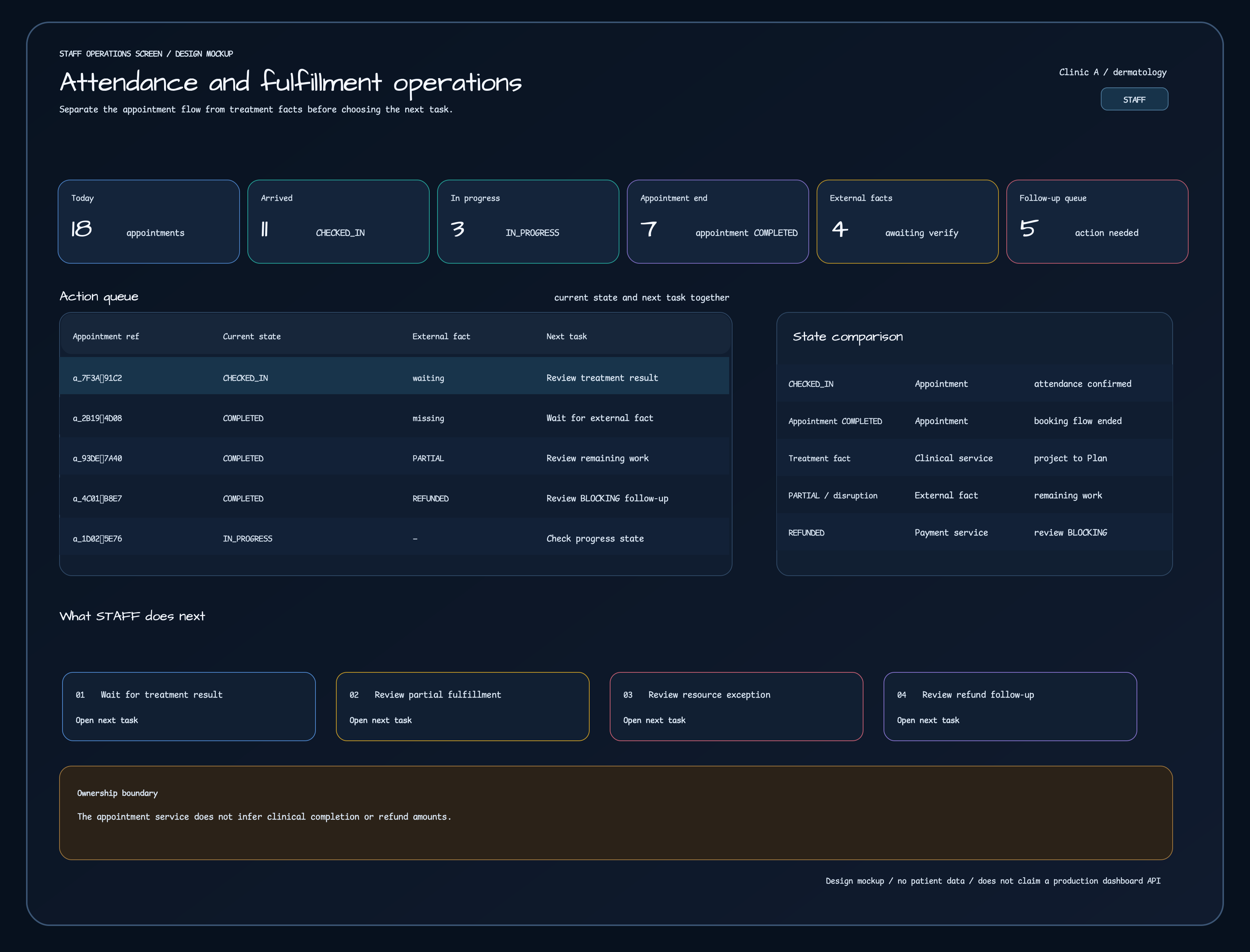
Synthetic design mockup. Values are illustrative and do not represent patient identifiers or a production operations API.
The six cards represent different facts:
| Card | Fact shown | STAFF next action |
|---|---|---|
| Today | Count of today’s CONFIRMED appointments | Review the appointment list and scheduled times. |
| Arrived | Appointments moved to CHECKED_IN | Confirm treatment start; do not mark treatment complete. |
| In progress | Appointments in IN_PROGRESS | Confirm where the actual treatment result will be recorded. |
| Appointment end | Appointments in appointment COMPLETED | Re-read whether an external fulfillment fact has arrived. |
| External facts | Appointments waiting for a verified TreatmentFulfillmentEvent | Do not infer clinical completion yet. |
| Follow-up queue | Work created by partial fulfillment, resource disruption, or refund | Handle remaining work, operational exceptions, and BLOCKING cancellation. |
The screen therefore does not show one “18 completed” number. Each queue row says what to do next: “review treatment result,” “wait for external fact,” “review remaining work,” or “review refund follow-up.”
Appointment completion and treatment fulfillment happen in different steps
Section titled “Appointment completion and treatment fulfillment happen in different steps”Follow one synthetic package appointment. It may contain laser and sedation treatment items, but it contains no real clinical record or patient identifier.
- STAFF checks the appointment and sends
CheckIn. The recorded fact is that the patient arrived. - STAFF sends
StartTreatment, moving the appointment toIN_PROGRESS. - The appointment service processes
Complete, moving the appointment toCOMPLETED. This ends the appointment workflow; it is not evidence that every treatment item was clinically completed. - The clinical or treatment service publishes a
TreatmentFulfillmentEvent. The appointment service verifies it and projects the result into a new immutable Plan revision. - For full fulfillment, the treatment item becomes
COMPLETED. For partial work or disruption, the completed original item stays intact and the producer supplies a remaining task with a new treatment key. - When a refund fact arrives, payment or commerce owns amount, approval, and settlement. The appointment service projects the fact
and only calculates which
BLOCKINGfollow-up work must be canceled.
The equation “appointment end = treatment complete = refund complete” is therefore false.
State comparison: the subject of COMPLETED matters
Section titled “State comparison: the subject of COMPLETED matters”The table is not meant to add status names for their own sake. It separates the owner of each fact from the next STAFF action.
| State or fact | Recording service | Meaning | STAFF next action |
|---|---|---|---|
CHECKED_IN | Appointment service | The patient arrived and was checked in. | Confirm treatment start; do not mark clinical completion. |
IN_PROGRESS | Appointment service | The appointment workflow is in progress. | Prepare the path for the actual treatment result. |
Appointment COMPLETED | Appointment service | The appointment workflow ended. | Check for an external fulfillment fact and any mismatch. |
Fulfillment fact COMPLETED | Published by the clinical/treatment service, verified and projected by the appointment service | A specific treatment obligation was actually completed. | Re-read the Plan and follow-up queue. |
PARTIALLY_FULFILLED | Published by the clinical/treatment service | Some work completed and a remaining-work definition arrived with it. | Preserve the original completed item and review a new remaining-work appointment. |
RESOURCE_DISRUPTED | Published by the clinical/treatment service | A device or other resource problem created remaining work. | Review the operational exception and producer-provided remaining work. |
REFUNDED | Published by the payment/commerce service | A refund fact was confirmed. | Do not recalculate the amount; review only BLOCKING follow-up work. |
The same word COMPLETED appears for an appointment and a treatment item because they are different facts. In prose and
screens, name the subject: “appointment COMPLETED” versus “fulfillment fact COMPLETED.”
A verified external fact changes the Plan in a defined sequence
Section titled “A verified external fact changes the Plan in a defined sequence”The sequence diagram shows where appointment states diverge from external fulfillment facts and converge again in the operations queue.
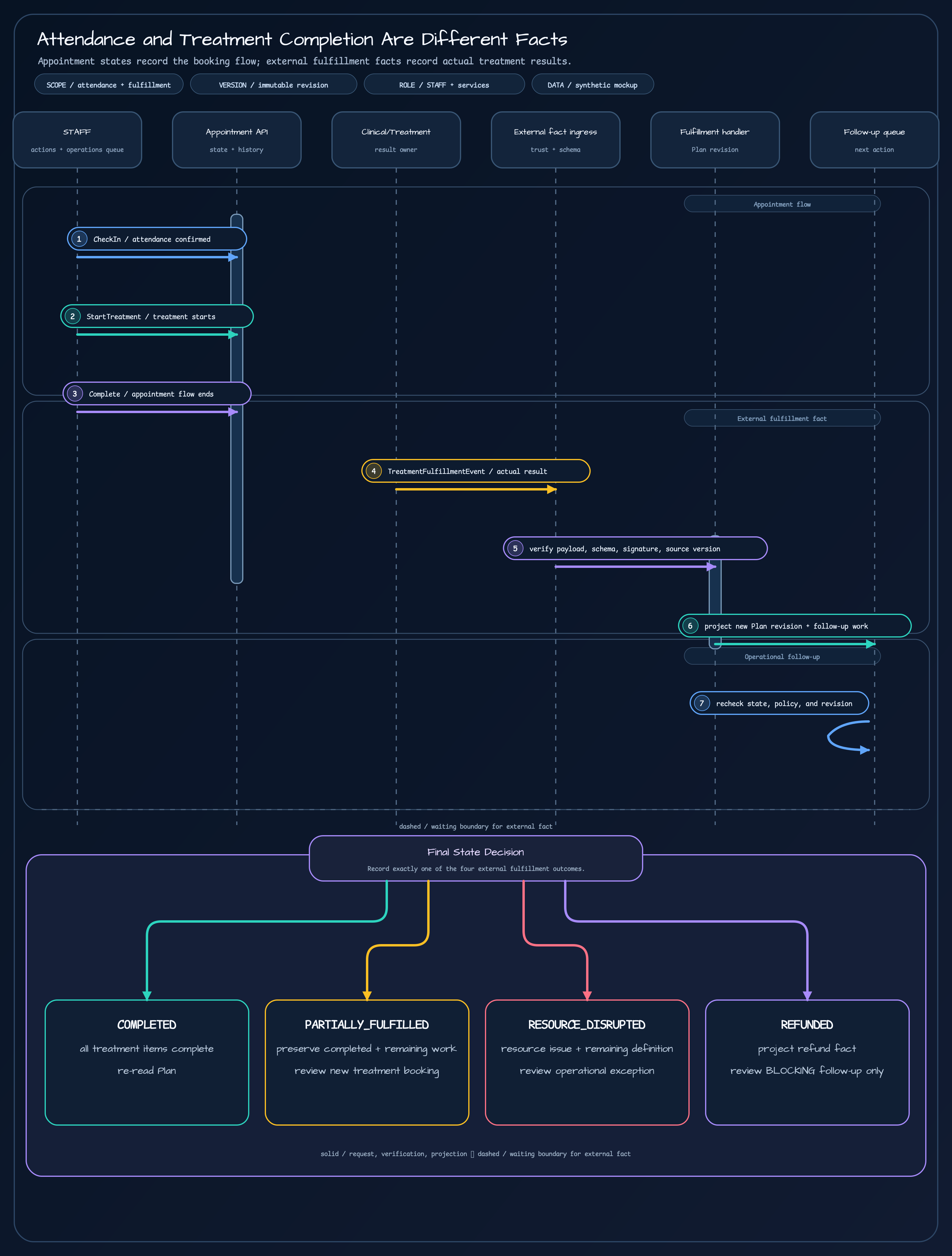
The sequence is:
- STAFF sends
CheckIn,StartTreatment, andCompleteto the Appointment API, which stores appointment state and history. - The clinical or treatment service sends the actual result as a
TreatmentFulfillmentEvent. ExternalFactEventIngressverifies payload size/depth, schema, metadata, hash, signature, and source version.TreatmentFulfillmentHandlerdoes not overwrite the original revision. It creates and activates a new immutable revision.- The STAFF follow-up queue shows remaining work and operational exceptions. After rechecking state, policy, and revision, it records the Final State Decision.
The only dashed line is the legend-defined boundary where an external fact is awaited. Relationship connectors stay solid, and every arrowhead uses the same color as its connector.
Partial fulfillment and resource disruption preserve the original item
Section titled “Partial fulfillment and resource disruption preserve the original item”The dangerous implementation for partial treatment or device disruption is to overwrite the original treatment item with “remaining treatment.” That loses what actually finished, which revision made the decision, and what needs a new appointment.
The current handler follows a stricter rule:
- Preserve the original treatment item with its completed status and provenance.
- Add remaining work using the producer-provided definition and a new treatment key. The appointment service does not guess the remaining treatment.
- Store a
RESOURCE_DISRUPTIONoperational exception together with the remaining item. - Leave the original Plan revision unchanged and activate a new revision.
- Let source version and idempotency rules converge duplicate or out-of-order events to the same result.
Booking the remaining item is an operational task of its own. Being able to compute an available time does not give the appointment service authority to decide clinical completion.
A refund is not another name for appointment end
Section titled “A refund is not another name for appointment end”Refunds belong in the flow, but the appointment service must not pretend to be the payment system.
- Payment or commerce owns refund amount, approval, and settlement.
- The appointment service records the
REFUNDEDfact and reason code, then calculates whetherBLOCKINGfollow-up work should be canceled. - Independent
NON_BLOCKINGfollow-up work can remain schedulable. - An additional purchase starts a new product contract and Plan instead of overwriting the existing Plan.
- Customer consultation and compensation belong to CRM/customer service queues, not to appointment state or treatment completion.
The refund screen and the appointment screen therefore do not share one “done” state. They connect their facts and show STAFF only the remaining work.
Failed external facts do not change the original
Section titled “Failed external facts do not change the original”Receiving an external event is not enough to change the Plan. The ingress verifies payload, schema, scope, hash, signature, and source version; a failed event is separated into quarantine or a retry-wait state.
The operations screen can show bounded next actions:
- Verification failed — preserve the original Plan.
- Source version gap — wait for the correct order.
- Duplicate event — result is unchanged.
- Retryable dependency failure — wait for the limited retry.
- Investigation required — check privacy, authority, or contract boundaries.
An invalid event leaves the active revision intact. Duplicate delivery is allowed, but the result is applied once, so a repeated event cannot reopen a completed item.
Keep current code, approved design, and operations mockup separate
Section titled “Keep current code, approved design, and operations mockup separate”| Boundary | What this article claims |
|---|---|
| Current implementation | Appointment CHECKED_IN → IN_PROGRESS → COMPLETED, TreatmentFulfillmentEvent, external fact verification, immutable Plan projection, full/partial/resource-disruption/refund facts, and replay/quarantine tests |
| Approved design | Separate ownership for appointment, Plan, treatment items, and resource allocation; an external completion fact contract; new remaining work and follow-up booking boundaries |
| Operations mockup | STAFF cards, action queue, state comparison, and Final State Decision. It is not real patient data or a production metrics API. |
| Follow-up scope | Clinic-specific clinical-record integration, patient communication and compensation policy, settlement screens, and real-data operations metrics |
This article does not propose that the appointment service know everything. It owns appointment state and history, verifies external facts, and projects them into a Plan. Clinical completion, refund amounts, and customer compensation remain with their owning services.
Four checks before STAFF closes a case
Section titled “Four checks before STAFF closes a case”Before closing one appointment, STAFF checks:
- Has the patient’s arrival been confirmed?
- Have the appointment workflow end and the actual treatment fulfillment fact both been read?
- Have new tasks after partial fulfillment, resource disruption, or refund been reviewed, including
BLOCKINGfollow-up? - Are the original Plan revision and event provenance still preserved?
When these four facts remain separate on the screen, STAFF can tell what to handle now and what to wait for. The screen should provide more clarity, not merely more rows.
Sources
Section titled “Sources”- Implementation 2: Appointment State Is More Than an Enum
- Implementation 9: Freezing Package Choices and Execution Order into a Visit Plan
- Operations 3: Appointment Recovery Starts with Impact Discovery
- Visit commitment API contract
- AppointmentState.kt
- AppointmentEvent.kt
- AppointmentStateMachine.kt
- TreatmentFulfillmentEvent.kt
- TreatmentFulfillmentHandler.kt
- ExternalFactEventIngress.kt
- TreatmentFulfillmentHandlerTest.kt
- Appointment Plan and Capacity design
- Visit commitment design
Comments
Leave a note or reaction with your GitHub account.