
bluetape4k-dependencies 1.3.0 in Practice Part 4: Input Boundaries and Resource Safety
Input edges are easy to underestimate. Small files, short strings, normal JSON, and hand-made test data all behave. Production sends something else:
- an 80MB TIFF
- an image with strange rotation metadata
- a scan where OCR may or may not work
- a 300,000-character search query
- a string crafted to bypass blockword checks
- text with broken encoding
Image: Check Memory Before OCR
Section titled “Image: Check Memory Before OCR”OCR examples are useful, but the first operational question is where the file enters memory.
// Convenient for samples. Risky for large uploads.val bytes = multipartFile.bytesval text = ocr.read(bytes)Large-file I/O should make size and streaming limits explicit before OCR options are tuned.
fun extractText(path: Path): OcrResult { return fileSystem.source(path).buffer().use { source -> imageReader .read(source) .resize(maxWidth = 2_000) .normalizeForOcr() .runOcr(language = "kor+eng") }}The request path needs limits at every stage.
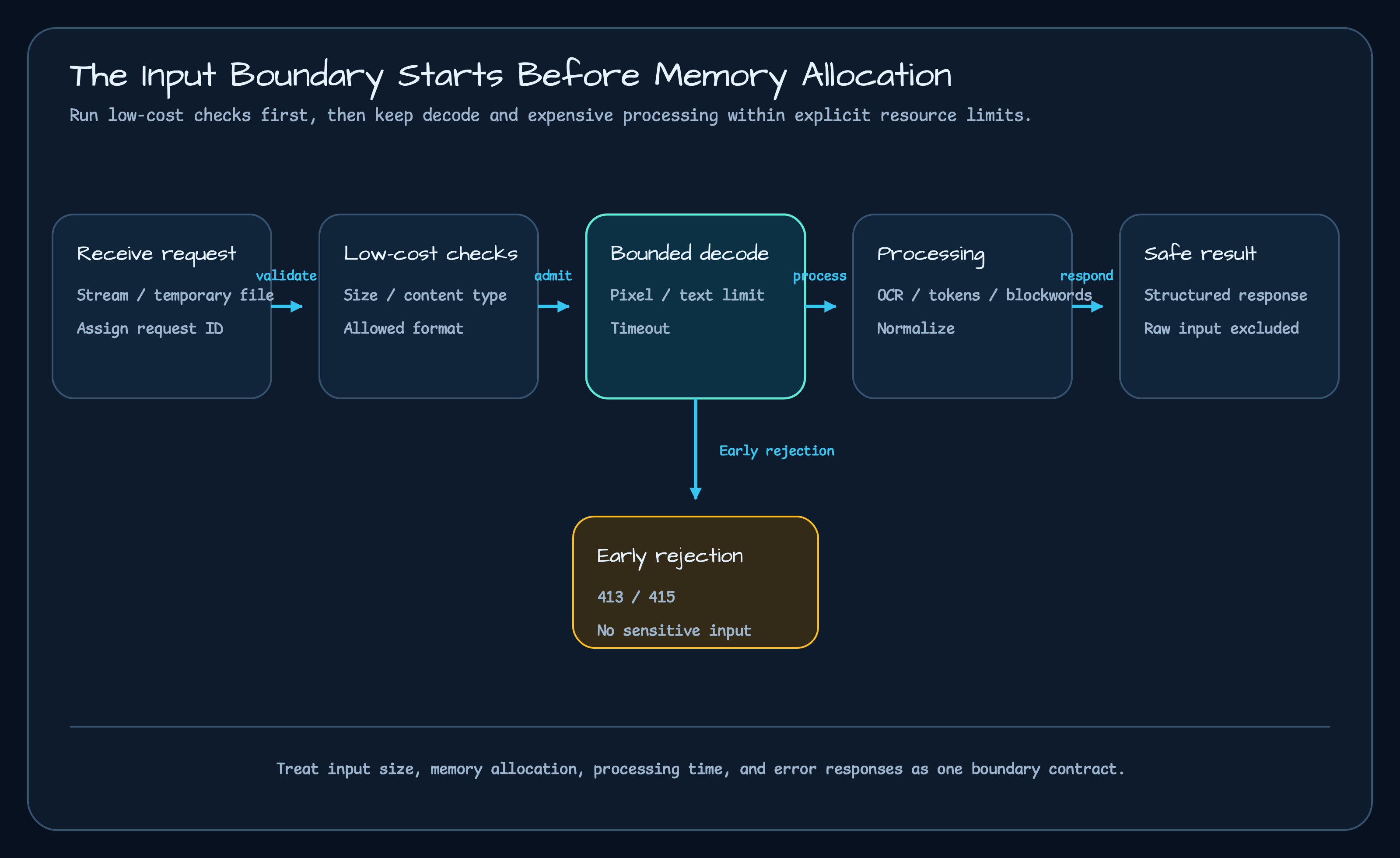
| Stage | Limit to apply |
|---|---|
| upload | request size, content type, timeout |
| temporary file | disk quota, cleanup policy |
| decode | supported formats, maximum pixel count |
| preprocess | resize limit, native runtime failure handling |
| OCR | language, timeout, empty-result handling |
API Responses Should Not Hide Failure
Section titled “API Responses Should Not Hide Failure”An OCR API should distinguish user input problems from server/runtime problems.
sealed interface OcrFailure { data object PayloadTooLarge : OcrFailure data object UnsupportedFormat : OcrFailure data object TimedOut : OcrFailure data class RuntimeFailed(val cause: Throwable) : OcrFailure}| Failure | HTTP status | Reason |
|---|---|---|
| file too large | 413 | The request exceeded an input limit. |
| unsupported format | 415 | The client must change the input. |
| OCR timeout | 504 or retryable failure | Processing exceeded its limit. |
| native runtime error | 500 | The server environment or native library needs inspection. |
Text: Put Length Limits Before Tokenizers
Section titled “Text: Put Length Limits Before Tokenizers”Tokenizers and language detectors are often attached behind HTTP endpoints. That makes input length a service policy, not only a library detail.
data class TextRequest(val text: String)
fun TextRequest.validate() {    require(text.length <= 10_000) { "text is too long" }}
The expensive work should run after validation.
val normalized = normalizer.normalize(request.text)val language = lingua.detect(normalized)val tokens = koreanTokenizer.tokenize(normalized)For search APIs, the empty or unresolved case is also a contract. Do not pretend language detection succeeded when it did not.
Blockword Checks Need More Than Pass/Fail
Section titled “Blockword Checks Need More Than Pass/Fail”A blockword API usually starts as a boolean:
val allowed = blockwordChecker.isAllowed(input)Production policy needs more questions:
- Which fields are checked?
- Is the original text logged?
- Does the user see which word matched?
- Are bypass strings normalized first?
- How does an administrator update dictionaries?
The safer shape carries a decision and a redacted response boundary.
data class BlockwordDecision( val allowed: Boolean, val matchedPolicy: String?, val reasonCode: String,)Input Boundary Checklist
Section titled “Input Boundary Checklist”| Boundary | Question |
|---|---|
| request size | What is the maximum size this endpoint accepts? |
| decode/tokenize timeout | Where does long processing stop? |
| memory | Where does input become a full ByteArray or String copy? |
| status code | How are user input problems separated from server problems? |
| error response | Does raw input leak into responses or logs? |
| normalization | Is OCR/text/blockword normalization required before checking? |
| observability | Can payload-too-large, timeout, and validation failures be seen as metrics? |
Closing
Section titled “Closing”dependencies 1.3.0 makes Image and Text APIs more usable, but the important lesson is still at the service edge.
Before OCR quality or tokenizer accuracy, decide how large input can be, when processing stops, what gets logged, and
which failure belongs to the client versus the server.
Series
Section titled “Series”If you want the first import path, start with the usage guide.
- bluetape4k-dependencies 1.3.0 in Practice Part 1: Features and Cleanup
- bluetape4k-dependencies 1.3.0 in Practice Part 2: Composing Services
- bluetape4k-dependencies 1.3.0 in Practice Part 3: Production Signals
- bluetape4k-dependencies 1.3.0 in Practice Part 4: Input Boundaries
Comments
Leave a note or reaction with your GitHub account.