
[Operations 8] Data Boundaries for Running Multiple Clinics in One Appointment Service

When several clinics share one appointment service, it is tempting to read data by clinicId alone. That is not enough. Two
different tenants may contain the same numeric clinicId, and appointmentId or eventId should not be treated as a globally
meaningful identifier without its scope. If the scope verified at the request boundary is not carried into cache, solver, SSE,
event, and notification work, clinic A’s appointment can appear on clinic B’s screen or enter clinic B’s background job.
In this article, a tenant is the service-operations unit that groups clinics and their policies. A clinic owns appointment resources inside that tenant. For STAFF, the first question on an operations screen is not only “how many?” but also “for which tenant and which clinic is this number valid?”
The conclusion is straightforward:
Tenant selection starts with the
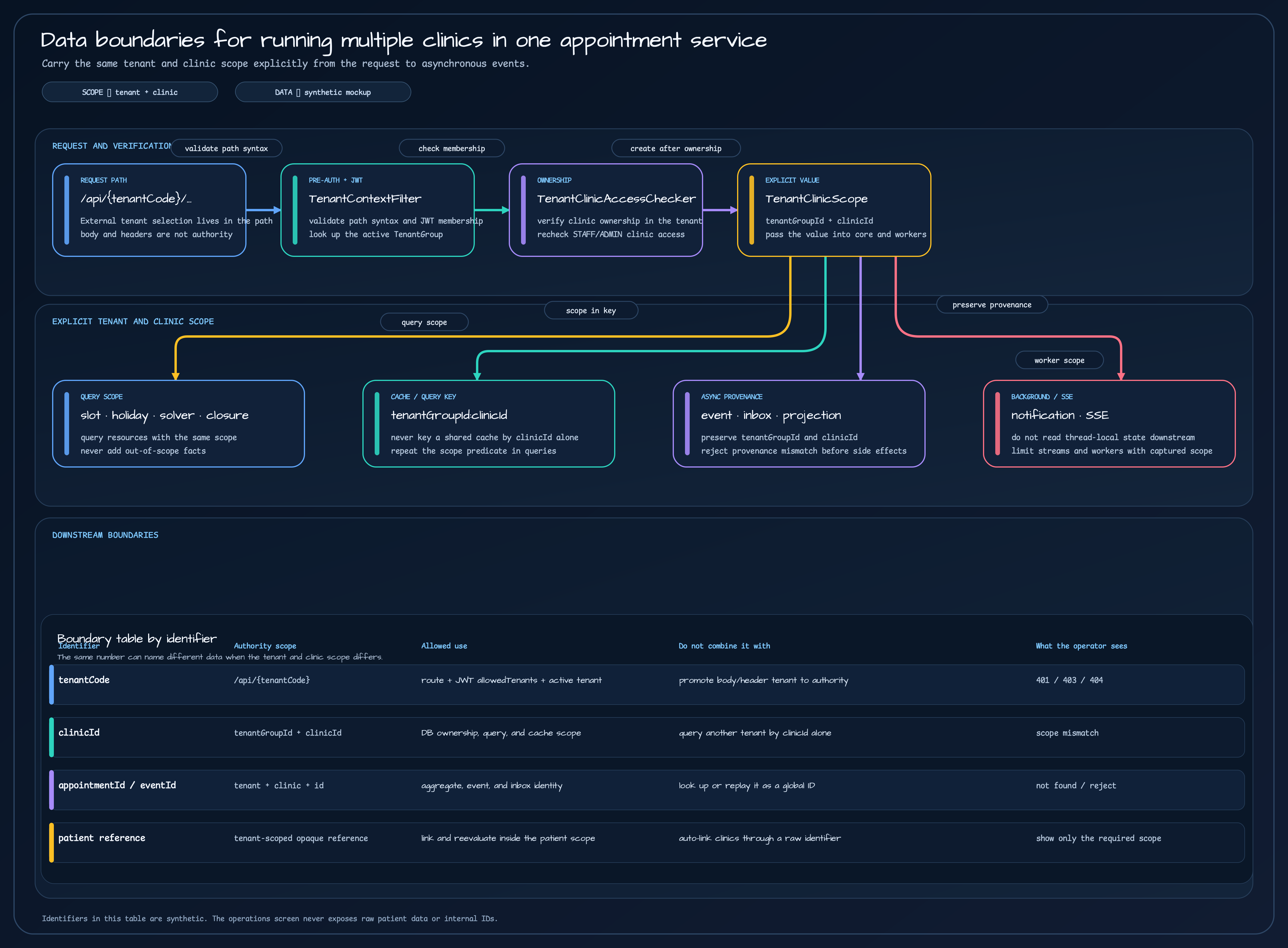
/api/{tenantCode}path and JWTallowedTenantsmembership. The service then verifies the active tenant and clinic ownership in the database. Once that check succeeds, it creates a(tenantGroupId, clinicId)TenantClinicScopeand passes it explicitly to downstream services. Cache keys, query predicates, event envelopes, inboxes, and projections preserve the same scope. The current dashboard validates tenant and clinic first, but its source of truth is still the current appointment aggregation.
The diagram and operations screen below are synthetic design visuals, not captures containing real clinic names, patient data, or operational metrics. The article separates what is visible in the current source from approved design, rollout evidence, and the next hardening steps.
clinicId alone does not define an appointment boundary
Section titled “clinicId alone does not define an appointment boundary”Seeing clinicId as a database surrogate key does not create permission for an external request or an asynchronous message. The
service must first answer: “Which tenant owns this clinic?” Only then can doctors, treatments, equipment, and appointments be
treated as resources in one scope.
| Identifier | Boundary checked first | Allowed use | Interpretation to reject |
|---|---|---|---|
tenantCode | /api/{tenantCode} + JWT allowedTenants + active tenant | Routing input that selects the request tenant | Promoting a tenant value from the body or header into authority |
clinicId | tenantGroupId + clinicId | Database ownership, query predicates, and cache namespace | Looking up another tenant’s clinic by clinicId alone |
appointmentId · eventId | Tenant + clinic + identifier | Lookup inside the aggregate, event, or inbox scope | Replaying it as a global ID or showing it in an unscoped operations queue |
| Patient reference | Opaque reference created inside the tenant | Linking and reevaluating records in the same patient scope | Automatically joining clinics by a raw phone number or email |
TenantClinicScope is the code-level form of this table. It is not an authentication object. It is a value that carries the
verified data boundary after the HTTP layer has checked tenant and clinic ownership.
val tenant = tenantClinicAccessChecker.verifySchedulingResources(    tenantCode = tenantCode,    clinicId = clinicId,    doctorId = doctorId,    treatmentTypeId = treatmentTypeId,    equipmentId = null,)
val query = SlotQuery(    scope = TenantClinicScope(tenant.id, clinicId),    doctorId = doctorId,    treatmentTypeId = treatmentTypeId,    date = date,)
SlotController checks resource ownership before placing the scope in SlotQuery. The order matters: if raw IDs reach the solver
before the boundary is checked, facts from outside the requested scope can enter the calculation.
Confirm tenant authority at the request path
Section titled “Confirm tenant authority at the request path”The current external tenant selector is /api/{tenantCode}/.... tenantCode is routing input supplied by the caller; it is not
proof of permission. The authority check has several distinct steps:
- Before reading the JWT,
TenantPathValidationFilterchecks the raw URI and servlet path. Percent escapes, path parameters, duplicate separators, traversal segments, reserved roots, and non-canonical slugs end as privacy-safe 404 responses. - The JWT parser verifies the signature, standard claims, and the closed claim set, then builds a principal with
allowedTenantsandallowedClinicIds. TenantContextFilterlooks up the activeTenantGroup. A missing tenant is 404; a tenant absent from the principal’sallowedTenantsis 403.- The controller and
TenantClinicAccessCheckerverify clinic ownership and the STAFF/ADMIN clinic allow-list again. - Only after those checks does the service create a
TenantClinicScopefrom the verified tenant ID and pathclinicId.
Failure results must have meanings that both operators and API consumers can distinguish.
| Situation | Result | What the screen or log may retain |
|---|---|---|
| JWT is missing or fails validation | 401 | Stable authentication-failure code and correlation ID |
Path tenant is not in allowedTenants | 403 | Reason code that the requested boundary is not allowed |
| Authenticated tenant is missing or inactive | 404 | A not-found result that does not explain existence |
| Path is malformed or encoded ambiguously | 404 before authentication | Request trace information without raw token or internal ID |
| Tenant lookup storage fails | Privacy-safe internal error | Correlation ID and a sanitized tenant code |
Putting tenantGroupId, clinicId, or X-Tenant-Code in a body or header does not change this boundary. Unknown DTO fields are
rejected with 400 under the strict deserialization contract, and a known value that conflicts with the path ends as a scope error.
“Ignored” means “not used as authority”; it does not mean that arbitrary fields are silently accepted.
Pass TenantClinicScope as a value to downstream work
Section titled “Pass TenantClinicScope as a value to downstream work”TenantContext is a helper for the request boundary. Core code, the solver, background workers, and event consumers must not read
thread-local context to reconstruct the scope. A virtual thread or asynchronous consumer may run after the request has finished,
or it may have no request context at all.
TenantClinicScope holds positive tenantGroupId and clinicId values and exposes the tenantGroupId:clinicId form through
cacheKey(). Passing the value created by the controller into the next boundary leaves the scope in the call contract.
| Downstream work | Why it needs the same scope | Failure when scope is missing |
|---|---|---|
| Holiday · slot · solver | Calculate clinic holidays, hours, resources, and appointment facts as one set | Another tenant’s holiday or doctor schedule enters the candidate set |
| Closure · reschedule · SSE | Read and change impacted appointments and candidates in one clinic | Another clinic’s appointment is read by a stream or rescheduling job |
| Event log · outbox · inbox | Preserve where a message was produced | The same event ID is reused in another consumer boundary |
| Notification | Limit direct delivery and worker permits to the real scope | A provider call is sent for the wrong clinic |
| Statistics projection | Separate date/status buckets and aggregate locks by scope | Dashboard numbers are merged across clinics |
An SSE stream follows the same rule: the controller captures the scope as a value, and a virtual thread does not look up
TenantContext again. When a stream reconnects, it rechecks active appointments in the same scope.
Check the same boundary in caches and queries
Section titled “Check the same boundary in caches and queries”A cache can outlive the database request, so fixing only the query predicate is not enough. If Redis uses clinicId=23 as its key,
the namespace no longer expresses which tenant owns that clinic. The current common key format serializes the two positive IDs as
${tenantGroupId}:${clinicId}.
Queries repeat the same rule. ClinicRepository.findByIdAndTenant verifies clinic ownership with tenant and clinic together, and
doctor, treatment, equipment, and holiday repositories apply the same scope predicate. A previously checked scope must not make a
downstream query trust a clinic-only ID.
The dashboard needs an especially careful reading of the current implementation:
DashboardStatsControllerfirst verifies tenant and clinic on/api/{tenantCode}/admin/stats.- The public methods in
DashboardStatsServicestill acceptclinicIdtoday. Therefore, controller validation alone does not prove that every query inside the service has an explicit tenant boundary. AppointmentStatsRepository, which checks current appointment state andAppointments.appointmentDate, is the source of truth.- The tenant-and-clinic-aware statistics projection repository is a supporting read model. Because an event envelope’s
occurredAtdoes not prove the actual appointment date,projectionRowsremains fail-closed instead of becoming an automatic replacement.
In other words, “the projection table has tenant and clinic columns” is not the same statement as “every dashboard aggregation has been safely moved to the projection.” The operations screen should show the distinction and use the current appointment aggregation as the source of truth until the projection is ready.
Preserve provenance across asynchronous boundaries
Section titled “Preserve provenance across asynchronous boundaries”AppointmentEventEnvelope carries eventId, occurredAt, tenantGroupId, clinicId, aggregateId, and its payload. The consumer
runtime compares the expected scope with the envelope scope before starting the inbox. A mismatch is isolated without invoking a
handler or provider.
This is more than adding one tenant field to an event payload:
- The outbox row commits with the appointment transaction.
- The relay claims the row with a lease and fencing, then preserves the event scope in the envelope.
- Each consumer checks inbox deduplication with its
logicalConsumerIdand event identity. - The handler transaction checks again that projection and notification side effects belong to the same scope.
- Replay and backfill run only after the target tenant, clinic, and consumer are confirmed with approval data.
The replay screen should not copy raw payloads or patient names either. STAFF needs the scope, stable reason code, event fingerprint, current processing state, and next action—not the original personal data.
Do not use patient identifiers as a cross-clinic join key
Section titled “Do not use patient identifiers as a cross-clinic join key”The business fact that one person may visit several clinics is different from having permission to merge their accounts across clinics. Seeing the same phone number, email, or external CRM identifier does not authorize the appointment service to merge patient records across tenant boundaries.
The current design takes this direction:
- Patient authentication and login identity are managed inside the tenant boundary.
- Profile-driven appointment reevaluation uses
tenantGroupId,clinicId, and an opaquepatientReferenceFingerprinttogether. - The fingerprint is not a value for recovering the original identifier, and an identical string in another tenant is not joined automatically.
- STAFF screens and metrics do not display patient names, phone numbers, email addresses, raw identifiers, or the fingerprint.
If cross-clinic patient unification is truly required, it belongs to an explicit cross-tenant identity contract owned by a CRM or patient-management service, with consent and audit records. The appointment service should not solve that problem by matching strings while that contract does not exist.
The STAFF screen must show scope and the next action
Section titled “The STAFF screen must show scope and the next action”When an operator sees a blocked request, they do not need more raw data first. They need the selected tenant and clinic, whether the block is a scope mismatch or an authorization failure, and whether the next step is to inspect, verify again, or record the block.
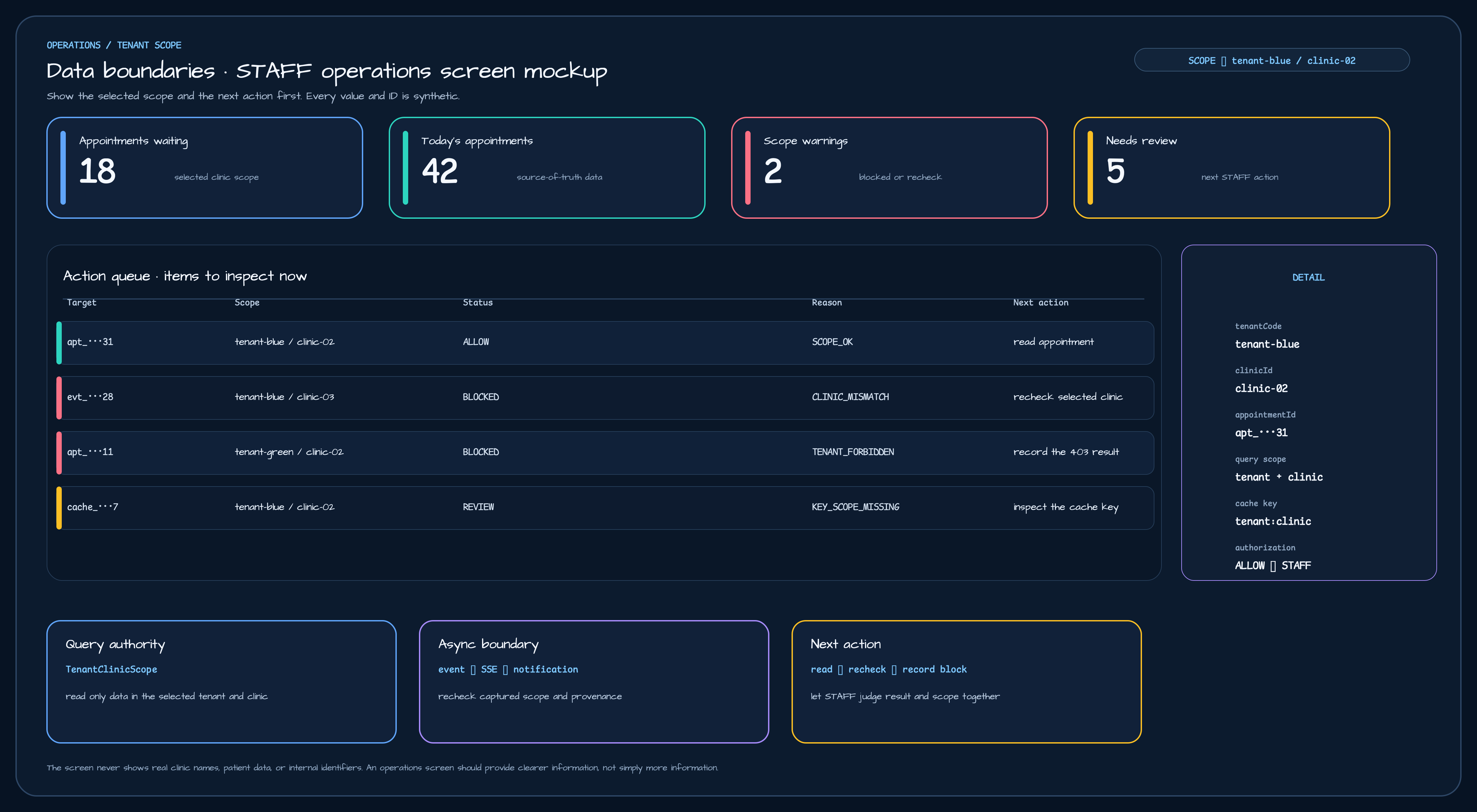
This is a synthetic operations screen. The action queue pairs status and reason code with the next task for STAFF. It never mixes a raw appointment from another tenant or clinic into the current view.
The screen is arranged in this order:
- The scope badge at the top fixes the active tenant and clinic.
- Metric cards separate waiting appointments, today’s appointments, scope warnings, and items needing review.
- The action queue keeps
ALLOW,BLOCKED, andREVIEWin one table while showing scope, reason, and next action together. - The detail panel exposes only
tenantCode,clinicId,appointmentId, query scope, cache key, and the authorization result. - The bottom cards remind the operator of the query source, asynchronous boundary, and next task.
If an appointment title or patient detail from another clinic appears in the TENANT_FORBIDDEN row, isolation has already failed.
The screen should show the block and a stable reason code while hiding details that could reveal whether the record exists.
Separate current implementation from the next step
Section titled “Separate current implementation from the next step”| Status | What this article can verify |
|---|---|
| Confirmed in the current source | Tenant path validation, JWT allowedTenants, active tenant lookup, clinic ownership checks, TenantClinicScope, scope propagation in slot, reschedule, and resource controllers, event envelope and consumer provenance checks, and tenant-and-clinic statistics projection schema |
| Current dashboard source of truth | Tenant and clinic pre-checks in DashboardStatsController plus current appointment aggregation in AppointmentStatsRepository; the projection is not an automatic substitute because it cannot prove appointment date |
| Approved design | Passing (tenantGroupId, clinicId) into holiday, slot, solver, closure, SSE, legacy event, and notification queries, with the same tuple in cache keys and direct-delivery permits |
| Awaiting rollout evidence | Real multi-tenant traffic, production broker/DB/SSE environments, migration backfill, cross-tenant negative tests, and recovery exercises |
| Next hardening | Narrowing clinic-only service and query APIs to scope inputs, and adding missing-scope tests to every cache, repository, and background entry point |
Introducing TenantClinicScope does not make every caller safe by itself. A public overload without scope, a clinic-only cache key,
or a tenant-free background job still makes omissions hard for the compiler and review to catch. The design therefore does not treat
thread-local interceptors, one schema per tenant, or a composite primary-key redesign as universal fixes. It changes the call
contracts together with query, cache, and event boundaries.
Five checks before STAFF closes an action queue item
Section titled “Five checks before STAFF closes an action queue item”- Do the tenant and clinic at the top of the screen match the appointment being handled?
- Did the server verify path tenant membership and clinic ownership?
- Do the query predicate and cache key both contain
tenantGroupId + clinicId? - Do the event, inbox, projection, and SSE work preserve the same scope and provenance?
- Does the screen clearly say whether the next action is inspect, verify again, retry, or record the block?
When these five checks are visible, STAFF can answer both “which clinic owns this data?” and “why should I take this action now?” Operating multiple clinics in one service is not just adding a tenant column. It is preserving the boundary from the request all the way to the final query and operations screen.
Source material
Section titled “Source material”- Operations 7: How Appointment Results Reach External Systems and Statistics
- Operations 6: Why Notifications and Reminders Are Separate Services
- Operations 4: Profile Changes Do Not Rewrite Confirmed Visit Commitments
- Tenant authority design
- Tenant query isolation design
TenantClinicScope.ktTenantPathValidationFilter.ktTenantContextFilter.ktTenantClinicAccessChecker.ktAppointmentMessagingContracts.ktAppointmentConsumerRuntime.ktAppointmentStatsProjectionRepository.ktDashboardStatsService.kt
Comments
Leave a note or reaction with your GitHub account.