
[Implementation 3] Computing Availability from Clinic-Specific Hours and Resources
Part 2 treated appointment state as a business contract with allowed transitions and history. Even with the correct state model, one question remains unanswered.
Can this clinic really see this patient at 10 a.m.?
An empty cell at 10 a.m. is not enough. The clinic may be open while the doctor starts at 11. The doctor’s calendar may be free while a one-hour treatment crosses lunch. Concurrent-patient capacity may already be full, or required equipment may be under maintenance.
This article avoids one enormous conditional and models availability as a pipeline that steadily narrows time ranges. It starts from business requirements, follows them into implementation and tests, then shows how equipment maintenance and failure extended the original contract.
Find Bookable Time, Not Empty Time
Section titled “Find Bookable Time, Not Empty Time”Each clinic operates differently. One clinic may accept starts every 30 minutes and close for lunch. Another may use 15-minute starts and open on public holidays. Inside one clinic, availability still changes by doctor, treatment, and equipment.
At minimum, the calculation needs these inputs.
| Scope | Information that affects availability |
|---|---|
| Clinic | Time zone, weekday hours, breaks, holiday policy, full and partial closures, start interval, default concurrent-patient capacity |
| Doctor | Owning clinic, provider type, weekday schedule, full and partial absences, doctor-specific capacity |
| Treatment | Duration, required provider type, treatment-specific capacity, required equipment and quantity |
| Equipment | Owned quantity, concurrent reservations, maintenance and failure intervals |
The appointment start interval and treatment duration are different settings. A clinic may expose starts every 30 minutes while one examination lasts 60 minutes. Candidates begin at 10:00, 10:30, and 11:00, but each candidate must reserve its doctor and equipment for a full hour.
Time also needs a location. Each clinic owns a time zone, and its hours and doctor schedules are interpreted as local dates and times. Monday at 9 a.m. in Seoul and Monday at 9 a.m. in New York are different instants. External exchanges and cross-clinic comparisons require time-zone conversion, while one clinic’s schedule calculation remains in that clinic’s local time.
Reject Whole-Day Conditions First
Section titled “Reject Whole-Day Conditions First”The service does not need to evaluate every rule for every candidate. Conditions that block the entire day can stop the calculation early.
If the clinic does not open on holidays and the requested date is a holiday, the answer is immediately empty. The same applies to a full-day closure, a weekday with no clinic hours, a doctor with no schedule, or a full-day doctor absence.
holiday policy · full-day closure · clinic hours · doctor availability → any whole-day blocker returns no slots → otherwise calculate the clinic and doctor's shared timeThis is more than a performance shortcut. It lets product and engineering distinguish “the clinic cannot accept any appointments today” from “this one period is unavailable.”
Subtract Downtime from the Shared Range
Section titled “Subtract Downtime from the Shared Range”For an operating day, the calculation first intersects clinic hours with doctor hours. If the clinic opens from 09:00 to 18:00 and the doctor works from 10:00 to 16:00, the initial range is 10:00–16:00.
Breaks, partial closures, and partial doctor absences are then subtracted. One long range may become several fragments.
TimeRange.kt
keeps that operation in computeEffectiveRanges.
val effectiveRanges = computeEffectiveRanges( clinicOpen = opHours.openTime, clinicClose = opHours.closeTime, doctorStart = doctorSchedule.startTime, doctorEnd = doctorSchedule.endTime, breakTimes = breakTimeRanges, partialClosures = partialClosureRanges, doctorAbsences = doctorAbsenceRanges,)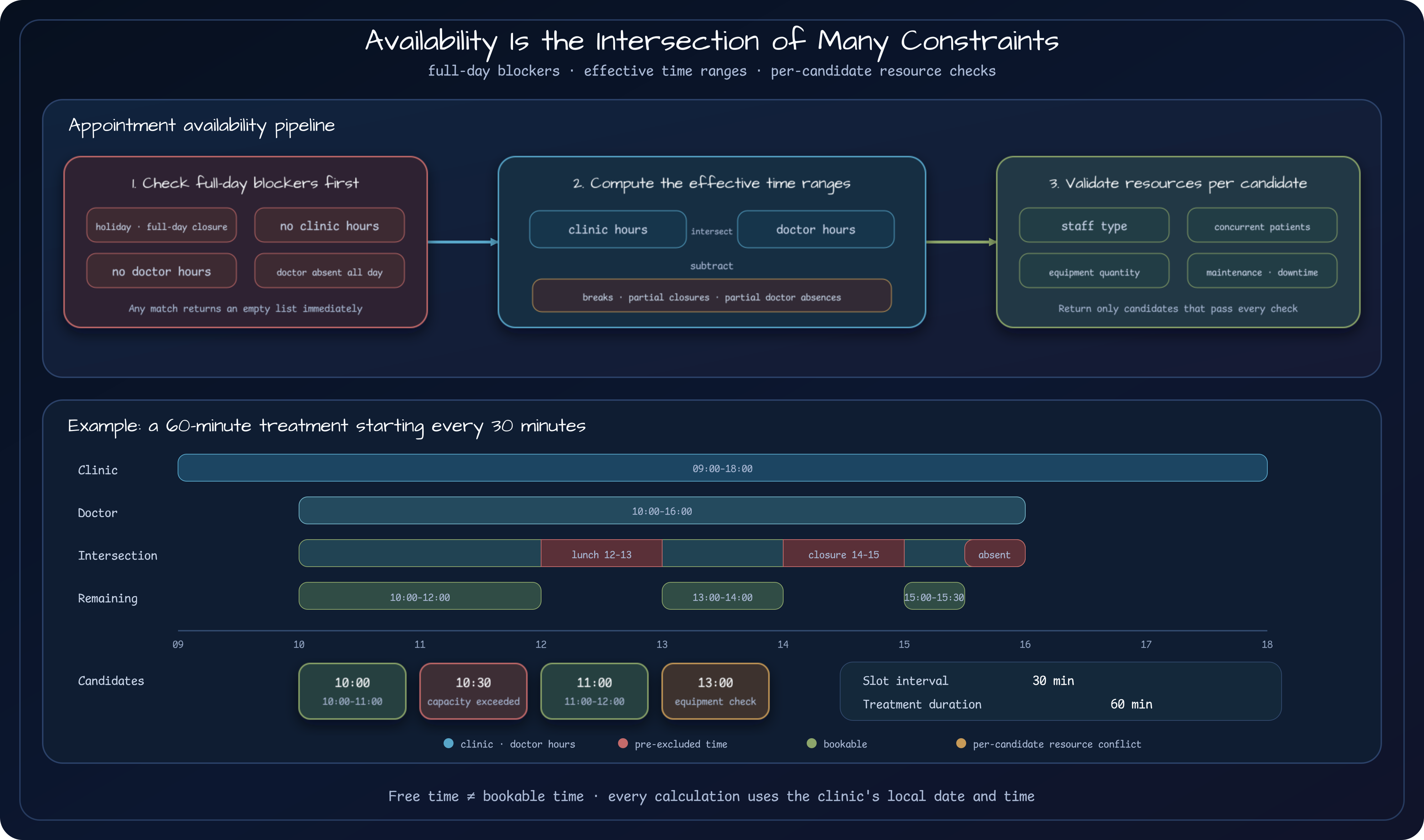
The pipeline explains how time narrows. At runtime, the API, calculation service, clinic and doctor data, existing appointments, and equipment collaborate in the following order. Whole-day blockers stop before resource queries; candidate-specific reservations and equipment are checked only after candidates exist.
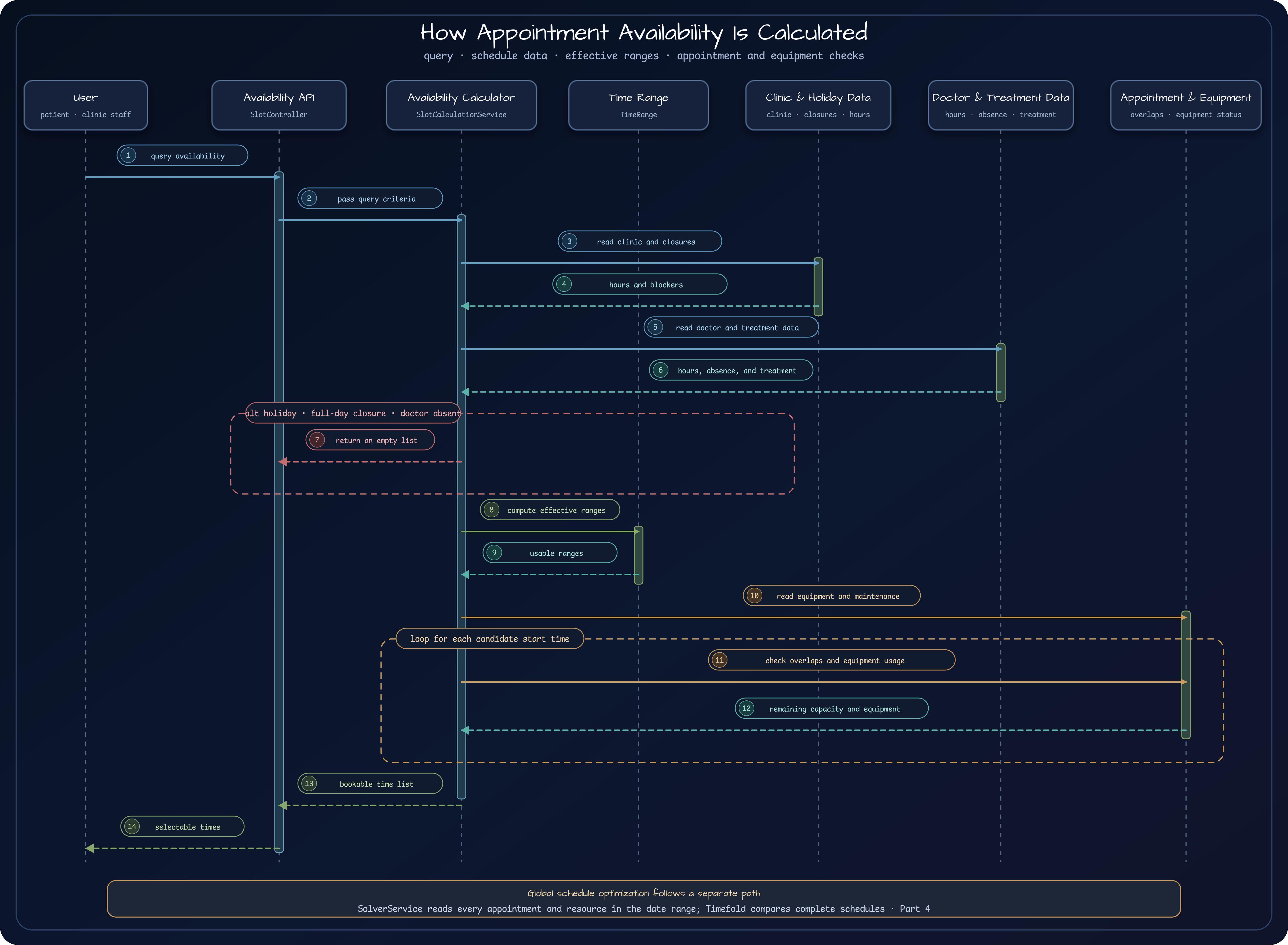
This layering gives every new rule a home. Lunch divides effective time ranges. Equipment maintenance rejects individual
candidates. Keeping those rules out of one flat chain of if statements makes the impact of requirement changes easier
to locate.
Generate Starts While Guaranteeing Treatment Duration
Section titled “Generate Starts While Guaranteeing Treatment Duration”SlotCalculationService generates candidates inside each effective range. Starts advance by the clinic’s slot interval, while end times use the treatment duration.
for (range in effectiveRanges) {    var current = range.start    while (true) {        val slotEnd = current.plusMinutes(duration.toLong())        if (slotEnd > range.end) break
        slotCandidates.add(TimeRange(current, slotEnd))        current = current.plusMinutes(clinic.slotDurationMinutes.toLong())    }}
Generation stops when a candidate would cross the range boundary. If lunch begins at noon and treatment lasts 60 minutes, an 11:30 start is excluded. A free start time does not help if the doctor and resources are unavailable before the treatment can finish.
An explicitly requested duration overrides the treatment default. The selected doctor’s provider type must also match the type required by the treatment. Empty-calendar search cannot express these business rules.
Check Patient Capacity and Equipment per Candidate
Section titled “Check Patient Capacity and Equipment per Candidate”A candidate that passes the time checks may still fail on resources. The service counts overlapping appointments and compares them with the applicable concurrent-patient limit.
The treatment-specific setting has highest priority, followed by the doctor’s setting and then the clinic default. A clinic may normally treat two patients at once while one procedure permits only one. This fallback order is a policy where a more specific rule overrides a general one, not just null handling.
Equipment-based treatments add two checks.
- Does the candidate overlap equipment maintenance or failure?
- After subtracting equipment used by overlapping appointments, is enough quantity still available?
Owning three devices does not mean three are always usable. If one is under maintenance and two are reserved, no new appointment can be accepted. A successful result includes start and end time plus available equipment and remaining concurrent capacity so the booking step can choose actual resources.
The current implementation completes the single required equipment type case. A treatment may be linked to several
equipment records, but SlotCalculationService keeps a candidate when any linked record has remaining quantity. In the
other direction, one linked record that overlaps downtime rejects the whole candidate. Those two decisions mean
different things depending on whether the treatment needs every device (AND) or may choose one alternative (OR).
Supporting multiple equipment types therefore requires an explicit relationship and required quantity. The availability-set and downtime checks must implement the same meaning, and tests must cover two or more linked equipment types together. The current single-equipment tests do not prove that broader contract.
Test Intersections, Not Just Individual Rules
Section titled “Test Intersections, Not Just Individual Rules”One happy-path test is not enough. Every rule may work independently while their boundaries still expose invalid slots.
SlotCalculationServiceTest covers scenarios such as:
- baseline candidates inside clinic hours;
- lunch, partial closures, and partial doctor absences;
- doctor hours narrower than clinic hours;
- a 60-minute treatment with 30-minute start intervals;
- holiday policy, full-day closures, and full-day absences;
- concurrent-patient and equipment quantity limits;
- candidates overlapping equipment downtime.
The 60-minute-treatment scenario is especially useful. Assertions must check each candidate’s start and end, not only the number of results, or the service can accidentally expose appointments that run into a break.
Equipment Ownership Is Not Equipment Availability
Section titled “Equipment Ownership Is Not Equipment Availability”The first equipment rule focused on whether the clinic owned the required type and had unused quantity at that time. Real clinics also take owned equipment offline for maintenance or failure.
The requirement became:
A treatment that requires equipment must avoid equipment maintenance and failure intervals as well as quantity limits.
The implementation connected EquipmentUnavailabilityService to slot calculation and excluded overlapping candidates. Tests cover downtime that intersects only part of a candidate.
One connection remains open in global optimization. The solver domain contains EquipmentUnavailabilityFact and the
H11 constraint, but
SolverService
does not load downtime facts into ScheduleSolution. A global run through this service therefore does not yet enforce
equipment maintenance or failure windows. Writing a constraint and supplying its problem facts at the execution entry
point are separate completion criteria.
This is the important path for follow-up requirements: adding a table is not completion. Trace the new fact through calculations, APIs, tests, and optimization policy.
Single-Appointment Availability Is Not Global Optimization
Section titled “Single-Appointment Availability Is Not Global Optimization”This service quickly answers which candidates work for one clinic, date, doctor, and treatment. That fits a patient screen. It does not answer how to arrange many patients, doctors, and limited devices into the best daily schedule.
The fact that 10 a.m. is available for one patient does not mean assigning it now is the best global choice. A first-fit sequence can consume the only space for a longer treatment or fragment a device’s remaining availability.
availability calculation  → quickly list valid candidates for one clinic, date, doctor, and treatment
global schedule optimization  → compare combinations of appointments and resources against operating rules and goals
Part 4 examines this boundary and decides which problems should be handed to Timefold Solver.
Explore the Implementation
Section titled “Explore the Implementation”- Core appointment module: Clinic, doctor, treatment, equipment, and slot-calculation models.
- Slot calculation service: Applies whole-day, range, capacity, and equipment rules in stages.
- Time range model: Intersects time ranges and subtracts unavailable intervals.
- Availability API: Accepts clinic, doctor, treatment, and date inputs.
- Clinic time-zone service: Converts between clinic-local and external time.
- Slot calculation tests: Covers intersecting breaks, closures, absences, capacity, and equipment rules.
Comments
Leave a note or reaction with your GitHub account.