
[Operations 1.2] A Waitlist Dashboard Should Tell Staff What to Do Next

The clinic team starts the morning shift. Two waitlist offers are still in OFFERED; one is close to its expiry time. The notification provider has not answered for another offer, leaving deliveryState=UNKNOWN. A hold attached to a vacancy created by a cancelled appointment is also still present and waiting for reconciliation or recovery.
If the screen only lists waitlist entries and offers in time order, staff must answer four questions again:
- Should the offer closest to expiry come before the offer whose delivery result is unknown?
- Can an unknown notification result be treated as an appointment confirmation?
- Is the current version still valid before staff send a confirmation command?
- Do expiry cleanup and hold recovery continue when operations are disabled for a clinic?
A list shows current state; it does not decide the next action. The operations screen in this article does not replace the list. It summarizes the clinic-level state first, orders the items that need attention in an action queue, and connects the selected item’s evidence to the commands that the current STAFF role may run.
A state list and an operational decision can share a screen without being the same thing
Section titled “A state list and an operational decision can share a screen without being the same thing”The previous article divided the waitlist into the WAITING → OFFERED → ACCEPTED | DECLINED | EXPIRED | WITHDRAWN state machine. This operations screen does not recalculate those states. It reads the current state returned by the API and presents a separate order for staff review.
The common path for the current STAFF API is:
/api/{tenantCode}/clinics/{clinicId}/waitlistGET /entries, GET /offers, and GET /offers/{offerRef} read current waitlist entries and offers. GET /offers/{offerRef}/decision reads the decision result. List endpoints use bounded keyset pagination: the server issues an opaque cursor based on the last sort key of the previous page, so one request cannot expand into an unbounded scan. The default is 50 items and the maximum is 100. The API response is the source data for the screen; the action queue is a separate view that orders that data for operational review.
Mixing those responsibilities creates a dangerous shortcut. OFFERED does not mean “the confirmation button is safe to press now.” The command still has to recheck version, expiresAt, the current slot occupancy, and the validity of the policy decision.
The top metrics summarize the clinic, not individual patients
Section titled “The top metrics summarize the clinic, not individual patients”Before reading patient rows, staff need to know the clinic-level state. The top metrics use bounded, low-cardinality values from the scheduler and health indicators; they do not put patient or offer identifiers into metric labels.
| Metric | What staff read | Implementation name |
|---|---|---|
| Active offers | Offers that are still in OFFERED | appointment_waitlist_active_offers |
| Active holds | Resource holds that have not been released | appointment_waitlist_active_holds |
| Expired backlog | Items past their expiry time that have not reached a terminal state | appointment_waitlist_expired_backlog |
| Age of the oldest open vacancy | The longest elapsed time since a vacancy opened | appointment_waitlist_oldest_vacancy_seconds |
| Operational readiness | Clinic-level readiness across adapters, schema, policy, and outstanding work | UP / DEGRADED / OUT_OF_SERVICE |
WaitlistDeliveryMetrics does not accept tenant, member, waitlist-entry, or offer IDs as tags. Adding those identifiers would make time-series cardinality grow with clinic size and turn an operational metric into a patient lookup path. Staff open a scoped opaque reference from the action queue for item details; the top metrics describe the clinic as a whole.
Operational readiness follows the same boundary.
| State | Decision condition | Meaning on the operations screen |
|---|---|---|
UP | Adapters, schema, and active policy are ready; the oldest open vacancy is under two minutes old; no job has failed | New offer work is within the normal range for review |
DEGRADED | Provider failure rate is at least 5%, the oldest open vacancy is at least two minutes old, or a delivery result is unknown | Inspect the cause and the affected item before sending a new command |
OUT_OF_SERVICE | A required dependency or policy is missing, the oldest open vacancy is over five minutes old, a job failed, or expired backlog exceeds 100 items | Do not start automated offer work |
These values do not prove that an individual offer succeeded. DEGRADED does not mean every offer must be declined, and UP does not permit staff to confirm an old version without rechecking it. Readiness is a clinic-level signal for reviewing new offer work. The final decision for an individual command comes from rechecking the offer and resources.
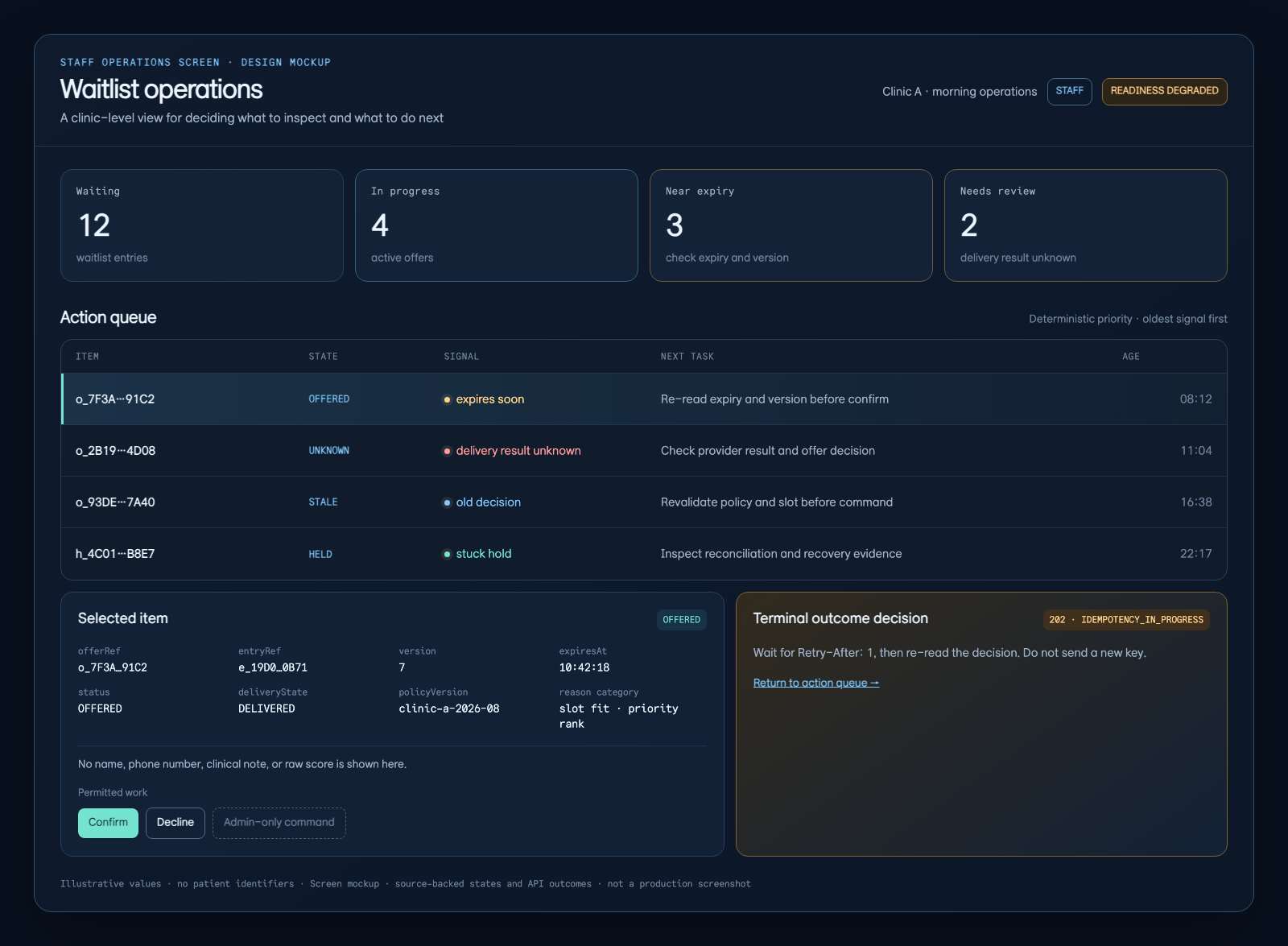
This is a screen design mockup, not a production capture. The values are illustrative; the reading order is the point: clinic metrics and readiness first, then the action queue, selected evidence, permitted work, and the terminal outcome decision.
The action queue turns state into the next thing to inspect
Section titled “The action queue turns state into the next thing to inspect”An action-queue row must not stop at one status badge. It shows both “what state is this in?” and “what should staff check first?” This screen handles four signals.
| Queue signal | First action | Why it is not automatic success |
|---|---|---|
| Near expiry | Read expiresAt and the current version again before deciding whether confirmation is possible | The offer may already be expired when the command runs and return 409 OFFER_EXPIRED |
deliveryState=UNKNOWN | Read the provider result and offer state again | An unknown delivery result does not prove acceptance or appointment creation |
| Stale decision | Revalidate policyVersion, slot, and the offer version together | An old decision cannot be applied as if it were new |
| Stuck hold | Inspect reconciliation or recovery results for the hold, offer, and vacancy, including the correlation ID | The database fence and CAS, not the screen order, decide which concurrent write wins |
The queue is not sorted by the alphabetic order of a status string. It needs a deterministic rule based on urgency, elapsed time, time to expiry, retryability, and the correlation ID so that the same input produces the same order. The product-specific UI formula is outside this article’s scope. The important requirement is that staff can trace why an item is above another item.
Selecting a queue item is still a read. It does not execute a write. The command is a separate step that rechecks the version and scope. If two staff members select the same row, the database fence and version condition—not the order in which the rows appeared—decide the final write.
The evidence panel explains the selection without oversharing patient data
Section titled “The evidence panel explains the selection without oversharing patient data”Staff need to answer “Why is this offer first?” They do not need a copy of the patient’s name and consultation notes in the side panel. The panel contains only what is required to verify the command.
offerRefandentryRef: scoped opaque references rather than internal integer IDsversion,expiresAt,status, anddeliveryState: values to compare again when sending the commandpolicyVersion, rank, and a stable reason category: evidence for the queue order- Correlation ID, last processing result, and retryability: the link between a failure and the next read
- Commands allowed and disallowed for the current
STAFFrole
Even if an API response includes memberId, the operations screen does not have to display a name, phone number, or clinical note. WaitlistController validates the scope of the waitlist and offer references before resolving them. A malformed or cross-clinic reference returns 404 WAITLIST_REFERENCE_NOT_FOUND without revealing whether the other reference exists. The operations screen must preserve that boundary so another clinic’s item cannot appear in search results and a reference cannot be used to infer existence.
The same principle applies to policy evidence. policyVersion and a stable reason category may be shown; raw score vectors and internal calculation notes should not be copied into the screen. Reproducible operational explanation and sensitive patient data are different datasets.
Buttons must expose the state-change boundary
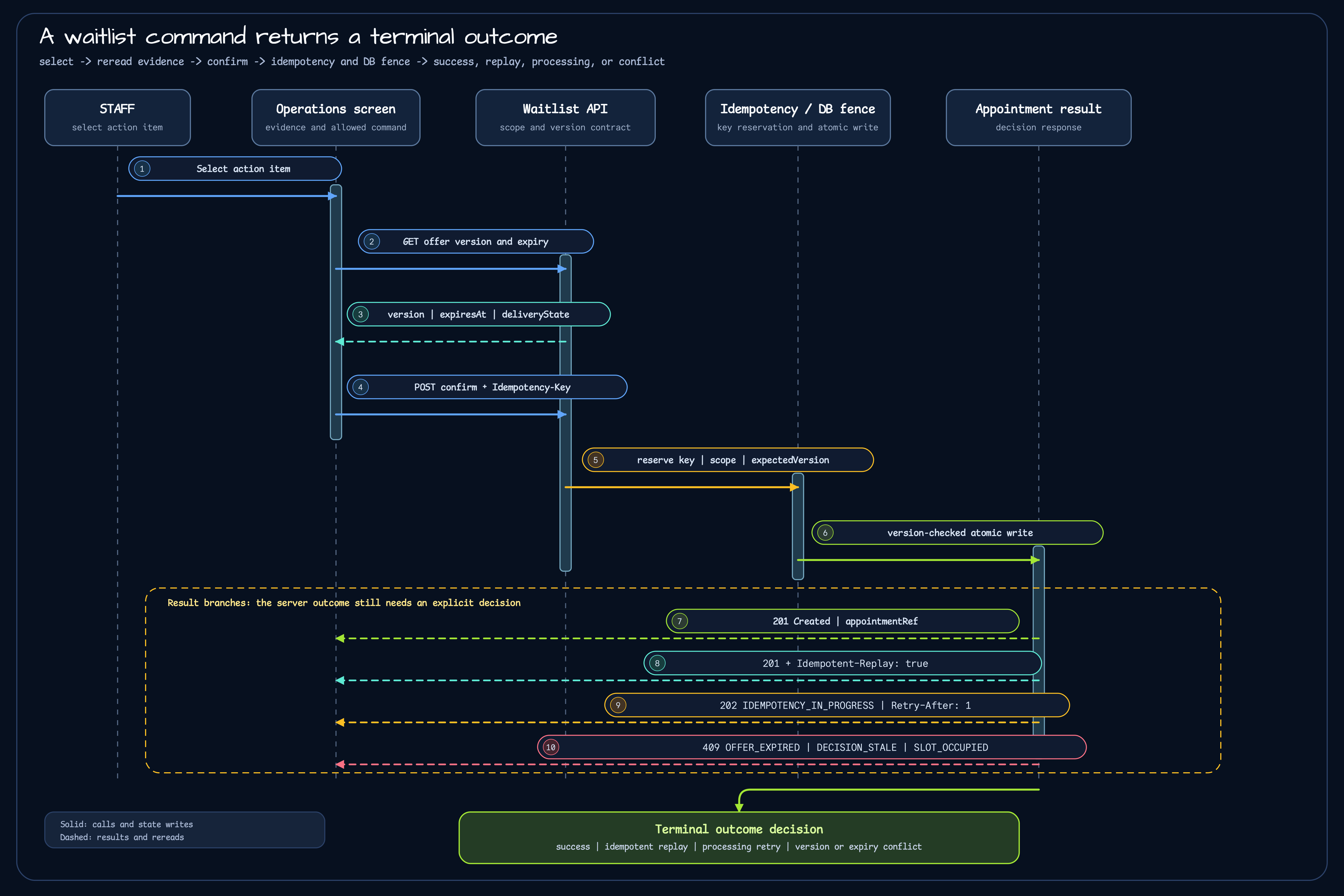
Section titled “Buttons must expose the state-change boundary”Only after reviewing the evidence should staff run a confirmation or decline command. The current API contract requires every mutation to carry a printable ASCII Idempotency-Key between 16 and 128 characters. Commands that change an existing offer or waitlist entry also require expectedVersion.
The screen sends a request like this:
POST /api/{tenantCode}/clinics/{clinicId}/waitlist/offers/{offerRef}/confirmIdempotency-Key: staff-confirm-20260814-01
{  "expectedVersion": 7}
The important part is not the button shape but the meaning of a repeat request.
| API result | Meaning shown on the screen |
|---|---|
201 with appointmentRef | The appointment was created and appointmentRef was returned. |
Same key and request return 201 with Idempotent-Replay: true | Show the original result without creating another appointment. |
202 IDEMPOTENCY_IN_PROGRESS with Retry-After: 1 | The command is still processing; read the decision again after the indicated delay. |
409 OFFER_EXPIRED | The offer expired before confirmation completed. |
409 DECISION_STALE | The decision or version read by the screen is no longer current. |
409 SLOT_OCCUPIED | Another command occupied the slot first. |
An idempotent replay shows the original success; it is not a retry that creates another appointment. A processing result is not an automatic failure either: read the decision again according to Retry-After. Expiry, stale decisions, and slot conflicts must remain visible as separate terminal outcome decisions instead of being presented as success.
ADMIN-only policy activation, limit changes, recovery credits, and benefit changes do not belong in the same button group as a STAFF confirmation or decline. Hiding unauthorized commands is not enough; the screen should show the responsibility boundary and make clear which state changes this role can execute.
An unknown delivery result is not acceptance
Section titled “An unknown delivery result is not acceptance”When the notification provider does not answer, the offer has neither disappeared nor become confirmed. The API contract separates notification delivery from accepting an offer. Provider failure or an unknown result is recorded as delivery state; it does not resurrect the offer or change it to accepted.
When staff select a deliveryState=UNKNOWN row, the screen should provide information rather than a “mark successful” button:
- The last provider attempt and its correlation ID
- The current offer
status,version, andexpiresAt GET /offers/{offerRef}/decisionfor reading the result of the same request- Commands allowed and disallowed for the current role
This order prevents a late provider response from being mistaken for proof that an appointment already exists. Delivery history and appointment creation are separate boundaries. Appointment creation is a separate mutation that checks the database fence and version condition.
Turning delivery off does not turn recovery off
Section titled “Turning delivery off does not turn recovery off”appointment.waitlist.delivery.enabled=false is the default. With clinicAllowlist, only selected clinics may start new vacancy-offer work. Turning that work off does not delete existing offers or holds.
After acquiring the leader lease, the scheduler runs these steps:
- Close expired offers and holds.
- Suppress pending notifications attached to offers that reached a terminal state.
- Reconcile and recover holds that are stuck.
- Start new vacancy-offer work only when delivery mode is
ACTIVE.
In GLOBAL_OFF or CLINIC_DISABLED, step four is skipped while the first three steps continue. An instance that cannot acquire the leader lease exits with zero work and does not start mutations. Row-level fencing still belongs to the repository and database, not to the scheduler lease.
The operations screen must therefore not show delivery-off as “there is no waitlist data.” GLOBAL_OFF and CLINIC_DISABLED mean that new offer work is not starting; expiry cleanup, notification suppression, hold reconciliation, and recovery remain active. The screen should distinguish “new offer work stopped” from “recovery work in progress” so staff do not miss outstanding work when the feature is enabled again.
The same screen answers different questions for different roles
Section titled “The same screen answers different questions for different roles”One operations screen can serve multiple readers if each area keeps its responsibility clear.
| Reader | First area to read | Question they need answered |
|---|---|---|
STAFF | Action queue → evidence panel → permitted command | Which item should I inspect now, and which command may I run? |
| Developer | Readiness, metrics, versions, and result codes | Does the state change and retry behavior follow the source contract? |
| PO (product owner) | Outstanding work, oldest vacancy age, and operating mode | Where is clinic operation blocked, and is it safe to widen activation? |
| Clinic stakeholder | Queue reason and terminal result | Why was this item handled first, and how can the result be explained? |
The dashboard does not need to split into four screens. The top metrics show clinic state, the action queue shows priority, the evidence panel shows bounded provenance, and the command result shows the state change and responsibility boundary. Developers can see the invariants and operators can see the next action without either view taking over the other.
Keep current implementation separate from operational activation
Section titled “Keep current implementation separate from operational activation”This article was checked against the develop source and waitlist delivery contract in clinic-appointment as of 2026-08-14. The following boundaries are explicit; the article does not claim that operational activation is complete.
| Category | Checked in this article |
|---|---|
| Current implementation | WaitlistController entry, offer, decision, confirmation, and decline paths; WaitlistOfferResponse version, expiry, and delivery state; health metrics; delivery settings; and the bounded scheduler batch |
| Approved contract | Opaque references, 404 for scope mismatch, bounded keyset cursors, Idempotency-Key and expectedVersion, replay/processing/conflict results, and the separation between unknown delivery and acceptance |
| Waiting for activation | Per-clinic allowlist activation, real provider failure-rate evidence, staging performance measurements, canary rollout, and recovery drills |
The existence of code and tests does not prove that the operations screen is enabled in a production clinic. It does not prove that new offers are enabled for a particular clinic. Activation requires a separate allowlist record, outstanding-work trend, provider results, and recovery-drill evidence.
An operations screen should provide clearer information, not more information
Section titled “An operations screen should provide clearer information, not more information”The quality of a waitlist operations screen is not measured by row count. It should make the sequence explicit: read clinic state, choose what to inspect, explain the choice with bounded evidence, and run only the command allowed by the current version and role.
That sequence keeps these facts visible:
- An unknown delivery result is not shown as success.
- An old version is revalidated before confirmation.
- Repeating the same command does not create another appointment.
- Expiry cleanup, notification suppression, hold reconciliation, and recovery continue when new offer work is disabled.
STAFFevidence andADMINpolicy changes are not mixed into one button group.
The previous article explained waitlist state and ownership. This article set the boundary for the screen that staff use to read and act on that state. The next article will connect each command to its API request and re-read flow in smaller units.
More visual companions
Section titled “More visual companions”- AppointmentPlan and capacity
- From product BOM to appointment flow
- Clinic appointment visual companions
Evidence links
Section titled “Evidence links”- clinic-appointment repository
- Waitlist delivery API contract
- Waitlist delivery requirements
- Waitlist core runbook
- Waitlist delivery design
- WaitlistController
- WaitlistResponses
Comments
Leave a note or reaction with your GitHub account.