
Bluetape Skills Part 1: Sharing and Installing the Toolkit

This article follows “Turning AI Collaboration Into Infrastructure”.
That earlier post explained how AGENTS.md, skills, search, memory, and hooks form a working
environment. This series moves from the environment itself to the problems we found while operating
it, the changes we made, and the way we packaged the result for other developers and multiple
machines.
A Codex skill is not just one SKILL.md file. Its practical quality depends on the references,
templates, validation scripts, and ordered checklists connected to that file. Sharing only the entry
file is like handing someone a title and summary instead of the procedure they need to execute.
That is why I separated the Bluetape skills from one machine’s private configuration and published them as an installable bundle.
- Repository: bluetape4k/bluetape-skills
- Scope: 14 canonical Bluetape skills for Codex
- Excluded: personal memory, local rules, hooks, config, plugin caches, secrets, and retired aliases
The important question is not merely how to copy the files. It is what must travel with a skill and what must stay behind.
It Was Not Shareable From the Start
Section titled “It Was Not Shareable From the Start”The current bundle was not designed in its final form on day one. It emerged by closing recurring gaps one by one.
| Recurring problem | Improvement | New safeguard |
|---|---|---|
| Agents skipped parts of long guidance or checked work without completion evidence | Converted executable guidance into blocking checklists | Action, Evidence, Failure, dependency order, repair gates |
The bluetape4k-* prefix looked Kotlin-specific and obscured other language scopes | Separated workflow names from language names | bluetape-*, bluetape-kotlin-patterns, bluetape-publish-jvm |
| A blog-oriented name made README and general documentation work look unrelated | Named the skill after its role rather than one output format | bluetape-writer |
Copying only SKILL.md could omit references or validation scripts | Made the whole skill directory the distribution unit | An allowlist of 14 canonical skills and manifest.json |
Changes made only under live ~/.codex/skills disappeared after the next apply | Required managed-source-first changes | Targeted apply, source/live parity, self-audit |
| Old names remained in historical documents and GNO indexes after renaming | Added an interpretation layer instead of rewriting history | Retired aliases and a migration mapping table |
| Public exports could include personal paths or runtime files | Exported from an allowlist and validated fail-closed | validate.sh, portable paths, private/runtime exclusions |
The problems look different, but they share one cause: implicit assumptions. People assume that related files will travel together, an earlier check must already have happened, or a live change will survive the next apply. Automation drops those assumptions first. We therefore moved them into file structure and validation commands.
Longer Instructions Did Not Prevent Skipped Steps
Section titled “Longer Instructions Did Not Prevent Skipped Steps”The early skills already described what to do. The problem was that executable requirements were mixed into prose. An agent could treat a later success as proof of an earlier step: a passing build might be reported as if plan approval, impact analysis, and locale parity had all passed too.
Each checklist row now requires three fields.
Action -> one concrete operation to perform nowEvidence -> command, file, URL, or count that proves it passedFailure -> where to stop and how to recover when evidence is missingAn unchecked row blocks dependent work. UNKNOWN is not PASS, and SKIPPED is not a valid status.
If a row does not apply, N/A still needs concrete scope evidence. If the workflow has already
jumped ahead, later success cannot hide the miss: repair the missing gate and rerun every affected
downstream check.
This checklist contract is shared by $bluetape-workflow and its leaf skills. Part 2 explains the
execution order in detail.
Canonical Names Came First
Section titled “Canonical Names Came First”Many original skills used the bluetape4k-* prefix. That made Go, Python, and Rust guidance look
Kotlin/JVM-specific, so canonical names moved to the neutral bluetape-* namespace.
| Previous name | Canonical name | Responsibility |
|---|---|---|
bluetape4k-code-patterns | bluetape-kotlin-patterns | Kotlin/JVM implementation and review |
bluetape4k-blog | bluetape-writer | README, article, and documentation localization |
bluetape4k-publish | bluetape-publish-jvm | JVM library publication |
bluetape4k-workflow | bluetape-workflow | Work classification and workflow routing |
Old names may remain as compatibility aliases in an existing private environment. The public bundle contains only canonical names so that new documents and automation do not spread retired ones.
We did not rewrite every historical occurrence. Plans, lessons, issues, PRs, and rollout logs already indexed by GNO should preserve the names that were current when they were written. A mapping table connects those names to their canonical replacements, while each retired skill is a thin forwarding alias that points to exactly one new name.
The aliases do not duplicate references. Duplicated rules would eventually drift between the canonical skill and its compatibility copy. Active guidance uses the new names; historical records are interpreted through the mapping. Once all machines have migrated and the old names have gone unused for a defined period, the aliases can be removed.
The Distribution Unit Is the Whole Skill Directory
Section titled “The Distribution Unit Is the Whole Skill Directory”The public repository contains 14 canonical directories under skills/. Each directory must be
installed as a unit.
skills/ bluetape-workflow/ SKILL.md references/ templates/ bluetape-diagram/ SKILL.md references/ scripts/This prevents two common omissions. First, a referenced checklist can disappear when only
SKILL.md is copied. The workflow gates and the writer’s Korean naturalness checks are not complete
without their reference files.
Second, executable validators can be lost. The diagram skill’s SVG audits pair rules with scripts. Both are required to move from “the diagram was generated” to “the rendered PNG was inspected and passed.”
Installation Starts With Validation
Section titled “Installation Starts With Validation”Another developer can install the bundle with these commands.
git clone --branch v1.2.1 --depth 1 \ https://github.com/bluetape4k/bluetape-skills.gitcd bluetape-skills./scripts/validate.sh./scripts/install.shvalidate.sh checks the inventory and front matter of all 14 canonical skills. It fails when the
bundle contains memory, rules, hooks, .system directories, secret-like files, macOS metadata, or
other payloads that do not belong in a public distribution.
install.sh targets ${CODEX_HOME:-~/.codex}/skills by default. It does not silently overwrite an
existing skill with the same name. Use --force only when replacement is intentional.
./scripts/install.sh --forceThe installer first moves the old directory into a timestamped backup. That is the minimum rollback path needed when testing a new version.
For a stable upgrade, clone the new immutable tag into a fresh directory, validate it, and then replace the installed skills.
git clone --branch v1.2.1 --depth 1 \ https://github.com/bluetape4k/bluetape-skills.git bluetape-skills-v1.2.1cd bluetape-skills-v1.2.1./scripts/validate.sh./scripts/install.sh --forceVerify discovery in a fresh Codex runtime after installation. The current task does not need to be closed first; a separate Codex process can validate the new runtime state in the same workspace.
Start With One Router
Section titled “Start With One Router”Users do not need to memorize every skill name. Start Bluetape ecosystem work with
$bluetape-workflow. The router classifies the request and selects the required leaf skills.
reproducible defect -> $bluetape-bugfixsmall bounded change -> $bluetape-fast-tracknew module or broad API -> $bluetape-full-featureKotlin/JVM work -> $bluetape-kotlin-patternsdocumentation -> $bluetape-writerRouting keeps every task from paying the heaviest process cost. A README wording change does not need a release checklist. A new module or publication workflow should not be closed with a light content check. The value of a skill is not the number of instructions it contains. It is the set of relevant checks it prevents the task from missing.
The Boundary Between the Public Bundle and Private Configuration
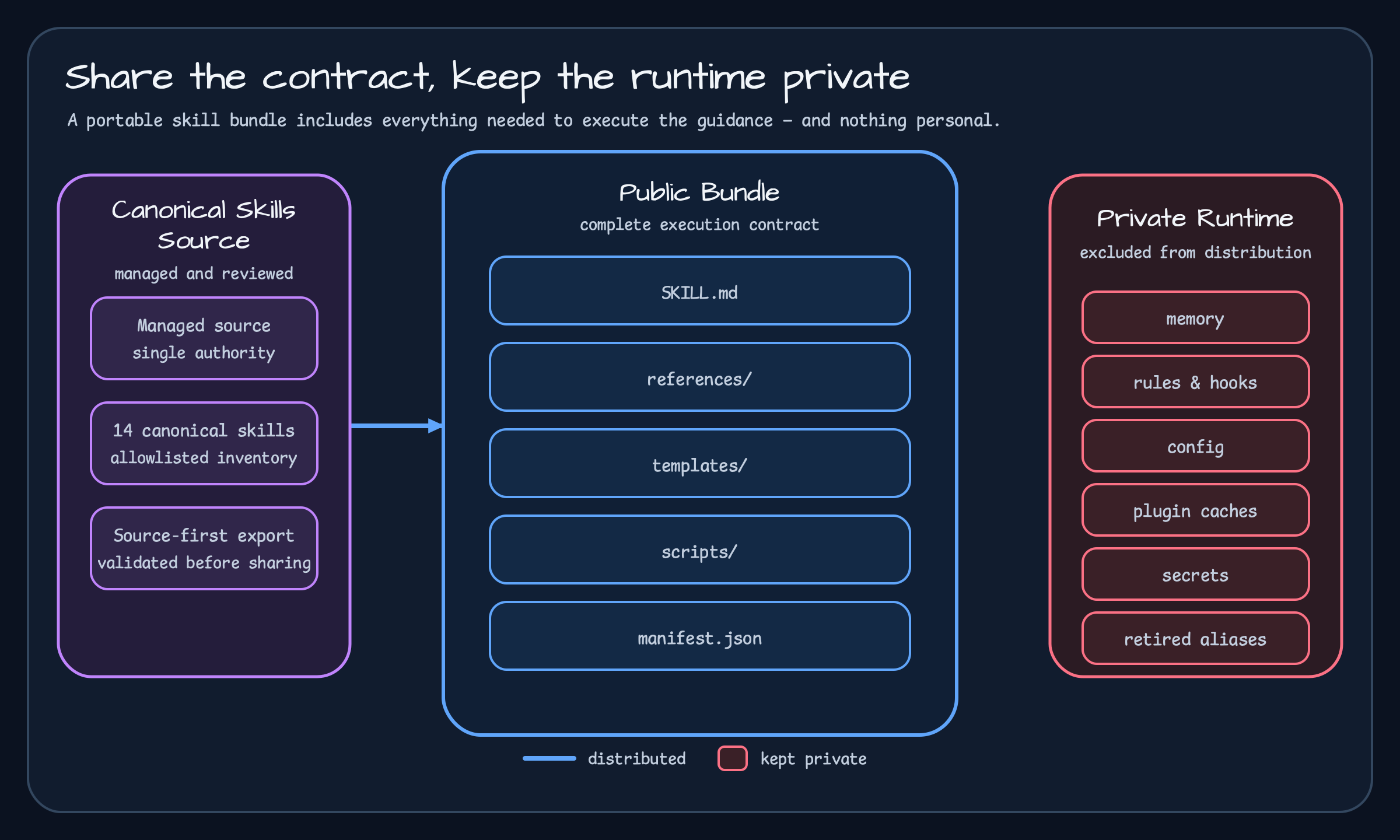
Section titled “The Boundary Between the Public Bundle and Private Configuration”A personal Codex environment includes work history, tool preferences, local hooks, and rules from other projects. Publishing that environment wholesale would impose irrelevant policy on installers and could expose personal or operational data.
The public bundle therefore contains reusable guidance only. It does not install personal memory or
hooks, and it excludes bluetape4k-* compatibility aliases. Those aliases help an existing machine
migrate; they are not the API a new installation should learn.
Canonical references and templates do belong in the bundle because they are part of the skill’s execution contract, not a particular user’s private state.
The first portability audit found two concrete leaks. macOS .DS_Store files followed skill
directories into the export, and a diagram reference still contained a machine-specific
/Users/... path. We excluded .DS_Store during export and added a validator rule so it could not
return silently. Absolute paths became CODEX_HOME- or PATH-discoverable commands.
That experience separated two claims: “it works on this machine” and “another developer can install it.” The public bundle independently validates canonical inventory, front matter, private/runtime directories, secret-like files, and operating-system metadata.
From Live-File Edits to Source-First Management
Section titled “From Live-File Edits to Source-First Management”Some skill improvements worked for one session and disappeared after the next chezmoi apply. The
cause was straightforward: the live file under ~/.codex/skills had changed, but the managed source
had not.
User-scope skill maintenance now treats the whole path as one unit.
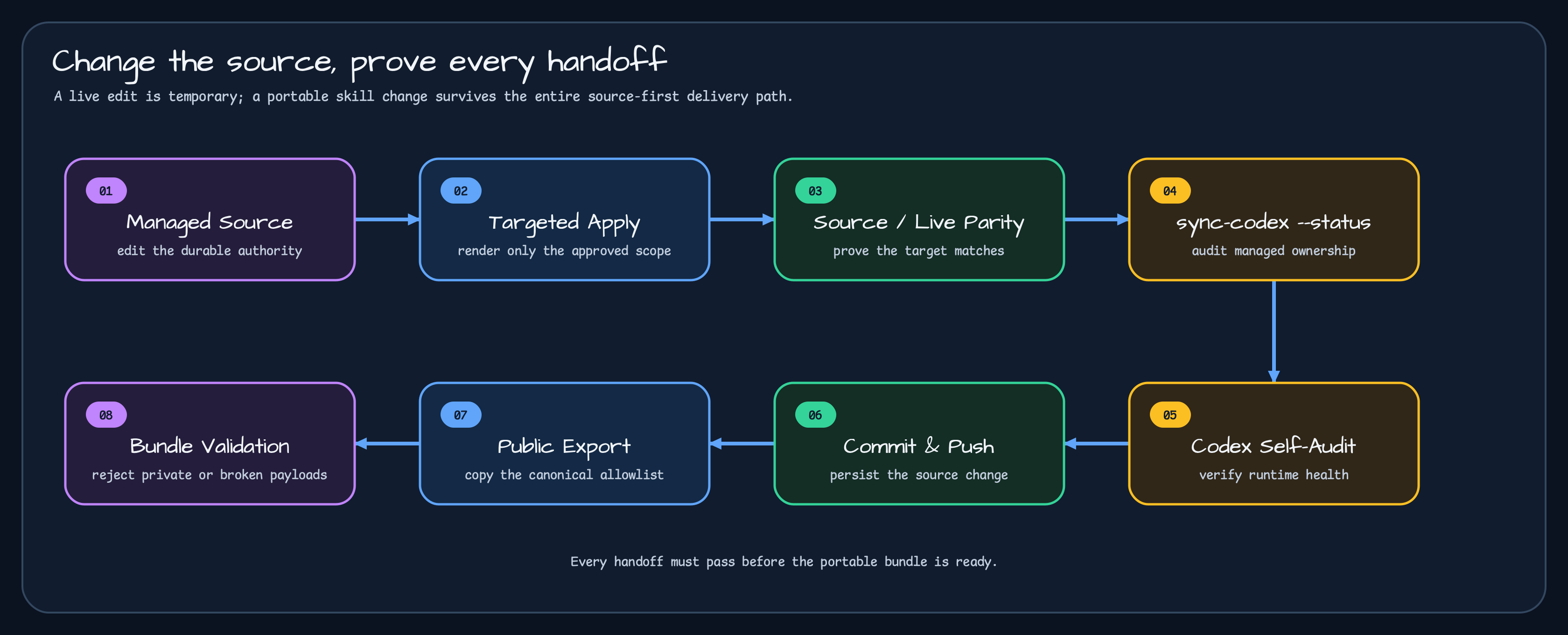
A successful chezmoi apply alone does not prove full synchronization. Live areas such as
config.toml, hooks, and .system skills can have separate ownership. The workflow first resolves
the source and target for the changed scope, then proves that the intended files match.
For public distribution, export-bluetape-skills copies only the 14 canonical directories. It does
not copy all of ~/.codex; retired aliases, memory, rules, hooks, config, and plugin caches stay out.
Sharing the Next Change Safely
Section titled “Sharing the Next Change Safely”When a skill changes, update the canonical source first, export the public bundle, and validate it.
The public skills/manifest.json is the machine-readable distribution list. A rename or new
reference therefore requires a coordinated check of the manifest, installer, both README locales,
and validator result.
This can look slower than copying a directory. It is still cheaper than having another developer’s installation fail because a reference is missing or a private path slipped into the bundle. A shareable skill is not just well-written guidance. It can be installed, validated, and updated with the same structure on another machine.
Installation is only the first half. Part 2 explains how $bluetape-workflow classifies a request,
why files stay read-only before the first plan approval, and how Action–Evidence–Failure checklists
open or block the next stage.
Series
Section titled “Series”- Start here: Turning AI Collaboration Into Infrastructure
- Bluetape Skills Part 1: Sharing and Installing the Toolkit
- Bluetape Skills Part 2: Starting Work with bluetape-workflow
- Bluetape Skills Part 3: Recovering and Resuming Interrupted Workflows
Comments
Leave a note or reaction with your GitHub account.