
[Implementation 1] Clinic Appointments Are More Than CRUD
The first sketch of a clinic appointment service often starts with the screen. Choose a date, choose a treatment,
select a preferred doctor, and press Save. The database gets one new row in appointments. So far, this looks like
ordinary CRUD.
Ask a clinic employee, however, and the questions start immediately.
- Is the clinic open that day?
- Does the appointment overlap lunch or a temporary closure?
- Is the selected doctor qualified for the treatment and actually on duty?
- Is the required equipment available rather than under maintenance?
- Would the appointment exceed the number of patients that can be treated at once?
- May a confirmed or already-started appointment be moved automatically?
If the service cannot answer these questions, the INSERT may succeed while the appointment itself fails. This
series follows how the clinic-appointment repository narrows that gap through requirements, design and planning,
implementation, review, and follow-up requirements. Part 1 starts with the map.
What Must Be Decided Before an Appointment Exists
Section titled “What Must Be Decided Before an Appointment Exists”The requirements describe three kinds of users. Patients search available times and make appointments. Clinic staff confirm them and record check-in and treatment completion. Administrators register closures and equipment downtime, then reschedule affected appointments.
They see different screens, but they act on the same appointment. To a patient, it is a 2 p.m. visit. To a staff
member, it is work that moves from REQUESTED to CONFIRMED. To an administrator, it is a schedule that must be
protected or moved when a clinic closes or a device fails. A useful appointment model therefore needs more than a date
and a patient name.
The current Appointments table stores clinicId, doctorId, treatmentTypeId, an optional equipmentId, the date,
start and end times, and the current state.
object Appointments : LongIdTable("scheduling_appointments") { // Reference deletion rules and columns unrelated to this discussion are omitted. val clinicId = reference("clinic_id", Clinics) val doctorId = reference("doctor_id", Doctors) val treatmentTypeId = reference("treatment_type_id", TreatmentTypes) val equipmentId = optReference("equipment_id", Equipments) val appointmentDate = date("appointment_date") val startTime = time("start_time") val endTime = time("end_time") val status = appointmentState("status")}This is not merely a table with several foreign keys. It shows that appointment validity is the intersection of several clinic rules. The indexes in Appointments.kt make that visible. Doctor and date support duplicate checks and slot lookup. Clinic, date, and state support active appointment queries and bulk state changes. Equipment and date support equipment usage checks.
Separate Shared SaaS Features from Clinic Rules
Section titled “Separate Shared SaaS Features from Clinic Rules”clinic-appointment assumes that several clinics use the same SaaS product. A top-level TenantGroup owns the data
isolation boundary, and several Clinic records may belong to it. But sharing a tenant does not mean sharing a
schedule.
Each clinic decides how many minutes apart appointment starts may be, which local time zone governs operations, how many patients may be treated concurrently, and whether it opens on public holidays. The appointment interval is not the duration of a treatment. Treatment duration is configured separately for each treatment type. Clinic hours and breaks, temporary closures, doctor schedules and absences, treatment types, equipment, and equipment downtime all sit under that clinic. The same request on the same date may be valid at Clinic A and invalid at Clinic B.
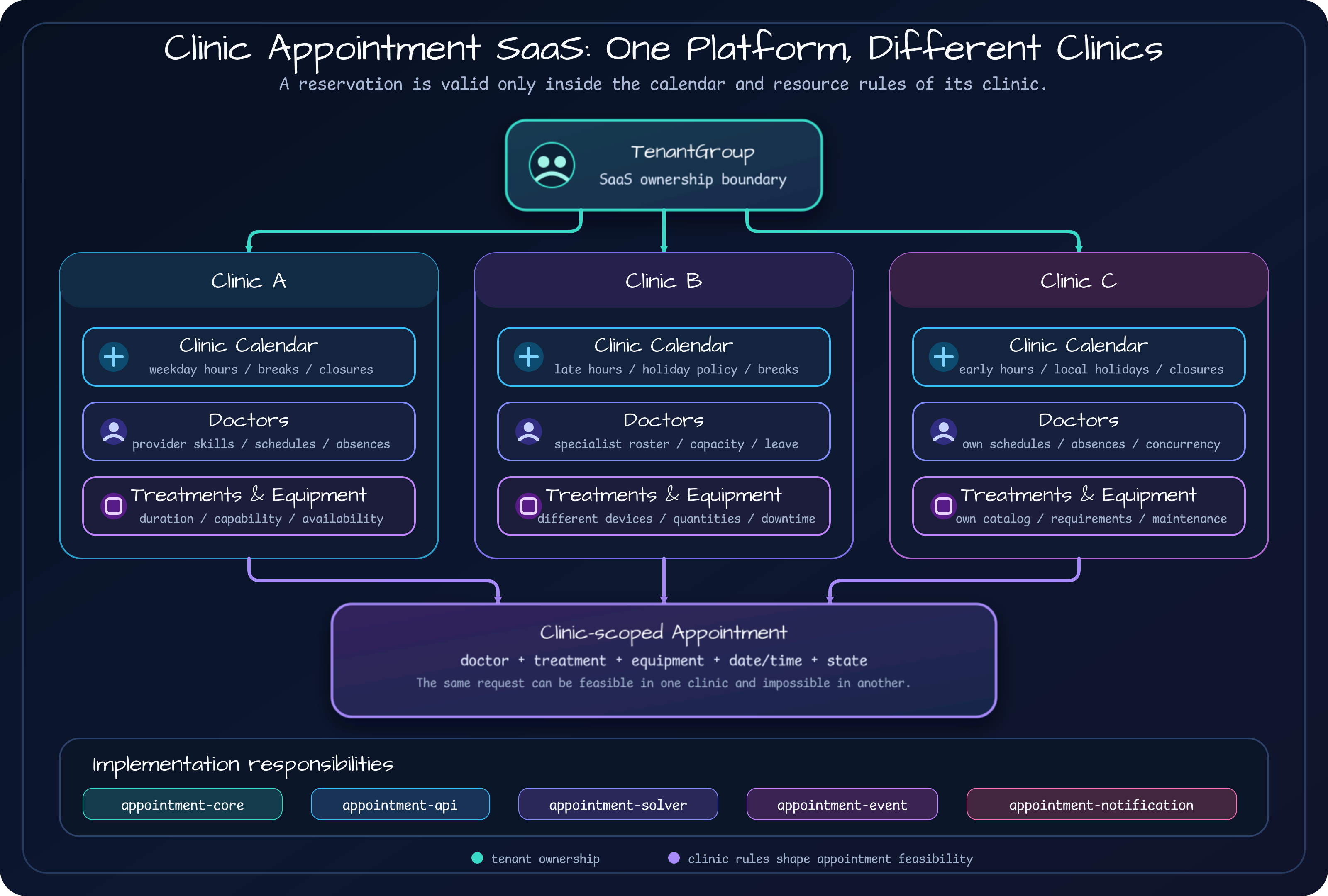
The diagram keeps two boundaries separate. TenantGroup → Clinic is an ownership and isolation boundary: one tenant
must not read or change another tenant’s clinic data. Clinic → Appointment is a business correctness boundary: the
system must decide whether that appointment works with this clinic’s schedule and resources.
Both matter, but they are not the same problem. Accurate clinic policy calculations without tenant checks create a security defect. Perfect tenant isolation that still accepts appointments during a closure creates a business defect.
In the current source,
TenantGroups.kt
defines the isolation owner, while
Clinics.kt
stores tenantGroupId and clinic-specific operating settings. Part 3 will follow clinic hours, doctors, and equipment
into availability calculation. Part 7 will return to the tenant access boundary.
Turn Requirements into Module Boundaries
Section titled “Turn Requirements into Module Boundaries”Putting every new feature into one Spring Boot module is fast at first. It also makes it difficult to tell which
capabilities must work independently. clinic-appointment divides the responsibilities as follows.
| Module | Responsibility | Why the boundary exists |
|---|---|---|
appointment-core | Domain model, repositories, state machine, real-time slot calculation | Keeps clinic scheduling rules independent of APIs and deployment shape. |
appointment-api | Tenant-scoped REST API, authentication, request validation | Connects external contracts to domain execution. |
appointment-solver | Bulk appointment optimization with Timefold | Single-slot lookup and global optimization have different costs and goals. |
appointment-event | Appointment domain events and event log | Decouples follow-up work from the core transaction. |
appointment-notification | Reminders and highly available delivery | Can run as a separate process even when the API is absent. |
| Frontend | Staff UI for appointments and reference data | Keeps Node/Angular and Kotlin build boundaries separate. |
Architecture ADR-4
records one especially useful decision: do not merge SlotCalculationService with SolverService. A patient checking
one available slot needs a short response time. An administrator moving many appointments needs a better overall
combination. Both are scheduling, but their call sites and search spaces demand different boundaries.
Notifications follow the same rule. The API does not depend directly on the notification module. It publishes an appointment change event, and a notification component subscribes to it. Appointment creation must still work before real email or SMS delivery exists, and the reminder scheduler must be deployable as a separate process. Those requirements produce the module boundary.
Design the Documentation Roles Before the Feature List
Section titled “Design the Documentation Roles Before the Feature List”One notable decision in this repository is that documentation itself is treated as a requirement. The March 2026 Living Documentation design assigns a different question to each source.
| Material | Question it must answer |
|---|---|
| Root and module READMEs | What does this repository provide, and where should a reader start? |
docs/requirements | What behavior and clinic rules do users expect? |
| Design specs and implementation plans | Which alternatives were considered, and in what order will the work be built? |
| Source code and tests | What actually works now? |
| Lessons | What did implementation and review miss, and what should change next time? |
This is not decoration for the article. The documents preserve facts from different points in the development process.
For example, the early requirements index leaves multitenancy in the backlog, while the current source contains
TenantGroups and tenant-scoped validation. One document counts 16 domain entities, while a newer list counts 17.
Frontend version labels also differ between documents.
Replacing every old number with the newest one would hide how the feature evolved. Treating an old document as current behavior would be inaccurate. This series therefore uses four rules.
- Requirements documents describe the business contract at that time.
- Design specs and implementation plans explain decisions and build order.
- Current behavior is checked again in source code and tests.
- Reviews and lessons explain the differences and feed the next requirements.
A document drifting from code is not automatically a failure. Leaving the difference undiscovered is much closer to one. Living documentation does not promise one page that is always correct. It tells readers which source supports which decision and when that source must be checked again.
The Next Question Appears After Implementation
Section titled “The Next Question Appears After Implementation”At this point, the first requirement has grown beyond “build appointment CRUD.”
Create, operate, and reschedule appointments inside each clinic’s operating policies and resource constraints, while preserving allowed state changes and their history within one tenant.
The longer sentence reveals the real design boundaries. We must model clinics and resources, calculate availability, restrict state changes, and handle existing appointments safely when operating constraints change. Moving several appointments together needs global optimization. The result then produces events and notifications.
Part 2 starts with the appointment state contract. It will go beyond listing values such as PENDING, CONFIRMED, and
COMPLETED to ask who may change a state, which event permits the change, and why the reason and history must be stored
with it.
Sources
Section titled “Sources”- Repository: bluetape4k/clinic-appointment
- Starting point: README.md
- Requirements index: docs/requirements/README.md
- User scenarios: docs/requirements/user-scenarios.md
- Architecture decisions: docs/requirements/architecture.md
Comments
Leave a note or reaction with your GitHub account.