
[Operations 11 · Appendix] How Patient Portals and Mobile Channels Show an Appointment

The appointment card a patient sees in a portal and the appointment fact stored by the appointment service are not two separate
facts. They are the same fact read across different responsibility boundaries. The portal presents a CONFIRMED status and a
date and time; the appointment service is responsible for how that status was stored after version checks and a request. A stale
portal cache or a delayed mobile push must never cause the appointment to be created or cancelled again.
The central conclusion is simple:
Patient channels read an appointment and request actions, but the appointment service remains the source of truth. Protect button actions with an ETag and an idempotency key, then re-read the result instead of treating an optimistic screen update as success. Prefer SSE for notification delivery, fall back to polling when necessary, and re-read the appointment when an event is out of order or stale. Capacitor/WebView, PWA, native messaging, and offline caching are separate roadmap items, not current production behavior.
The figures and screen below are synthetic examples derived from the repository contracts; they do not contain patient data or a product screenshot. The article keeps current implementation, approved design, and open roadmap work distinct.
/portal is the entry point for a patient channel
Section titled “/portal is the entry point for a patient channel”The current frontend has a lazy /portal route. patientAuthGuard checks the patient session before opening the portal shell. The
shell exposes Appointments, Notifications, and Profile. These routes establish where a patient starts, but they do not make
the portal the owner of appointment truth.
patient-portal.routes.ts places the appointments, notifications, and profile pages below the portal. The API client carries tenant
context with its requests. A portal read therefore checks not only which patient is signed in, but also which tenant and clinic
scope the request belongs to.
| Screen element | Contract visible in the current repository | What the screen does not own |
|---|---|---|
/portal shell | patientAuthGuard, plus Appointments, Notifications, and Profile navigation | Authority to confirm or cancel an appointment locally |
| Portal API client | Typed request and response models with tenant context | Treating browser cache as the source of truth |
| Appointments | CommitmentStatus, product, session, and time display | Inventing CONFIRMED from local state alone |
| Notifications | Sequence ordering and read state | Turning delayed delivery into an appointment failure |
| Profile | Portal route and session boundary | Overwriting a CRM profile with an appointment-service value |
PatientProfilePageComponent currently provides a shell/loading stage rather than a complete production profile editor. This article
therefore does not turn “the Profile menu exists” into a claim that profile editing or mobile authentication is already operating.
An appointment card is a screen representation; its state is an appointment contract
Section titled “An appointment card is a screen representation; its state is an appointment contract”The portal card groups the product, clinic, date and time, session count, and status so a patient can scan it quickly. The current
appointment-summary.ts uses the product name when it exists and a safe fallback when it does not. It renders either 3 of 10 sessions or just session 3, depending on whether the total is known. It does not silently append an invented “unknown” value.
The status contract is defined by portal-api.models.ts: PROPOSED, HELD, CONFIRMED, EXPIRED, and CANCELLED. A localized
label may be easier to read, but it must not change the meaning of the API and storage identifiers.
Product Laser toningClinic Clinic A · DermatologyWhen September 18, 2026 14:30–15:10Sessions 3 of 10Status CONFIRMED → ConfirmedConfirmed is a display label; CONFIRMED is the contract identifier. If the portal paints a confirmed badge before the API
response arrives, network latency can show a result that is not the actual appointment. Loading, error, and re-read states need their
own presentation, including the time and scope of the last appointment read.
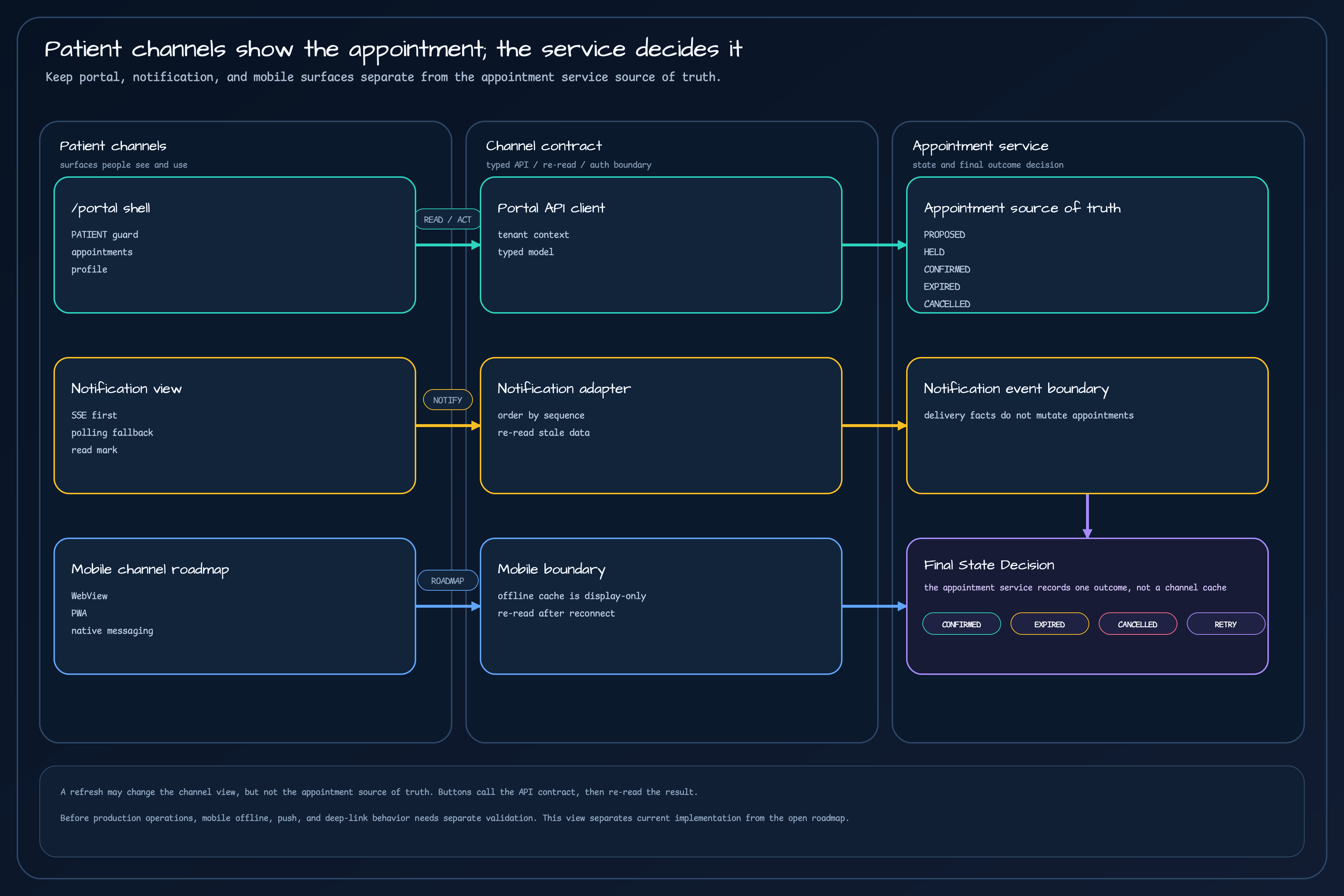
Final State Decision belongs to the appointment service rather than a channel cache. The mobile card is explicitly marked as an open roadmap item.The lines in the figure answer three questions: which API contract receives a portal action, which ordering and re-read rule the notification view uses, and why the mobile plan does not replace the appointment service. Each line starts at a card boundary rather than floating in empty space or starting inside a card, so the display area and state-changing area are not confused.
A button moves an appointment contract, not just local screen state
Section titled “A button moves an appointment contract, not just local screen state”When a patient selects Request change, Cancel, Accept, or Decline, the portal can hide a conflict if it updates the screen
first and tries to reconcile with the server later. AppointmentCommitmentFacade currently coordinates request, load, accept,
decline, and cancel flows. A busy guard prevents the same action from being sent concurrently. Requests carry a session identity and
an idempotency key, and mutations include the latest ETag.
The abbreviated flow is:
Read the current appointment → keep its ETag and intended action → send ETag + Idempotency-Key with accept/decline/cancel → on 412 Precondition Failed, re-read the appointment → show success, conflict, or expiry → re-read once more to confirm the final screen stateAn ETag asks whether the version I read is still current. An Idempotency-Key identifies one command when the same patient presses
the button twice. They solve different problems: an ETag alone does not distinguish duplicate commands, while an idempotency key
alone does not stop a stale screen from overwriting a newer appointment.
On 412, the portal does not merely say “try again.” Another tab or a STAFF operator may have changed the appointment, so the portal
re-reads it and recalculates the actions that are now available. For an expiry such as 410 Gone, it distinguishes the expired
proposal from the next action for finding a new available time. Refusing to overwrite a conflict can feel like one extra confirmation
to a patient, but it is safer than silently changing an appointment already confirmed by someone else.
Notifications are a fast path; appointment reads are the confirmation path
Section titled “Notifications are a fast path; appointment reads are the confirmation path”PortalEventStreamAdapter first tries SSE at /api/{tenant}/notifications/stream. If the connection cannot be maintained, it falls
back to polling through PortalApiClient.getNotifications(). SSE is faster, but an SSE event is not treated as the final appointment
result.
| Situation | Channel behavior | Attitude toward the appointment service |
|---|---|---|
| SSE arrives normally | Sort by sequence and update read state | Use the event as a hint and re-read the relevant appointment |
| An event arrives out of order | Drop the stale event and re-read the commitment | Never let notification order overwrite appointment state |
A 412 conflict is returned | Re-read the latest commitment and refresh the screen | Do not treat the patient’s last screen as the write authority |
410 Gone | Show expiry together with the action for finding a new available time | Do not restore an expired proposal to confirmed |
503 with Retry-After | Calculate reconnect or polling timing | Do not interpret a notification outage as an appointment cancellation |
Seeing “Your appointment is confirmed” in the notification view does not mean the notification confirmed it. Confirmation is the state stored by the appointment service; the notification is a separate fact that communicates that state. This distinction keeps a sleeping browser tab or delayed push from creating a duplicate mutation.
Keep mobile behavior separate from the mobile roadmap
Section titled “Keep mobile behavior separate from the mobile roadmap”The repository currently provides an Angular portal route and its browser-facing contract. The frontend/appointment-frontend
README documents /portal startup, its API server dependency, and portal test commands. The route can be opened in a desktop
browser, and the screen design can preserve card and button order at 320px wide.
The following items remain a separate mobile scope:
- Capacitor-based iOS and Android WebView packaging and native bridges
- A PWA service worker plus expiry and reconnect policy for offline cache
- Push delivery and a deep link from a notification into the relevant appointment
- Native messaging,
postMessage, and re-reading after an app wakes from sleep
Offline cache can help a patient see the last appointment briefly. It cannot create CONFIRMED or record a successful cancellation.
After reconnecting, the client must re-check tenant, patient, and clinic scope and read from the appointment service again. Without
that rule, a stale mobile card can continue to show a cancelled appointment, or a duplicated push can send the same mutation twice.
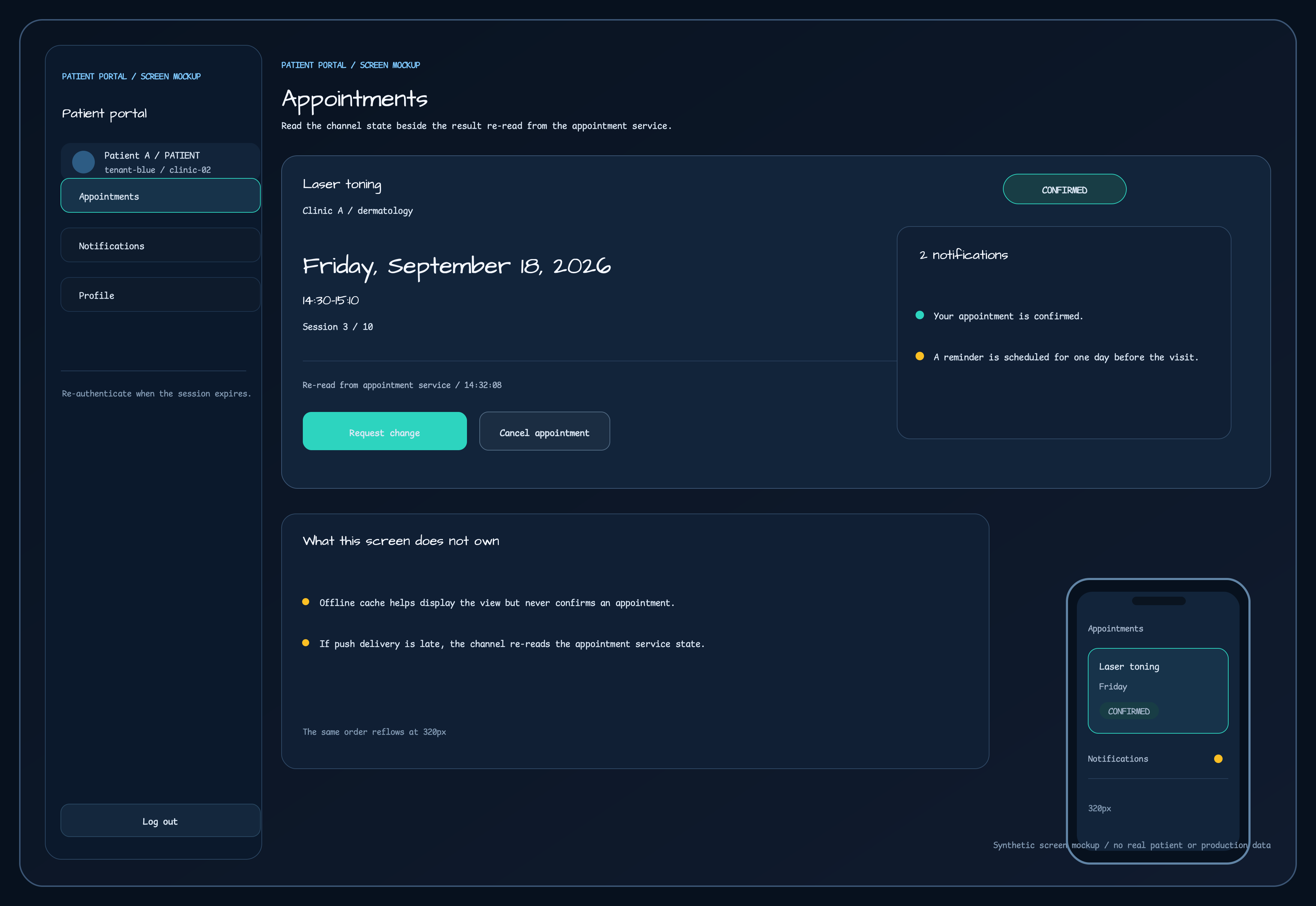
A synthetic patient-portal screen concept. The card keeps product, clinic, time, session, and status together; the note at the bottom says that offline cache and push do not decide appointment truth. At 320px, the same information order is reflowed rather than replaced.
Request change and Cancel in this screen are not local state-changing buttons. They call the API contract, and the server’s ETag,
status, and error code determine the next screen. The notification panel does not confirm an appointment either. If delivery is late,
the screen shows the last-read time and re-reads the appointment service for the current result.
Read current implementation, approved design, and open roadmap separately
Section titled “Read current implementation, approved design, and open roadmap separately”The most common mistake in a patient portal article is to infer that a mobile app is complete because a route exists, or that a screen is ready to ship because a concept image exists. The evidence belongs in three different buckets.
| Scope | What this article checks | Evidence status |
|---|---|---|
| Current implementation | /portal lazy route, patientAuthGuard, appointments/notifications/profile child routes, typed portal API models, ETag/idempotency/conflict re-read in the commitment facade, and SSE with polling fallback | Confirmed in repository code |
| Approved design | Find a new available time after expiry, re-read on out-of-order events or 412, honor Retry-After for 503, and reflow the screen at 320px with keyboard focus | Confirmed in design documents and visual references |
| Open roadmap | Capacitor WebView, PWA service worker, offline-cache recovery, push/deep links/native messaging, and real-device mobile tests | Must not be presented as operating today |
In particular, this article does not expand the current implementation to include a complete profile editor or mobile authentication. The existence of a portal shell, a mobile design item, and an operationally verified reconnect flow are three different kinds of evidence.
Five checks before exposing an appointment action to a patient
Section titled “Five checks before exposing an appointment action to a patient”Before adding appointment actions to a portal or mobile app, answer these questions:
- Does the tenant, clinic, and patient scope in the screen match the scope of the API request?
- Do the card status and date/time come from the last appointment-service read?
- Does each accept, decline, change, or cancel request use the latest ETag and a new
Idempotency-Key? - Are
412,410, and503presented as conflict, expiry, and delivery delay, with a concrete next action rather than one generic error? - Do offline cache and push events remain non-authoritative, with a re-read after reconnect?
If any answer is missing, define the scope and re-read contract before adding the button. Patients do not need a screen with more internal rows; they need a clear explanation of which appointment source they are seeing and what will be checked after an action.
Related material
Section titled “Related material”- Operations 6: Why Notifications and Reminders Are Separate Services
- Operations 8: Data Boundaries for Running Multiple Clinics in One Appointment Service
- Operations 9: Retries and Replay Must Change an Appointment Only Once
- Operations 10: Apply Only the Latest Calculation to an Appointment
app.routes.tspatient-portal.routes.tspatient-portal-shell.component.htmlappointment-commitment.facade.tsportal-api.models.tsportal-event-stream.adapter.ts- Patient portal design document
- Patient portal visual reference
- Frontend startup and test README
Comments
Leave a note or reaction with your GitHub account.