
Okio 세그먼트로 CSV 파서 할당 줄이기

bluetape4k-projects의 bluetape4k-csv 모듈은 원래 Reader 기반 CSV lexer를 사용했습니다. 구조는
단순하고 정확했지만, 큰 CSV를 읽을 때는 모든 문자를 Reader에서 디코딩한 뒤 StringBuilder에
누적하고 다시 필드 문자열로 만드는 흐름이 반복됐습니다.
이번 최적화의 목표는 할당을 줄이고, 특히 큰 CSV 작업 부하에서 처리량을 높이는 것이었습니다. 결론부터 말하면
Okio 세그먼트와 읽기 전용 UnsafeCursor를 사용한 UTF-8 고속 경로가 가장 효과적이었습니다.
UnsafeCursor 세그먼트 탐색까지 벤치마크와 함께 정리합니다.출발점
섹션 제목: “출발점”기존 공개 진입점은 그대로 유지했습니다.
CsvRecordReader() .read(input, UTF_8, skipHeaders = true) .count()내부 구현은 CsvLexer가 Reader를 받고, CSV 상태 기계가 한 문자씩 읽으면서 필드를 만듭니다.
이 방식은 문자 집합 처리와 대체 처리에는 적합하지만, UTF-8 CSV가 대부분인 대량 처리 경로에서는 불리합니다.
이번 작업의 경계는 명확했습니다.
- 공개 API는 바꾸지 않습니다.
- UTF-8, ASCII 구분자·인용 부호, 이중 인용 부호 이스케이프만 고속 경로로 처리합니다.
- 그 밖의 문자 집합이나 설정은 기존
CsvLexer로 처리합니다. - 전체 파일을 한 번에 메모리화하지 않습니다.
구현 경로
섹션 제목: “구현 경로”첫 번째 아이디어는 InputStream을 Okio BufferedSource로 감싸고, 필드 본문을 Okio Buffer에
쌓은 다음 필드가 끝날 때 한 번만 UTF-8 문자열로 디코딩하는 것이었습니다.
OkioCsvLexer(input.source().buffer(), settings, skipHeaders)이것만으로도 “문자 단위 디코딩 후 append” 경로는 피할 수 있습니다. 하지만 단순 바이트 루프는 정확성은
좋았어도 성능 개선 폭이 작았습니다. nativeLexer_large 기준으로는 약 22% 개선에 그쳤습니다.
두 번째 실험은 Okio의 세그먼트 구조를 더 직접 활용하는 것이었습니다. Buffer.UnsafeCursor는 내부 세그먼트
바이트 배열을 읽기 전용으로 순회할 수 있습니다. 이름 그대로 주의해서 써야 하지만, 이번 경우에는
구조 바이트인 구분자, 인용 부호, CR, LF만 찾으면 되므로 잘 맞았습니다.
최종 구현은 다음과 같습니다.
private fun findTerminatorOffset(terminators: ByteString): Long { source.buffer.readUnsafe().use { cursor -> while (cursor.next() != -1) { val data = cursor.data ?: continue var index = cursor.start while (index < cursor.end) { if (isTerminator(data[index], terminators)) { return cursor.offset + index - cursor.start } index++ } } } return -1L}조금 더 일반화하면, Okio Buffer 안에서 여러 구분자 후보 중 첫 위치를 찾는 도우미 함수는 다음처럼
쓸 수 있습니다. 핵심은 readUnsafe()로 얻은 cursor를 use로 닫고, cursor.start until cursor.end
범위만 읽는 것입니다. cursor.data는 세그먼트 내부 배열이므로 수정하지 않습니다.
private fun Buffer.indexOfAnyByteUnsafe(targets: ByteArray): Long { readUnsafe().use { cursor -> while (cursor.next() != -1) { val data = cursor.data ?: continue var index = cursor.start while (index < cursor.end) { if (data[index] in targets) { return cursor.offset + index - cursor.start } index++ } } } return -1L}중요한 점은 cursor를 쓰기 용도로 사용하지 않았다는 것입니다. 소스 버퍼의 세그먼트는 읽기만 하고,
종료 구분 바이트 앞의 필드 본문은 fieldBuffer.write(source.buffer, offset)로 옮깁니다. 그래서 탐색은 세그먼트
위에서 끝내고, 필드 디코딩은 필드가 끝난 뒤 한 번만 수행합니다.
동작을 지키는 안전장치
섹션 제목: “동작을 지키는 안전장치”UnsafeCursor는 성능 도구이지 파서 의미론을 바꿔도 되는 면허가 아닙니다. 그래서 기존
CsvLexer와 결과가 같은지를 직접 검증했습니다.
parseWithOkio(csv) shouldBeEqualTo parseWithReader(csv)특히 extra_words.csv처럼 실제 픽스처에 가까운 큰 CSV 파일을 통째로 비교했습니다. 이 픽스처는 세그먼트
경계 근처의 인용 부호, null 필드, 긴 한국어 본문을 함께 검증합니다. 단순한 정상 경로 CSV만 통과하는
최적화는 여기서 걸러집니다.
추가로 maxCharsPerColumn도 확인했습니다. 고속 탐색이 terminator를 찾으려고 무한정 읽어 버리면
큰 필드를 막는 제한 검사가 약해지므로, 탐색한 세그먼트를 필드 버퍼로 옮길 때 바이트 상한을 검사하고
최종 디코딩 뒤 문자 길이도 다시 검사합니다.
벤치마크 설정
섹션 제목: “벤치마크 설정”벤치마크는 bluetape4k-csv의 CsvParserBenchmark에서 실행했습니다.
./gradlew :bluetape4k-csv:testBenchmark작업 부하는 세 가지입니다.
| 작업 부하 | 입력 |
|---|---|
| 소규모 | product_type.csv의 첫 10 KiB |
| 중간 | product_type.csv 전체 |
| 대규모 | product_type.csv를 16회 반복 결합 |
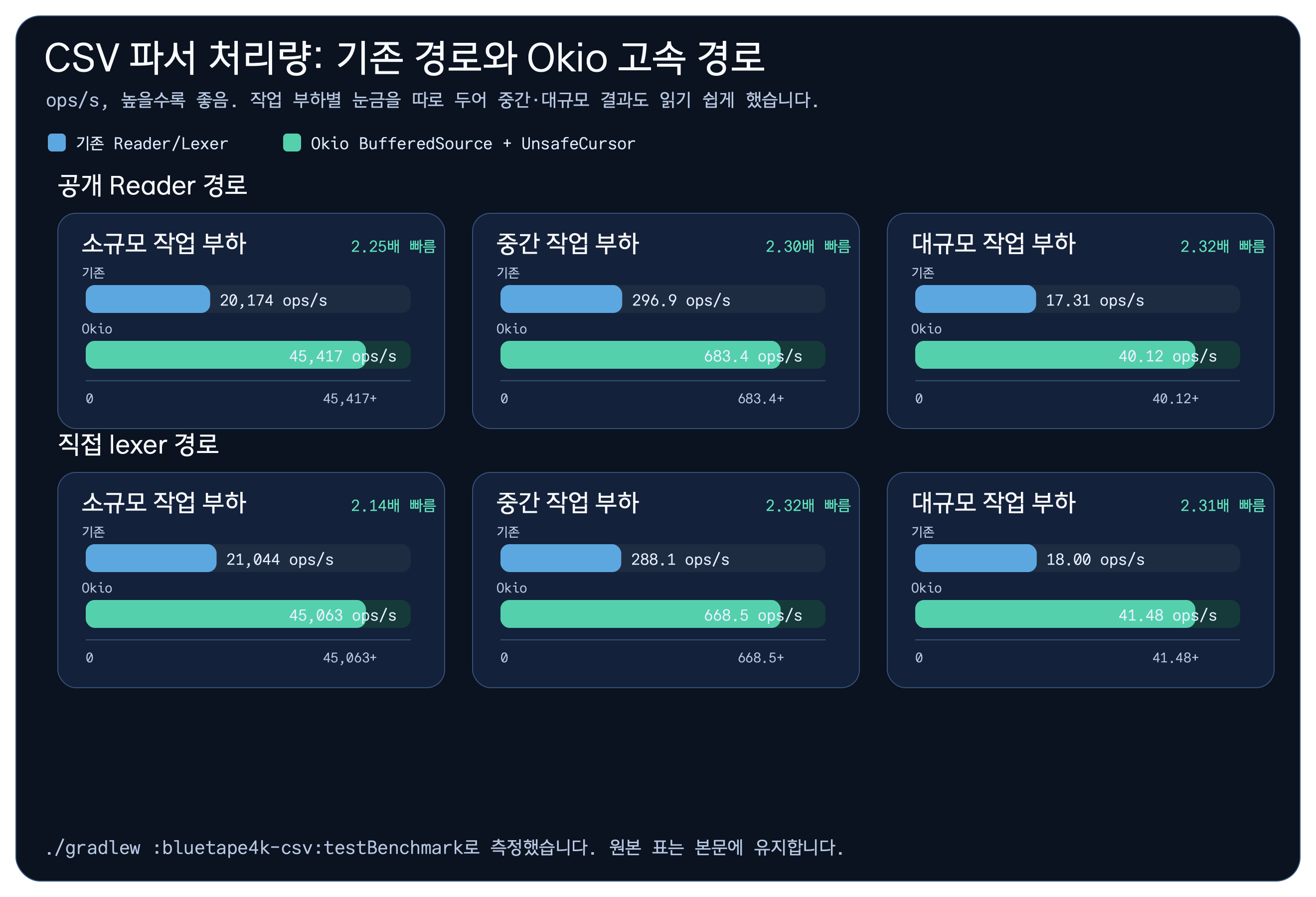
측정 단위는 JMH 처리량 ops/s이며, 높을수록 좋습니다.
공개 Reader 경로 결과
섹션 제목: “공개 Reader 경로 결과”가장 중요한 값은 공개 API인 CsvRecordReader.read(...) 경로입니다. UTF-8 CSV와 기본 설정에서는 새
Okio 고속 경로를 사용합니다.
| 벤치마크 | Reader 기준선 | Okio 고속 경로 | 상대 속도 |
|---|---|---|---|
nativeCsvRead_small | 20,173.731 ops/s | 45,417.110 ops/s | 2.25배 |
nativeCsvRead_medium | 296.944 ops/s | 683.434 ops/s | 2.30배 |
nativeCsvRead_large | 17.312 ops/s | 40.115 ops/s | 2.32배 |
소규모, 중간, 대규모 작업 부하 모두 2.25~2.32배 범위로 개선됐습니다. 소규모 작업 부하에서도 빨라진 이유는
문자 단위 디코딩과 StringBuilder append를 피하고, 구조 바이트 탐색을 세그먼트 바이트 배열 위에서
끝내기 때문입니다.
Lexer 수준 비교
섹션 제목: “Lexer 수준 비교”공개 Reader 결과가 우연인지 확인하려면 내부 lexer끼리도 비교해야 합니다. 같은 입력을 기존
CsvLexer와 새 OkioCsvLexer로 각각 직접 읽었습니다.
| 벤치마크 | 기존 CsvLexer | OkioCsvLexer | 상대 속도 |
|---|---|---|---|
nativeLexer_small | 21,043.679 ops/s | 45,062.565 ops/s | 2.14배 |
nativeLexer_medium | 288.105 ops/s | 668.457 ops/s | 2.32배 |
nativeLexer_large | 17.996 ops/s | 41.484 ops/s | 2.31배 |
두 표가 같은 방향을 가리킵니다. 개선은 CsvRecordReader 래퍼에서 생긴 착시가 아니라 lexer 자체의
입력 처리 방식에서 나옵니다.
채택하지 않은 선택지
섹션 제목: “채택하지 않은 선택지”BufferedSource.indexOfElement()도 후보였습니다. API는 안전하고 코드도 짧습니다. 하지만 BufferedSource
수준의 탐색은 필요 이상으로 상위 입력 스트림을 읽을 수 있고, 실험 중 큰 픽스처의 동등성 검증을 깨뜨리는
경로가 있었습니다. 이 변경에서는 채택하지 않았습니다.
단순 Okio 바이트 루프도 제외했습니다. 정확성은 좋았지만 nativeLexer_large가 17.481 → 21.290 ops/s 정도였고,
Okio 세그먼트의 장점을 충분히 활용하지 못했습니다.
최종 선택은 읽기 전용 UnsafeCursor였습니다. 위험한 API를 쓰되, 사용 범위를 구조 바이트 탐색으로
좁히고 큰 픽스처 동등성 테스트로 잠그는 쪽이 가장 낫다고 판단했습니다.
다음 후보: Okio CSV Writer
섹션 제목: “다음 후보: Okio CSV Writer”읽기 최적화 뒤의 다음 후보는 대량 데이터를 CSV로 저장하는 파이프라인입니다.
bluetape4k-csv에는 이미 FlowCsvWriter.writeFile(rows: Flow<Iterable<*>>) 형태가 있어 API는
스트리밍에 가깝습니다. 다만 내부는 OutputStreamWriter와 Writer.write(...) 중심입니다.
UTF-8 파일 저장 경로라면 BufferedSink 기반 고속 경로를 둘 수 있습니다. 행 단위로 큰 String을
만들지 않고 구분자·인용 부호·줄 구분자를 바이트로 쓰며, 필드 본문만 필요한 시점에 UTF-8로
sink에 쓰는 방식입니다.
suspend fun writeCsvFileWithOkio(    path: Path,    rows: Flow<Iterable<*>>,    delimiter: Byte = ','.code.toByte(),    quote: Byte = '"'.code.toByte(),): Long = withContext(Dispatchers.IO) {    var count = 0L    path.sink().buffer().use { sink ->        rows.collect { row ->            var first = true            for (field in row) {                if (!first) sink.writeByte(delimiter.toInt())                first = false
                val value = field?.toString()                if (value != null) {                    sink.writeByte(quote.toInt())                    for (ch in value) {                        if (ch == '"') sink.writeUtf8("\"\"") else sink.writeUtf8CodePoint(ch.code)                    }                    sink.writeByte(quote.toInt())                }            }            sink.writeUtf8("\n")            count++        }    }    count}
이 코드는 개념을 설명하기 위한 예시입니다. 실제 구현은 기존 DelimitedWriter의 null/빈 문자열 왕복,
quoteAll, TSV 구분자, 문자 집합 대체 처리, 종료 및 flush 동작을 그대로 지켜야 합니다. 읽기에서는
BufferedSource와 UnsafeCursor가 할당을 줄였고, 쓰기에서는 BufferedSink가 행 파이프라인의 중간
String과 작은 Writer.write 호출을 줄일 가능성이 있습니다.
참고 링크
섹션 제목: “참고 링크”- 후속 글: CSV Writer가 모래주머니를 벗었을 때
- 주요 구현:
OkioCsvLexer - 벤치마크:
CsvParserBenchmark - 동작 검증:
OkioCsvLexerTest - 테스트:
./gradlew :bluetape4k-csv:test→ 268개 통과 - 벤치마크 실행:
./gradlew :bluetape4k-csv:testBenchmark
마무리
섹션 제목: “마무리”이번 작업의 핵심은 “Okio를 쓴다”가 아니라 “Okio의 세그먼트 모델을 어디까지 안전하게 활용할 수
있는가”였습니다. 단순 래퍼만으로는 부족했고, 무제한 탐색은 조심해야 했습니다. 읽기 전용
UnsafeCursor는 부담이 있는 선택이지만, 픽스처 동등성 검증과 크기 제한 검사를 함께 두면 CSV 구조
탐색에는 충분히 실용적인 도구가 됩니다.
댓글
GitHub 계정으로 의견을 남기거나 reaction을 남길 수 있습니다.