
Bluetape4k AWS Part 3: Spring Boot와 Ktor 통합
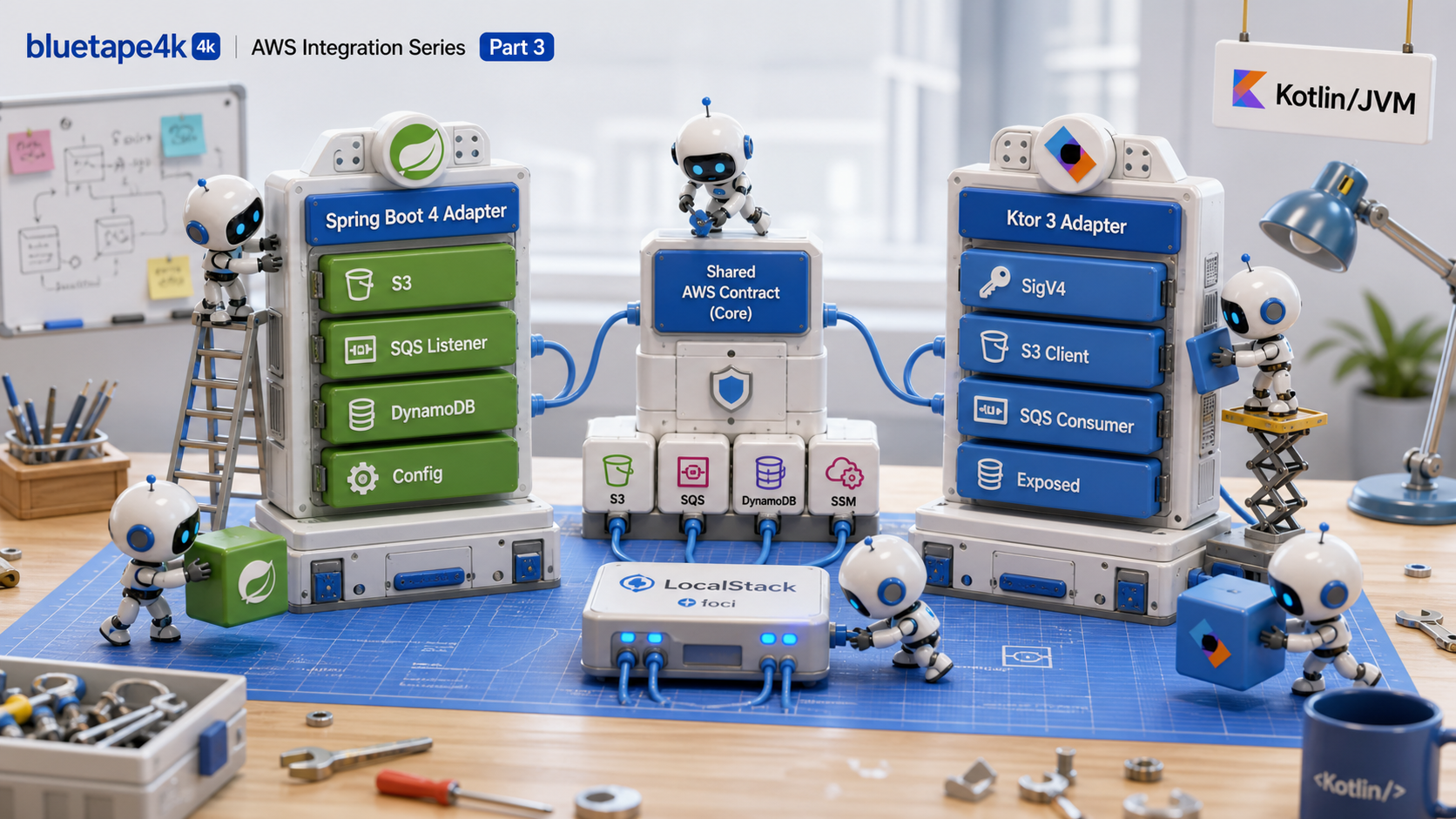
이 글은 bluetape4k-aws 시리즈의 3편입니다. Part 1에서는
프로젝트 개요와 사고 모델을 살펴봤고, Part 2에서는
핵심 모듈과 AWS 서비스 지원 현황을
정리했습니다. 이번 글에서는 이 공통 도우미를 Spring Boot 4와 Ktor 3에 연결하는 방법을 살펴봅니다.
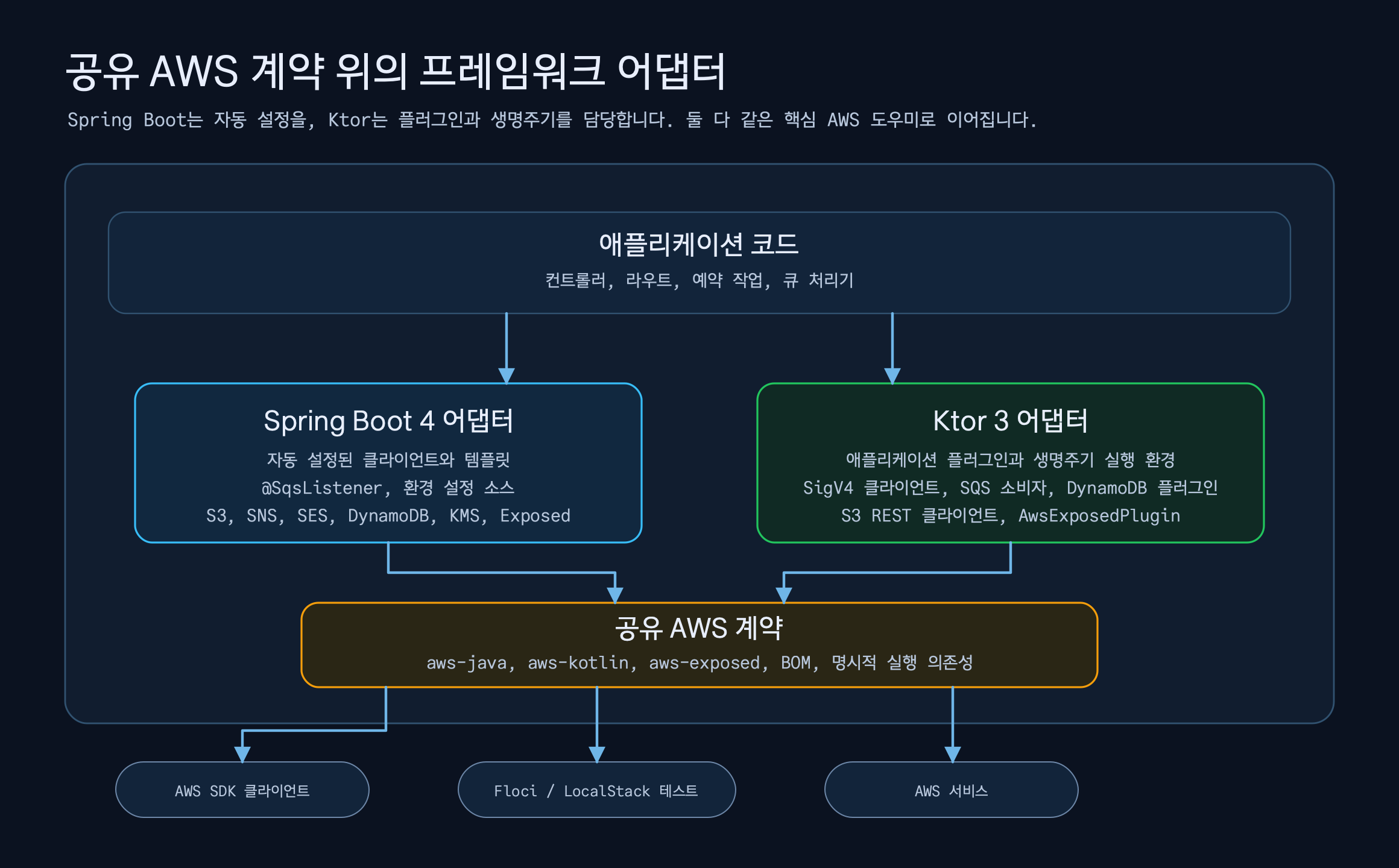
두 프레임워크의 API를 같은 형태로 만드는 것이 목적은 아닙니다. Spring Boot는 @ConfigurationProperties,
자동 구성, EnvironmentPostProcessor, 애너테이션 리스너처럼 Spring에 익숙한 방식으로 통합합니다.
Ktor는 ApplicationPlugin, 생명주기 이벤트, 경로 도우미, 코루틴 런타임을 사용합니다. 같은 AWS 문제를
다루더라도 애플리케이션 코드가 기대하는 진입점은 서로 다릅니다.
경량 어댑터가 하는 일
섹션 제목: “경량 어댑터가 하는 일”Part 2의 핵심 모듈은 SDK와 코루틴 사이의 반복 작업을 줄였습니다. 하지만 실제 애플리케이션에서는 클라이언트를 만드는 것만으로 충분하지 않습니다.
- 설정 값을 어디서 읽을지 정해야 합니다.
- 클라이언트의 생명주기와 종료 책임을 정해야 합니다.
- 큐 리스너의 동시성, 가시성 타임아웃, 재시도 정책을 정해야 합니다.
- S3나 DynamoDB 도우미를 컨트롤러, 경로, 저장소 코드에 어떻게 주입할지 정해야 합니다.
- 로컬 에뮬레이터와 실제 AWS 엔드포인트를 설정만 바꿔 전환할 수 있어야 합니다.
bluetape4k-aws-spring-boot와 bluetape4k-aws-ktor는 이 통합 경계를 맡습니다. SDK 호출을 다시 구현하지
않고, 애플리케이션마다 반복하던 프레임워크 구성 코드를 줄입니다. Spring Boot 모듈은 Spring Cloud AWS가
제공해 온 Spring 친화적 사용 방식에서 출발해 Spring Boot 4와 Kotlin 코루틴에 맞게 구성했습니다. Ktor
모듈은 같은 AWS 공통 도우미를 Ktor 3 플러그인과 생명주기에 연결합니다.
Spring Boot 4 방식
섹션 제목: “Spring Boot 4 방식”Spring Boot 통합의 출발점은 자동 구성입니다. bluetape4k.aws.enabled=true와 서비스별 설정을 두면,
필요한 빈이 조건부로 등록됩니다. 공통 설정인 bluetape4k.aws.region,
bluetape4k.aws.endpoint-override, 웹 자격 증명 설정은 여러 서비스가 공유하고, 서비스별
설정이 있으면 그 값이 우선합니다.
대표 기능은 세 갈래로 볼 수 있습니다.
| 영역 | 제공 기능 | 애플리케이션 코드에서 줄어드는 일 |
|---|---|---|
| 클라이언트/템플릿 | S3, SNS, SES, SQS, DynamoDB, KMS 클라이언트와 코루틴 템플릿 | SDK 빌더, 비동기 연결, 기본 옵션 구성 |
| 리스너/런타임 | @SqsListener, 리스너 컨테이너, 재시도·가시성·승인 설정 | 수신 반복문, 성공 시 삭제, 실패 후 가시성 처리 |
| 설정 | S3 설정, Secrets Manager, Parameter Store, Exposed 데이터베이스 레지스트리 | 원격 속성 로딩, 비밀 값 바인딩, 데이터베이스 풀 구성 |
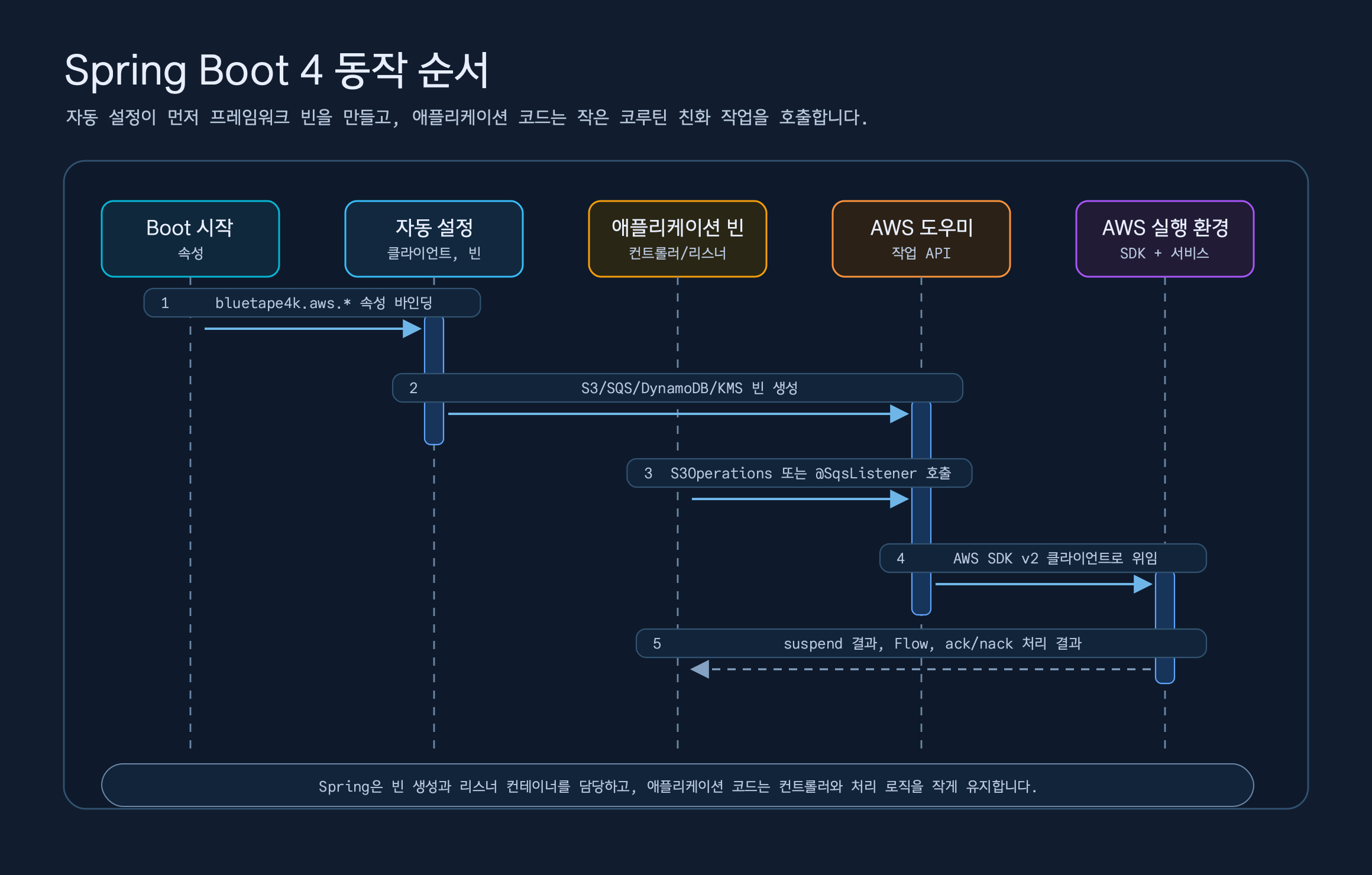
Spring Boot 모듈의 S3 예제는 이 방향을 잘 보여 줍니다. 컨트롤러는 S3Operations를 주입받고 업로드,
다운로드, 목록 조회, 사전 서명 URL 생성을 suspend 함수나 Flow로 실행합니다.
@RestController@RequestMapping("/s3/documents")class S3DocumentController(    private val s3: S3Operations,    private val encryptedS3Provider: ObjectProvider<S3ClientSideEncryptionOperations>,) {    @PutMapping(consumes = [MediaType.APPLICATION_OCTET_STREAM_VALUE])    suspend fun upload(        @RequestParam bucket: String,        @RequestParam key: String,        @RequestBody bytes: ByteArray,        @RequestHeader(HttpHeaders.CONTENT_TYPE, required = false) contentType: String?,    ): S3DocumentUploadResponse {        val response = s3.upload(bucket = bucket, key = key, bytes = bytes, contentType = contentType)        return S3DocumentUploadResponse(bucket, key, response.eTag())    }
    @GetMapping("/objects")    fun listObjects(        @RequestParam bucket: String,        @RequestParam(required = false) prefix: String?,    ): Flow<S3DocumentObjectResponse> =        s3.listFlow(bucket = bucket, prefix = prefix)            .map { S3DocumentObjectResponse(key = it.key(), size = it.size()) }}
컨트롤러는 S3 클라이언트 빌더를 알 필요가 없습니다. 엔드포인트 재정의, 경로 방식 접근, 사전 서명 URL 유효 시간, 클라이언트 측 암호화, TransferManager 사용 여부는 설정과 자동 구성이 맡습니다. 컨트롤러에는 도메인 API만 남습니다.
SQS에서는 차이가 더 큽니다. SQS를 직접 사용하면 수신 반복문, 가시성 타임아웃, 삭제 시점, 재시도, 종료
전 처리 완료를 계속 관리해야 합니다. Spring Boot 어댑터는 @SqsListener와 코루틴 리스너 컨테이너를
사용해 이 책임을 프레임워크 경계로 옮깁니다.
@Componentclass OrderMessageListener(    private val store: ReceivedOrderStore,) {    @SqsListener(queue = "\${example.aws.sqs.listener-queue:orders}", maxMessages = 1, waitTimeSeconds = 1)    fun handle(message: String) {        store.record(message)    }
    @SqsListener(id = "typed-order-listener", queue = "\${example.aws.sqs.typed-listener-queue:typed-orders}")    suspend fun handleTyped(order: OrderPayload, acknowledgement: SqsAcknowledgement) {        store.record(order)        acknowledgement.acknowledge()    }}
리스너 메서드는 String, AWS SDK Message, SqsReceivedMessage, 형식이 지정된 페이로드를 받을 수
있습니다. SqsAcknowledgement를 매개변수로 받으면 수동 승인 방식이 됩니다. 처리기가 정상 종료되면
메시지를 삭제하고, 예외가 발생하면 삭제하지 않습니다. error-visibility-timeout-seconds와 재시도
설정으로 실패한 메시지가 다시 보이는 시점도 명시할 수 있습니다.
DynamoDB는 DynamoDbEnhancedAsyncClient 위에 코루틴 저장소를 구성합니다. 예제 저장소는 테이블
이름과 키 매핑만 정의하고, save, findById, scan, query 같은 반복 작업은
AbstractCoroutinesDynamoDbRepository가 맡습니다.
@Repositoryclass OrderRepository(    enhancedClient: DynamoDbEnhancedAsyncClient,    tableNameResolver: DynamoDbTableNameResolver,) : AbstractCoroutinesDynamoDbRepository<Order, String>(    enhancedClient = enhancedClient,    tableNameResolver = tableNameResolver,    entityClass = Order::class.java,) {    override val tableName: String = "orders"
    override fun keyFromId(id: String): Key =        Key.builder().partitionValue(id).build()
    override fun keyFromItem(item: Order): Key =        Key.builder().partitionValue(item.id).build()}
여기서도 모듈이 테이블 생성을 자동으로 맡지는 않습니다. 테이블 프로비저닝은 마이그레이션, 배포 자동화, 테스트 설정이 담당해야 합니다. 라이브러리는 저장소의 반복 코드를 줄이고 테이블 접두사와 같은 이름 결정 규칙만 지원합니다.
원격 설정 지원도 Spring Boot 통합의 중요한 차이입니다. S3 객체, Secrets Manager 비밀 값, Parameter
Store 매개변수를 시작할 때 Environment 속성 소스로 읽고, 필요하면 지연 갱신을 적용할 수 있습니다.
@SecretsValue, @ParameterStoreValue는 Spring @Value를 조합한 애너테이션입니다. 데이터베이스 비밀번호
같은 값은 이 과정을 거쳐 bluetape4k-aws-exposed의 레지스트리 설정에 전달할 수 있습니다.
Ktor 3 방식
섹션 제목: “Ktor 3 방식”Ktor 모듈은 Spring Boot의 자동 구성을 모방하지 않습니다. Ktor에서 익숙한 install(...), 경로 도우미,
애플리케이션 생명주기 이벤트를 사용합니다. AwsKtorCore는 리전, 엔드포인트, 자격 증명 공급자, 서명 시계
같은 공통 기본값을 한 번 정의하고, S3KtorClient, SqsConsumer,
DynamoDbKtorPlugin이 필요하면 그 값을 상속합니다.
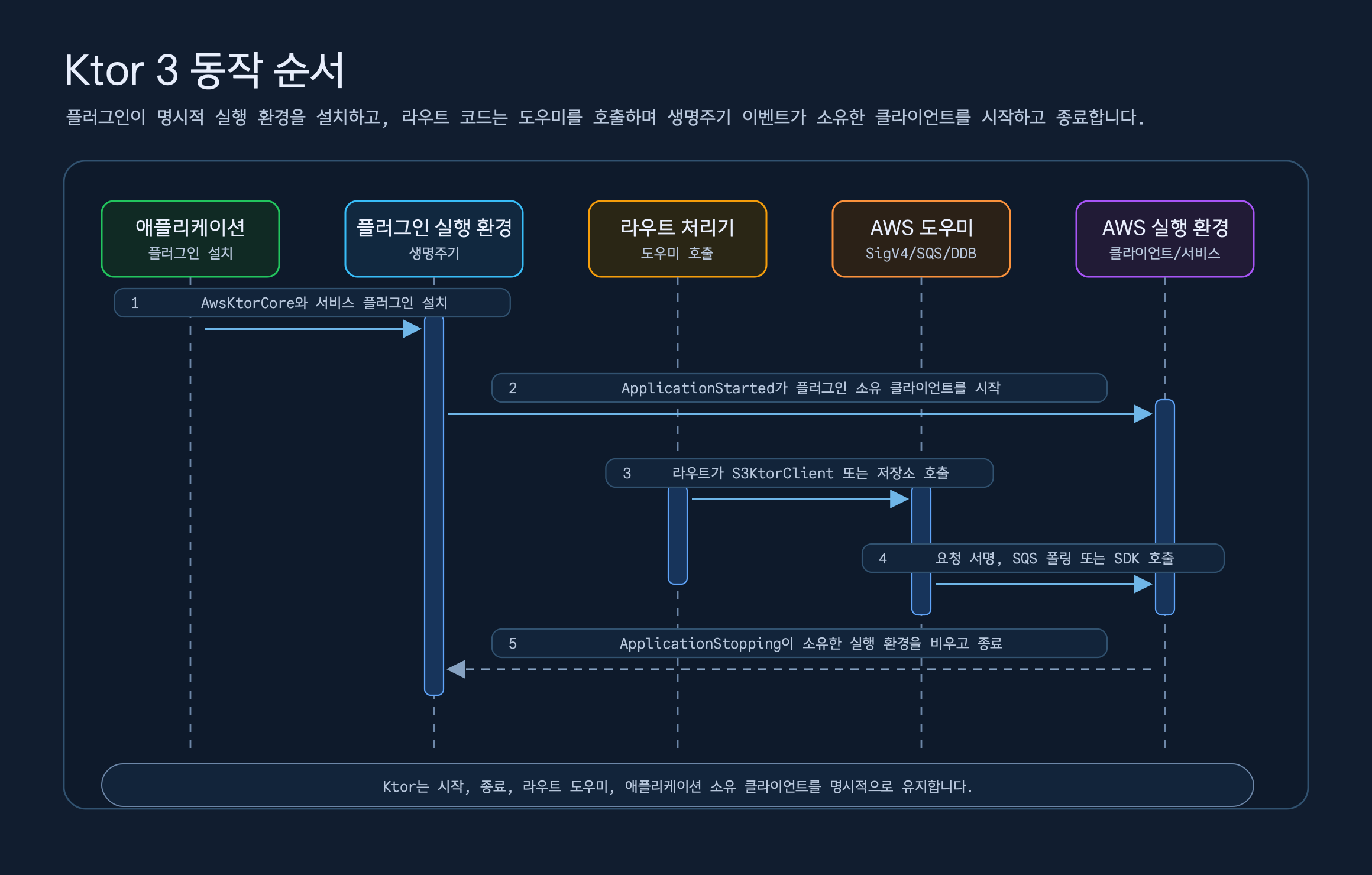
S3 통합은 AwsSigV4Plugin 위에 S3KtorClient를 구성합니다. Ktor HttpClient로 S3 REST API를 호출하고,
경로 방식 엔드포인트, 사전 서명 URL, 스트리밍 다운로드, 설정 객체, 서버 측 암호화 헤더,
클라이언트 측 봉투 암호화 도우미를 제공합니다.
fun Route.s3DocumentRoutes(    s3: S3KtorClient,    bucket: String,) {    put("/s3/objects/{key...}") {        val key = call.s3KeyParameter()        val bytes = call.receive<ByteArray>()        val response = s3.putObject(            bucket = bucket,            key = key,            bytes = bytes,            contentType = call.request.headers["Content-Type"],        )        call.respondText(            text = """{"bucket":${bucket.jsonString()},"key":${key.jsonString()},"eTag":${response.eTag.jsonOrNull()}}""",            contentType = ContentType.Application.Json,        )    }
    get("/s3/presigned-get/{key...}") {        val presigned = s3.presignGetObject(bucket, call.s3KeyParameter(), Duration.ofMinutes(15))        call.respondText(            text = """{"method":"${presigned.method}","url":${presigned.url.toString().jsonString()}}""",            contentType = ContentType.Application.Json,        )    }}
Ktor SQS는 Spring의 애너테이션 리스너 대신 ApplicationPlugin을 사용합니다. SqsConsumer는 애플리케이션
시작 시점에 폴링 런타임을 시작하고, 종료 시점에 수신 반복문과 처리 중인 작업을 정리합니다. 처리기 안에서는
ack()와 nack(timeoutSeconds)를 직접 호출할 수 있고, 인터셉터와 관찰자로 수신, 호출, 승인, 거부
이벤트를 관찰할 수 있습니다.
fun Application.sqsExampleModule(    sqsClient: SqsAsyncClient,    queueUrl: String,) {    install(SqsConsumer) {        sqsAsyncClient = sqsClient        this.queueUrl = queueUrl        coroutines = 2        maxMessages = 10        deleteOnSuccess = false
        onMessage<String> { body ->            if (body.startsWith("retry-once:")) {                nack(timeoutSeconds = 0)                return@onMessage            }
            handleOrder(body)            ack()        }    }}
DynamoDB는 AWS Kotlin SDK 클라이언트를 Ktor 생명주기에 연결합니다. DynamoDbKtorPlugin이 생성한
클라이언트는 종료할 때 닫지만, 애플리케이션이 소유한 클라이언트는 닫지 않습니다. 로컬 개발에서는
autoCreateTables=true와 table { } 설정으로 없는 테이블을 만들 수 있지만, 운영 스키마 검증이나
마이그레이션을 대신하지는 않습니다.
fun Application.dynamoDbExampleModule( endpointUrl: Url, region: String, credentialsProvider: CredentialsProvider,) { install(DynamoDbKtorPlugin) { this.endpointUrl = endpointUrl this.region = region this.credentialsProvider = credentialsProvider autoCreateTables = true table( tableName = "orders", keySchema = listOf(partitionKeyOf("id")), attributeDefinitions = listOf(stringAttrDefinitionOf("id")), ) }}Exposed도 같은 원칙을 따릅니다. AwsExposedPlugin은 bluetape4k-aws-exposed의 레지스트리를 Ktor
생명주기에 묶고, 경로에서는 call.awsExposedTransaction { ... }으로 Exposed JDBC 작업을 실행합니다.
원격 설정 소스 명세는 플러그인 설정에 보존하고, AwsDatabaseSettingsResolver가 최종 JDBC 값을
해석합니다. 따라서 Ktor 애플리케이션은 로컬 속성과 AWS 설정 소스를 어떤 해석기로 연결할지 명시적으로
선택할 수 있습니다.
fun Application.exposedExampleModule(database: ExampleDatabaseConfig) {    install(AwsExposedPlugin) {        defaultDatabase {            url = database.url            driverClassName = database.driverClassName            username = database.username            password = database.password        }    }
    routing {        get("/exposed/orders") {            val orders = call.awsExposedTransaction {                OrderRepository.findAll()            }            call.respond(orders)        }    }}
예제는 무엇을 보여 주나
섹션 제목: “예제는 무엇을 보여 주나”Part 3의 목적은 각 예제를 깊이 설명하는 것이 아니라 전체 구성을 파악하는 데 있습니다. 실제 적용 흐름은
Part 5에서 examples/와 bluetape4k-workshop/aws를 더 자세히 다룹니다. 여기서는 어떤 프레임워크와
서비스 조합이 실행 가능한 예제로 검증되는지 살펴봅니다.
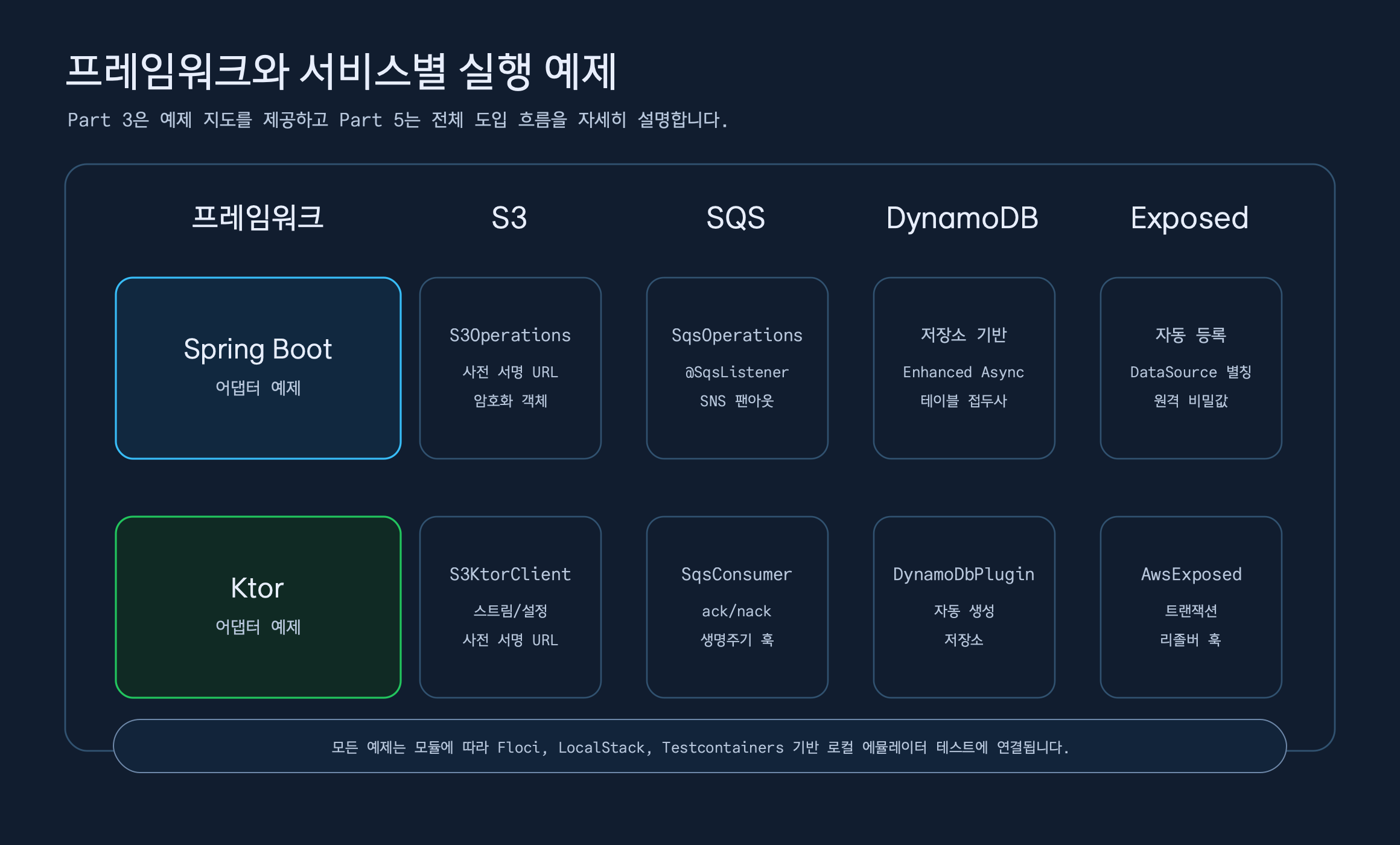
| 예제 | 프레임워크 | 보여 주는 것 |
|---|---|---|
aws-spring-boot-s3-examples | Spring Boot | S3Operations, 사전 서명 URL, 객체 목록, 선택적 클라이언트 측 암호화 |
aws-spring-boot-sqs-examples | Spring Boot | SqsOperations, SNS 팬아웃, @SqsListener, 형식이 지정된 페이로드, 재시도 리스너 |
aws-spring-boot-dynamodb-examples | Spring Boot | AbstractCoroutinesDynamoDbRepository, Enhanced Async 테이블, 컨트롤러 API |
aws-spring-boot-exposed-examples | Spring Boot | AWS 기반 Exposed 레지스트리, DataSource와 Database 구성 |
aws-ktor-s3-examples | Ktor | S3KtorClient, 스트리밍과 설정 객체, 사전 서명 URL |
aws-ktor-sqs-examples | Ktor | SqsConsumer, 수동 승인과 거부, 인터셉터, 관찰자 |
aws-ktor-dynamodb-examples | Ktor | DynamoDbKtorPlugin, 테이블 자동 생성, 저장소 도우미 |
aws-ktor-exposed-examples | Ktor | AwsExposedPlugin, 코루틴 트랜잭션 도우미 |
중요한 것은 예제 수가 아니라 프레임워크에 따른 통합 방식의 차이입니다. Spring Boot에서는 빈과
애너테이션이 자연스럽고, Ktor에서는 플러그인 설치와 경로 단위 도우미가 자연스럽습니다.
bluetape4k-aws는 이 차이를 없애지 않고 각 프레임워크의 문법에 맞춰 반복 구성을 줄입니다.
운영에서 조심할 지점
섹션 제목: “운영에서 조심할 지점”프레임워크 어댑터가 반복 코드를 줄여도 AWS 운영 문제가 사라지지는 않습니다. 다음 결정은 편의 기능 뒤에 숨기지 말고 애플리케이션 정책으로 명시해야 합니다.
- Secrets Manager와 Parameter Store 값은 애플리케이션 시작 순서에 영향을 줍니다. 원격 속성 소스가 느리거나 실패할 때 기존 설정 사용이나 시작 실패 중 어느 정책을 적용할지 정해야 합니다.
- SQS의 성공 시 삭제와 수동 승인은 의미가 다릅니다. 처리기가 예외를 던졌을 때 메시지가 언제 다시 보이는지 가시성 설정으로 명시해야 합니다.
- SNS HTTP 엔드포인트 메시지는 파싱만으로 충분하지 않습니다. 서명, 인증서 체인, 예상
TopicArn검증은 애플리케이션의 보안 경계입니다. - DynamoDB 테이블 자동 생성은 로컬 개발과 테스트를 위한 편의 기능입니다. 운영 스키마 관리는 마이그레이션이나 배포 자동화가 맡아야 합니다.
- Ktor에서는 애플리케이션 소유 클라이언트와 플러그인 소유 클라이언트의 생명주기를 구분해야 합니다. 애플리케이션이 주입한 클라이언트는 플러그인이 닫지 않습니다.
- LocalStack, Floci, Testcontainers는 개발 주기를 단축하지만 AWS IAM, 네트워크 정책, 할당량, 암호화 정책까지 대신 검증하지는 않습니다.
이 항목은 프레임워크 어댑터가 맡을 일과 애플리케이션 운영 정책이 맡을 일을 나누는 기준입니다. 이 경계가 흐려지면 로컬 편의 기능을 근거 없이 운영 환경에 적용하게 됩니다.
소스 링크
섹션 제목: “소스 링크”- 저장소: bluetape4k-aws
- Spring Boot 설명서: aws-spring-boot/README.md
- Ktor 설명서: aws-ktor/README.md
- Exposed 설명서: aws-exposed/README.md
- Spring Boot S3 예제: S3DocumentController.kt
- Spring Boot SQS 리스너 예제: ReceivedOrderStore.kt
- Spring Boot DynamoDB 저장소 예제: OrderRepository.kt
- Ktor S3 예제: S3KtorServerExamples.kt
- Ktor SQS 예제: SqsExampleRoutes.kt
- Ktor DynamoDB 예제: DynamoDbExampleRoutes.kt
- Ktor Exposed 설계 문서: 2026-05-21-issue-76-ktor-exposed-plugin-design.md
마무리
섹션 제목: “마무리”Spring Boot와 Ktor 통합은 같은 AWS 도우미를 하나의 API 형태로 강제하는 작업이 아닙니다. Spring Boot에서는
자동 구성, 속성 바인딩, EnvironmentPostProcessor, 애너테이션 리스너가 반복을 줄입니다. Ktor에서는
ApplicationPlugin, 생명주기에 연결된 런타임, SigV4 클라이언트, 경로 도우미가 반복을 줄입니다.
선택 기준은 단순합니다. Spring Boot 서비스는 Spring의 구성 방식으로 AWS 도우미를 연결하고, Ktor 서비스는 Ktor의 플러그인과 생명주기 모델로 연결합니다. 핵심 모듈은 그 아래에서 SDK와 코루틴 경계를 정리하고, 예제는 이 조합이 로컬 에뮬레이터에서 실제로 동작하는지 검증합니다.
다음 글에서는 Java 진영에서 널리 쓰이는 Spring Cloud AWS와 bluetape4k-aws를 상세히 비교하고,
장단점을 분석합니다. 목표는 “누가 더 많은 기능을 가졌나”가 아니라, 왜 Spring 중심 통합과
Kotlin/Ktor까지 포함한 통합이 다른 선택을 하게 되는지 설명하는 것입니다.
댓글
GitHub 계정으로 의견을 남기거나 reaction을 남길 수 있습니다.